EasyManua.ls Logo

Philips VS23605T - Mechanical Instructions; Disassembly and Panel Removal; Service Position and Reassembly

Philips VS23605T
29 pages
Print Icon
To Next Page IconTo Next Page
To Previous Page IconTo Previous Page
Loading...
cs
4.
Mechanical
instructions
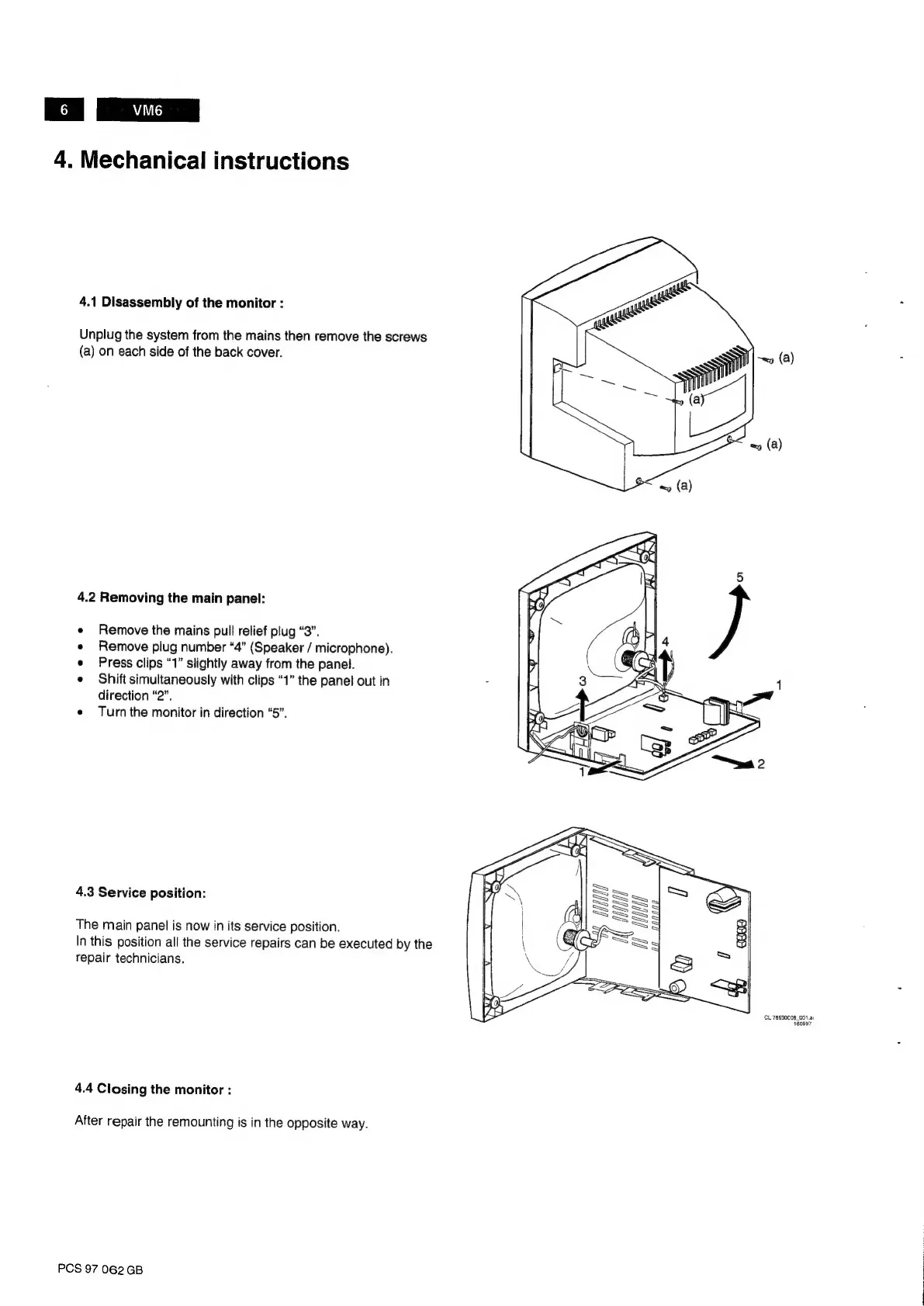
4.1
Disassembly
of
the
monitor
:
Unplug
the
system
from
the
mains
then
remove
the
screws
(a)
on
each
side
of
the
back
cover.
4.2
Removing
the
main
panel:
Remove
the
mains
pull
relief
plug
“3”.
Remove
plug
number
“4”
(Speaker
/
microphone).
Press
clips
“1”
slightly
away
from
the
panel.
Shift
simultaneously
with
clips
“1”
the
panel
out
in
direction
“2”.
e
Turnthe
monitor
in
direction
“5”.
4.3
Service
position:
The
main
panel
is
now
in
its
service
position.
In
this
position
all
the
service
repairs
can
be
executed
by
the
repair
technicians.
4.4
Closing
the
monitor
:
After
repair
the
remounting
is
in
the
opposite
way.
PCS
97
062
GB
CL
76630C08_001.a1
160997

Related product manuals