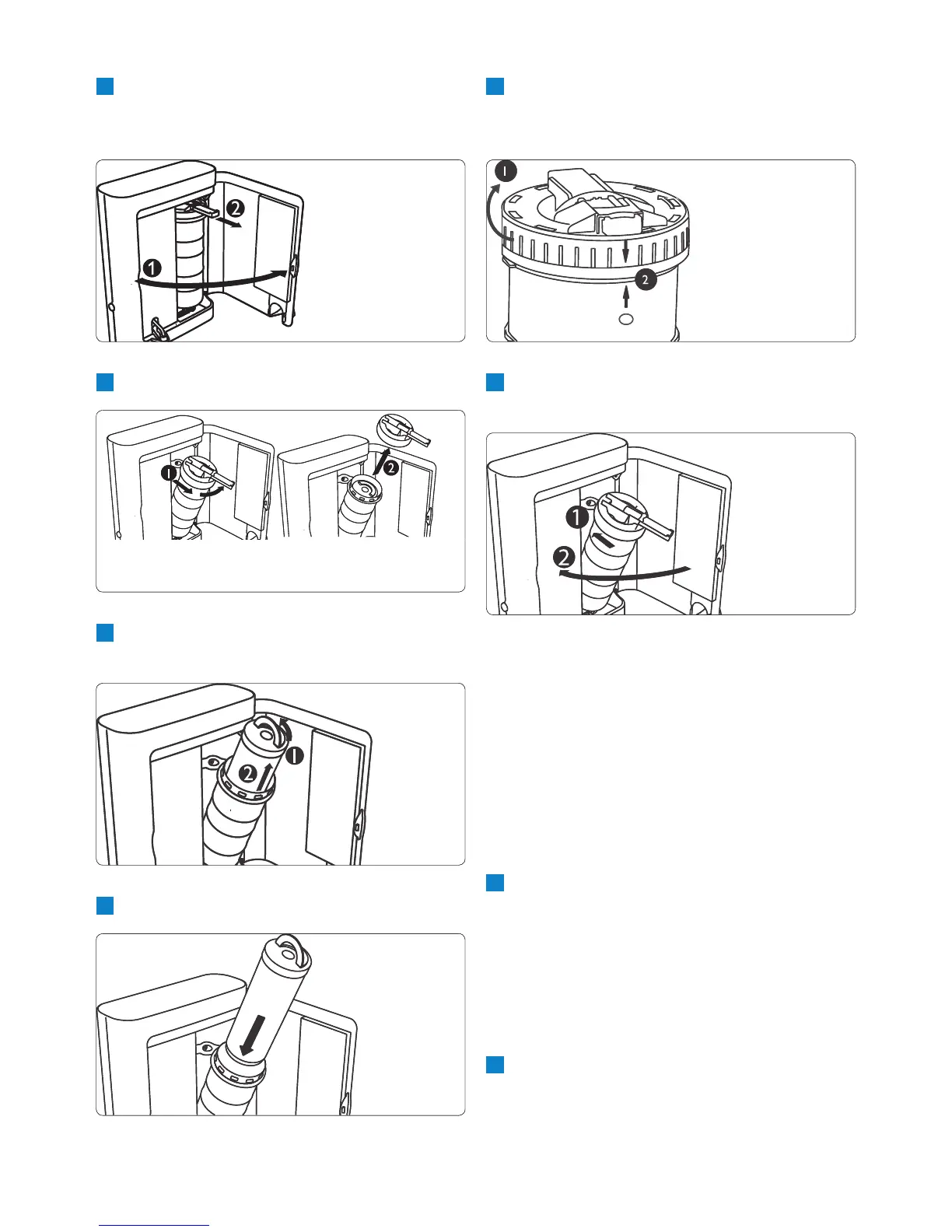
6 Align the arrow on the cap with the arrow
on the lter housing and press the cap down
rmly (1). Turn the cap clockwise to x it (2).
7 Push the lter holder back into place (1) and
close the appliance door (2).
D Note:
Each time you replace the lter, make sure you
also clean the macro lter (see section ‘Cleaning
the macro lter’ above).
Once you have replaced the lter, you have to
conrm replacement of the lter. The pure water
dispenser only operates normally again after you
conrm replacement of the lter.
7.0.5 Conrming lter replacement
1 Switch on the pure water dispenser.
If you replaced the lter during the warning
period (between 2700 and 3000 litres),
the lter indicator c ashes. Wait until the
dispense button d starts ashing (ready to
dispense - manual mode).
If you replaced the lter after lter expiry,
the lter indicator lights up continuously.
2 Press and hold the MUSIC button
and then press and hold the dispense
•
•
2 Open the appliance door (1). Pull the lter
towards you with the lever (2) and slightly
tilt the lter.
3 Turn the lter cap (1) and remove it (2).
4 Grab the handle on top of the lter (1) and
slowly pull the lter out of the holder (2).
5 Put a new lter in the lter holder.


 To Next Page