15
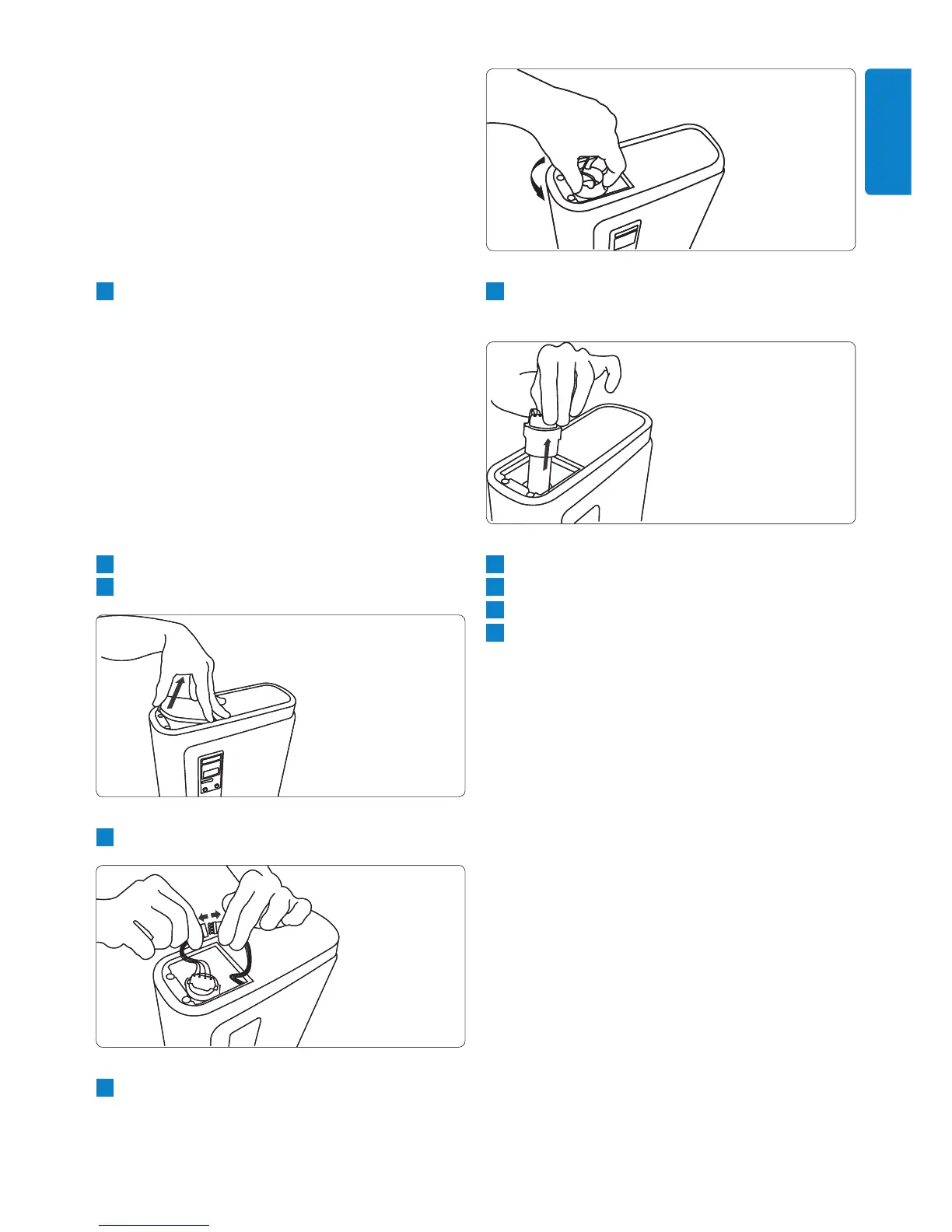
5 Remove the UV lamp unit (lamp, rubber seal
and lamp holder).
6 Insert the new UV lamp unit.
7 Reattach the lamp retaining cap.
8 Reconnect the wire connectors.
9 Close the cover of the UV chamber.
7.0.7 Replacement items
If you have any difculties obtaining replacement
items for this appliance, please contact the Philips
Customer Care Centre in your country or consult
the worldwide guarantee leaet.
Always replace the dual lter with an original
Philips dual lter, type number WP3990.
Always replace the UV lamp unit with an
original Philips UV lamp unit, code number
421530875020.
button. Keep both buttons pressed
simultaneously for at least 4 seconds.
The pure water dispenser now
acknowledges the new lter.
The lter indicator c goes off.
D Note:
If the lter warning still persists, repeat
step 2.
3 Place a container with a capacity of at least
10 litres under the pure water dispenser.
The pure water dispenser automatically
performs the PureFlush procedure, during
which 10 litres of water ow out of the
appliance.
7.0.6 Replacing the UV lamp unit
B Warning:
Always replace the UV lamp unit with an original
Philips UV lamp (code no. 421530875020).
1 Switch off the pure water dispenser.
2 Remove the cover of the UV chamber.
3 Disconnect the UV lamp wire connectors.
4 Unscrew the UV lamp retaining cap.
•
•
•
ENGLISH


 To Next Page