Usage
3 Programming and saving the parameters
1
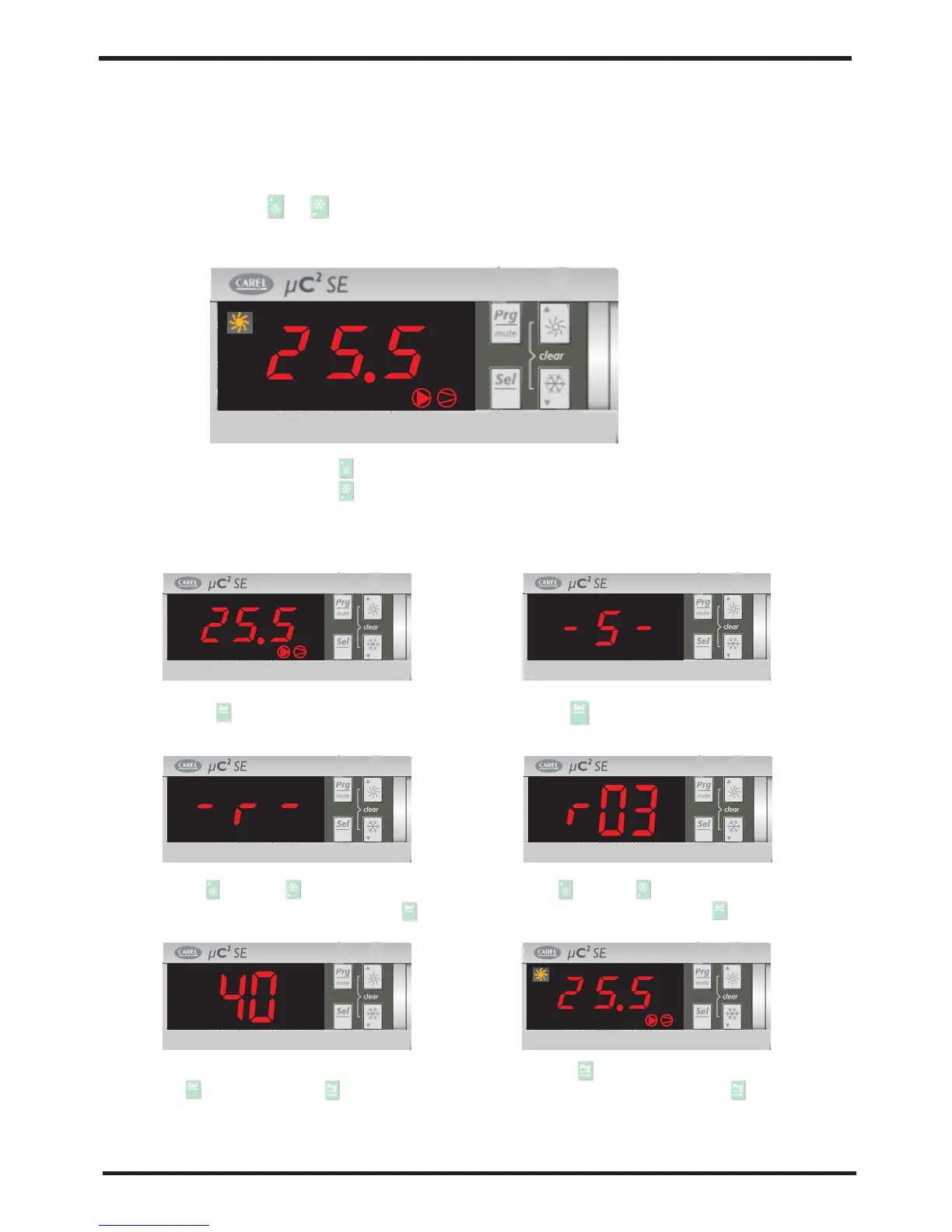
If you press“ ”,the unit will be heating mode;
If you press“ ”,the unit will be cooling mode;
[1]Start or stop unit
press“ ” lasts 3 seconds to start or stop unit, the
LED display as following:
or
[2]Check the setting data and amend the setting
2) press“ ” to go into parameter group.
1
1) press“ ” to go into data setting.
3)use“ ”and“ ”to select the
parameter group and then press“ ”.
4)use“ ”and“ ”to select the
parameter and then press“ ”.
5)after making the changes to the parameter,
press“ ”to confirm or “ ”to cancel the
changes.
6)Press“ ”to return to the previous menu
to save the modiications, press“ ”repeatedly
until reaching the main menu
1
Usage
5.2 Installation of remote controller
(1)Connection
Telephone cable
Max.l.=40m
RJ12
Power supply
G0 G
G0
G
N F
24Vac 17VA
Fuse 250mA
Max.l.=250m
(min.cross-section
1.5mm2/AWG16)
RS485
twisted pair + shield
Rx/Tx+, Rx/Tx-, Gnd
Insert 120 ohm
terminal resistor
between Tx/Rx+
and Tx/Rx- for lines
longer than 20 m
To install the remote terminal, no
configuration is required on the UC2,
as the terminal works with any serial
address set for parameter H10.
Check, however, that is fitted with the
serial interface the Uc2 FCSER00000
.When first switched on the display
will show the. firmware version of the Uc2
After around 4 s the main screen will be
displayed, with the symbols that represent
he status of the Uc2.
1
14
15


 To Next Page