Usage
Usage
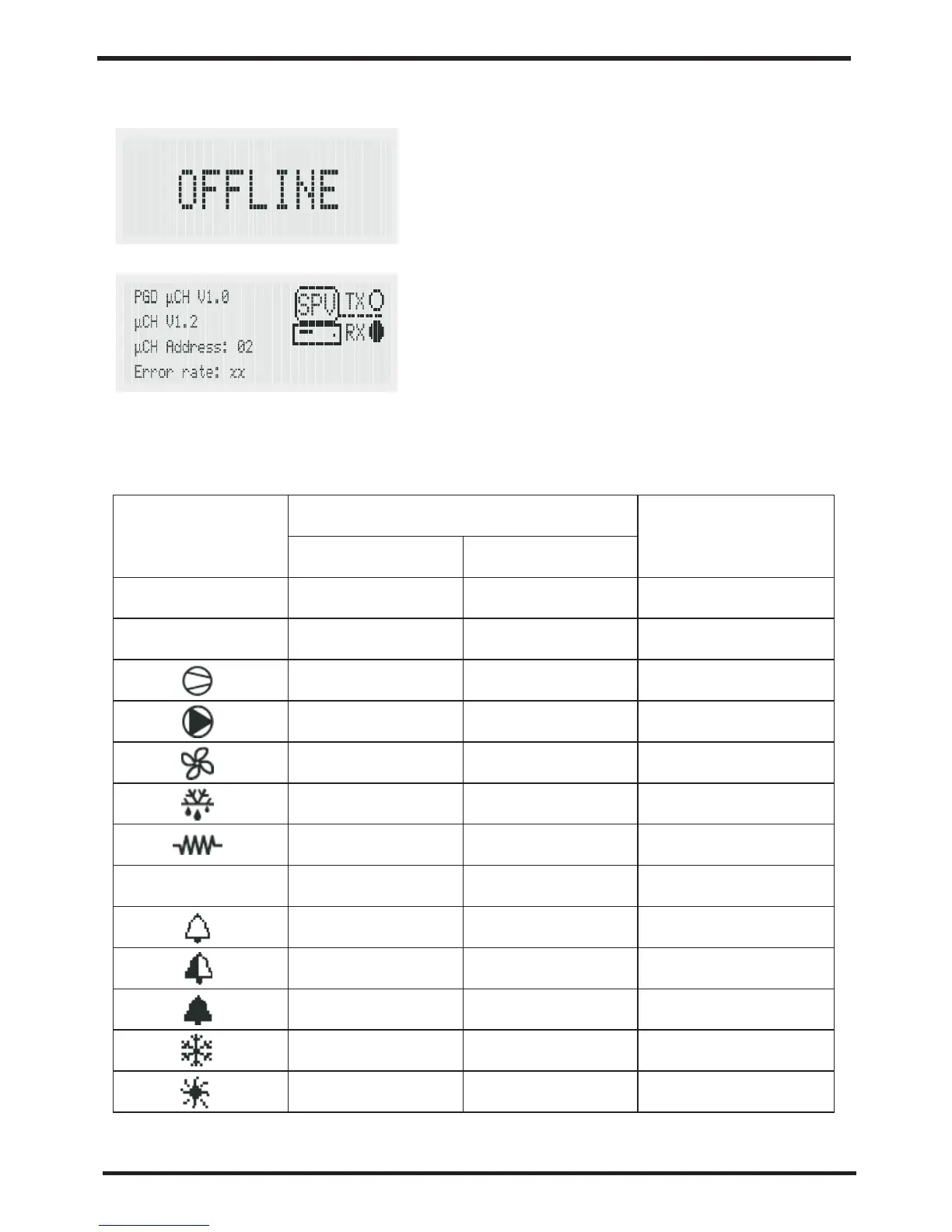
In the event where the RS485 connection
is not performed correctly or the controller
is off, the terminal will clear the display and
show the message“OFFLINE”
Pressing the “Up”+“Down”+“Sel”
buttons together for more than 6 seconds
displays the“INFO”screen containing
information on the UC2 system and on the
communication.
Pressing the“Prg”button returns to the
main screen.
5.3 Symbol meaning
Symbol
Meaning
ON
Flashing
Refrigerant circuit
involved
1,2
3,4
Alarm button
red LED
Compressor 1
and/or 2 ON
Start request
1
2
Start request
Compressor 3
and/or 4 ON
At least one
compressor ON
1 and/or 2
1 and/or 2
1 and/or 2
1 and/or 2
1 and/or 2
1 and/or 2
1 and/or 2
1 and 2
1 and 2
Pump ON
Start request
Condenser fan ON
Start request
Defrost active
defrost request
Heater ON
Start request
Alarm active
EEPROM alarm
Alarm active
Warning relay
activated
Alarm relay active
Heat pump mode
(P6=1)
Chiller mode
(P6=1)
Season changeover
reques
Season changeover
reques
5.4 Functions associated with the buttons
Press for 5 s
Button Button operationUnit status
Switch off buzzer or alarm relay,
if alarm active
Press once
Enter parameter programming mode
after entering password
Return to higher subgroup inside the
programming environment until
exiting, saving to EEPROM
Press once
Manual reset of alarms that are no
longer active
Press once
Select higher item inside the
programming environmen
Switch from standby to heat pump
mode (P6= 1) and vice-versa
Press once or
hold
Press for 5 s
Access direct parameters:selection
(as for button on Uc2)
Select item inside the programming
environment and display direct
parameter values/confirm the changes
to the parameter
Press for 5 s
Press once
Select lower item inside the
programming environmen
Switch from standby to chiller mode
(P6= 1) and vice-versa
+
Immediately reset the hour counter
(inside the programming environment)
Start manual defrost on both circuits
Display the terminal Info screen
Press once or
hold
Press for 5 s
Press for 5 s
Press for 5 s
Press for 6 s
16
17


 To Next Page