9
P H O E N I X G O L D I N T E R N A T I O N A L
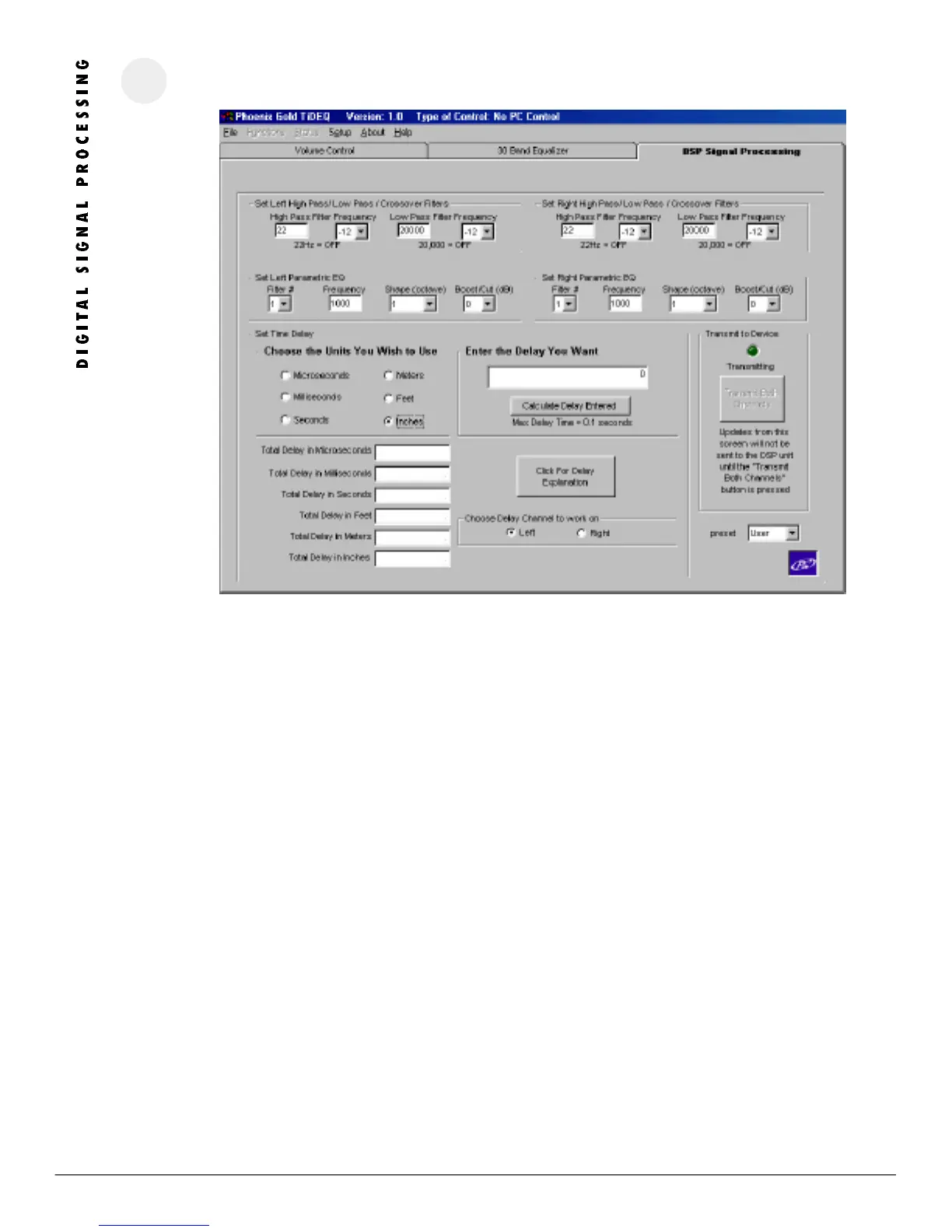
R E M I N D E R : Changes will not take affect inside the vehicle until you click on the Transmit Both Channels Button.
HI GH P AS S FIL TE R F RE QUENCY
Adjusts the High Pass filter for each channel. Slope is adjustable as 12 or 24db per Octave. Setting the High Pass filter to 22Hz turns the filter off. Type in the
crossover point in the High Pass Frequency Box for each channel.
LOW P ASS FI LTER F RE QUENCY
Adjusts the Low Pass filter for each channel. Slope is adjustable as 12 or 24db per Octave. Setting the Low Pass filter to 20kHz turns the filter off. Type in the
crossover point in the Low Pass Frequency Box for each channel.
PAR AM ET RI C EQ
Each channel has 3 parametric filters (6 total) that can be used to alter system response. The center frequency can be between 20Hz to 20kHz. Its Q is
adjustable in 1/3, 1/6, 1/12, or 1/18 octave values. The signal can be changed from a range of +6dB to -18dB. Type in the centered frequency in the
Frequency Box.
DEL AY SE TTINGS
Delay can be set individually for left or right channels in Microseconds, Milliseconds, Seconds, Meters, Feet, or Inches. For an explanation of how to use delay
click on the Delay Explanation button.
TRA NS MI T BOTH CHAN NEL S
Clicking on this button will send all changes for the current preset to the TiDEQ Comp. It will not transmit changes for all 4 presets at the same time. Changes
for each preset must be transmitted individually.




 To Next Page