8
P H O E N I X G O L D I N T E R N A T I O N A L
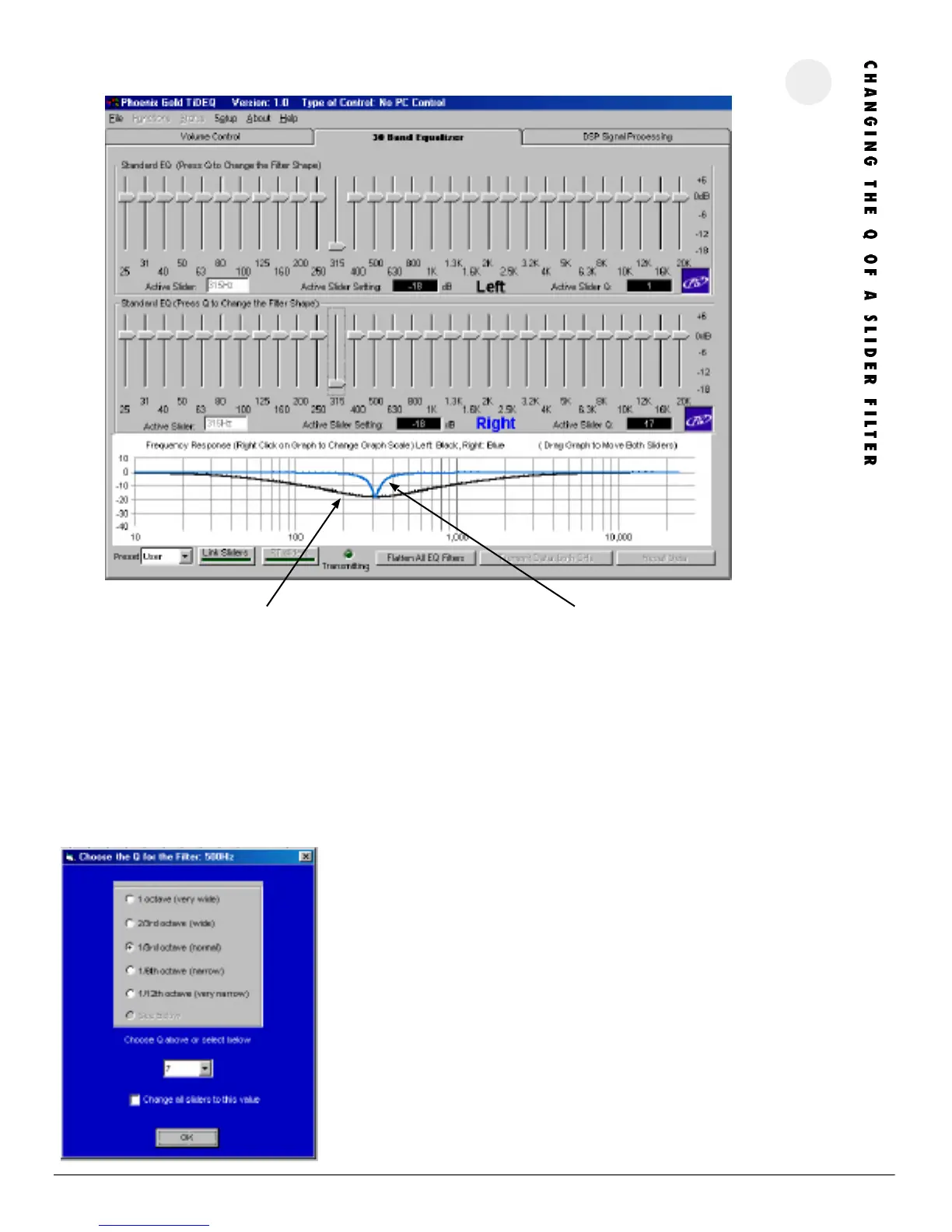
This feature allows users to change the Q value for any of the sliders on the TiDEQ Comp. Changing this value will affect how narrow or wide of a frequency
range will be affected by the slider’s adjustment.
The example above shows the difference the Q value can make. The 315Hz slider is set to -18dB for both the left and right channels but the graph above
shows a drastic difference in the system response. The black or left channel’s response has a Q value of 1 or very wide. The blue or right channel’s response has
a Q value of 17 or very narrow.
ADJU STI NG THE Q VAL UE
Select a slider by clicking on it then press the “Q” key. The screen to the left will
appear. To adjust the Q of the slider simply select from one of the bullet presets or
pick the specific value from the selection box below. After the value is selected click
the OK button.
To change all 30 sliders’ Q value with one adjustment. Simply check the “Change all
sliders to this value” box. This will change all 30 sliders’ Q value to the selected value.
Left: Q=1 Right: Q=17
Frequency Slider:
315Hz @ -18dB




 To Next Page