P H O E N I X G O L D I N T E R N A T I O N A L
4
STA TU S LE Ds
Visible through the window are two dual color LEDs. One for
each channel.
G R E E N : TiDEQ Comp is on and operating normally.
ORANGE: Receiving data from the TiDEQ Comp software or the
output signal of the TiDEQ Comp is being clipped.
PRESET
SELECT
INPUT OUTPUT
L
R
COMPUTERREMOTE DISPLAY
TRIGGER
OUTPUT
USER SQ RTA SPL
B+ B- R DR
POWER
PRESET
SELECT
INPUT OUTPUT
L
R
SENSOR INPUT
1 2 3 64 5
I N P U T S
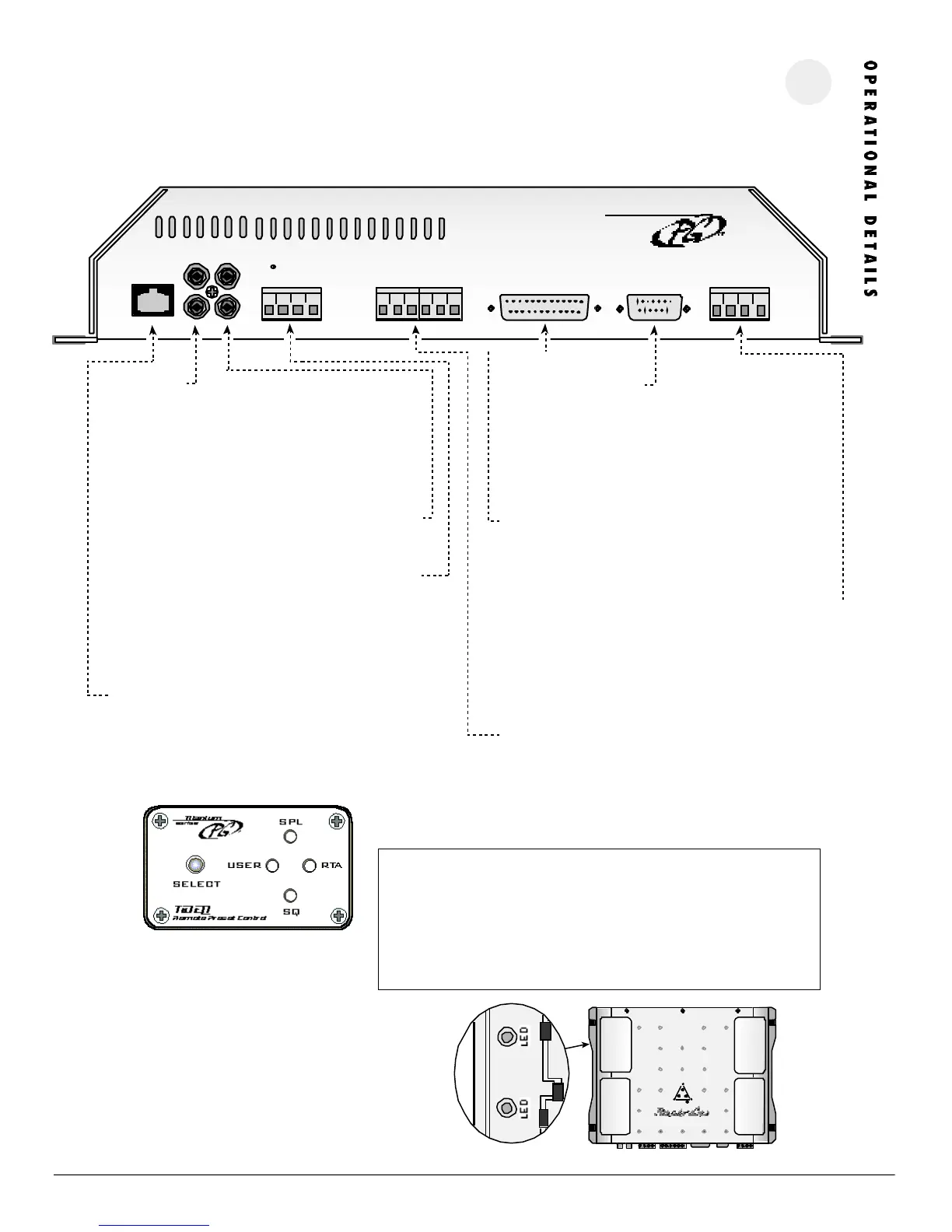
Connect pre-amp signal cables from the headunit to these termi-
nals. To maximize noise rejection, we recommend using Phoenix
Gold ZEROpoint Musical Reference, ZEROpoint Pro, ZEROpoint QLX,
ZEROpoint TRX, XS560 or XS460 series twisted pair interconnects.
Do not use a line driver to drive the inputs of the TiDEQ Comp.
OUT PUT S
Connect pre-amp signal cables to the amplifiers to these terminals
GR OU ND T RIGGER OUT PUT S
Ground will be shown to the preset terminal that is selected on the
TiDEQ Comp. This can be used to trigger relays for multiple applica-
tions. For more information see the Ground Trigger Outputs page 5
of the manual.
RE MOTE P RES ET C ONT RO L ( SEE BEL OW)
This port is for connecting the remote preset control. Pressing the
select button will toggle through the four presets: SPL, SQ, RTA,
USER. Please wait at least 10 seconds after you have changed
presets with the remote before you turn your audio system off.
power
i
COM PU TE R P ORT
This port is for connecting the TiDEQ Comp to a computer. The
connection is made via the serial port using a RS232 cable. Please
consult your computer’s hardware setting to configure what COMM
port your computer will be using to communicate with the TiDEQ
Comp.
REM OT E DI SPLAY PORT
This port is for connecting the optional TiDEQ Comp Remote
Control Unit.
POWE R TER MINAL
B+: Fused +12 volt lead from the battery
B-: Chassis Ground
R: Remote turn-on lead from your headunit
DR: Delayed remote output for turning on other equipment 3
seconds after the TIDEQ COMP turns on.
SENS OR I NP UTS
These inputs are used to display the status of any 12 volt source on
the optional TiDEQ Comp Remote Control. The TiDEQ Comp Remote
and Software must be used in order for the sensor inputs to operate.
The TiDEQ Comp remote control manual illustrates how to use these
inputs.
I M P O R T A N T I N S TA L L AT I O N N O T E S :
• Do not use a line driver to drive the inputs of the TiDEQ Comp. A line driver is
not needed for the TIDEQ Comp to reach full output.
• Do not mount the TiDEQ Comp to any metal part of the vehicle's chassis this
can cause system noise in some cases.
• Do not plug or unplug the serial port cable or RCA input cables while the TiDEQ
Comp is ON this can damaged the EQ.




 To Next Page