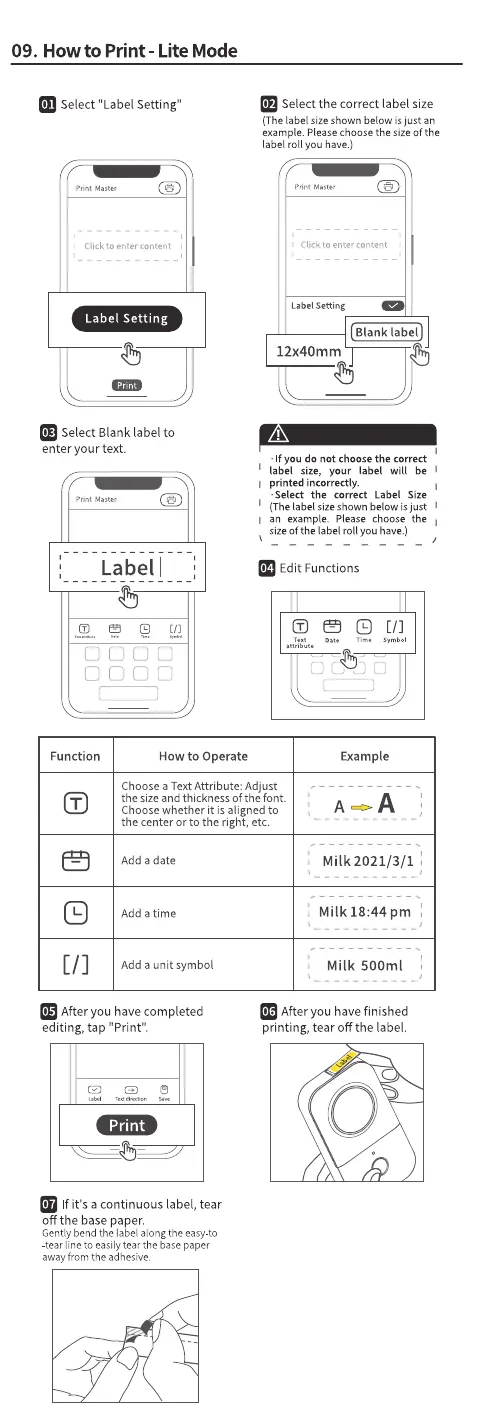
09. Howto Print - Lite Mode
Select "Label Setting"
print Master
Click to enter content
Label Setting
Select Blank label to
enter your text.
Label I
Select the correct label size
(Thelabel sizeshown below is just an
example. Pleasechoosethe sizeof the
label roll you have.)
Print Master
1 Click to enter content
LabelSetting
Blank label
12x40mm
•If you do not choose the correct
label size, your label will be
printed incorrectly.
• Select the correct Label Size
(The label sizeshown below isjust
an example. Please choose the
sizeof the label roll you have.)
Edit Functions
attribute
Function
How to Operate
Choose a Text Attribute: Adjust
the size and thickness of the font.
Choose whether it is aligned to
the center or to the right, etc.
Add a date
Add a time
Add a unit symbol
[1]
symbol
Example
Milk 2021/3/1
Milk 18:44 pm
Milk 500ml
After you have completed
editing, tap "Print".
print
-0
If it's a continuous label, tear
Offthe base paper.
Gentlybendthe labelalong the easy-to
-tear line to easily tear the base paper
awayfromthe adhesive.
After you have finished
printing, tear Offthe label.



 To Next Page