04. Component Description
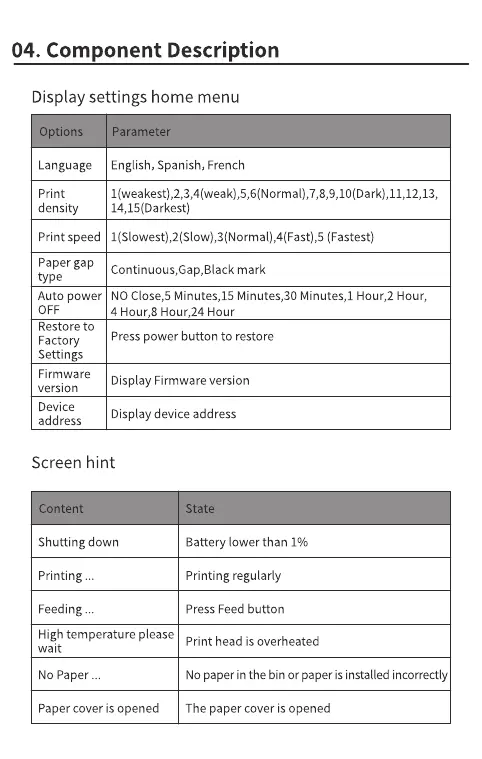
Display settings home menu
Options
Language
print
density
Print speed
Paper gap
type
Auto power
OFF
Restore to
Factory
Settings
Firmware
version
Device
address
Parameter
English, Spanish, French
I(Slowest),2(Slow),3(Normal),4(Fast),5 (Fastest)
mark
NO Close,5 Minutes,15 Minutes,30 Minutes,l Hour,2 Hour,
4 Hour,8 Hour,24 Hour
Presspower button to restore
Display Firmware version
Display device address
Screen hint
ontent
Shutting down
Printing
Feeding
High temperature please
wait
NO Paper
Paper cover is opened
State
Battery lower than 1%
Printing regularly
Press Feed button
Print head is overheated
NOpaper in the bin or paper is installed incorrectly
The paper cover is opened



 To Next Page