05. Printer Paper Roll Installation
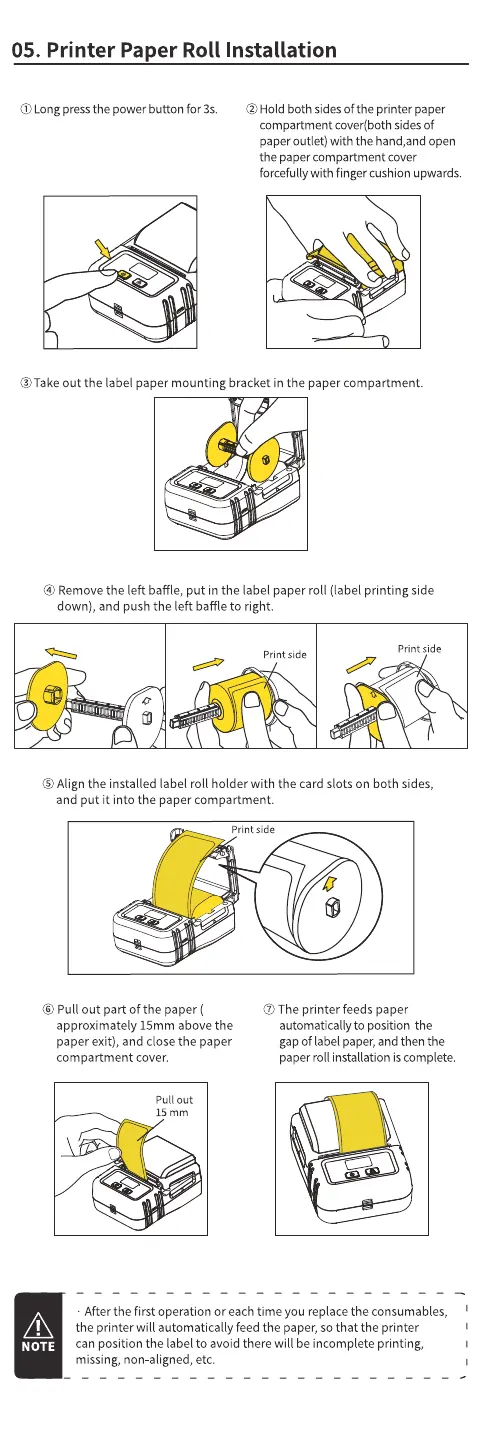
O)Long pressthe power button for 3s. @Hold both sidesOfthe printer paper
compartment cover(bothsidesOf
paper outlet) with the hand,and open
the paper compartment cover
forcefully with finger Cushionupwards.
@Take out the label paper mounting bracket in the paper compartment.
@ Removethe left baffle, put in the label paper roll (label printing side
down), and push the left baffle to right.
Print side
Print side
(9 Align the installed label roll holder with the card slots on both sides,
and put it into the paper compartment.
Print side
@ Pull out part of the paper (
approximately 15mm above the
paper exit), and close the paper
@ The printer feeds paper
automatically to position the
gapof label paper, and then the
NOTE
• After the first operation or each time you replace the consumables,
the printer will automatically feed the paper, so that the printer
can position the label to avoid there will be incomplete printing,
missing, non-aligned, etc.



 To Next Page