02. Product Description
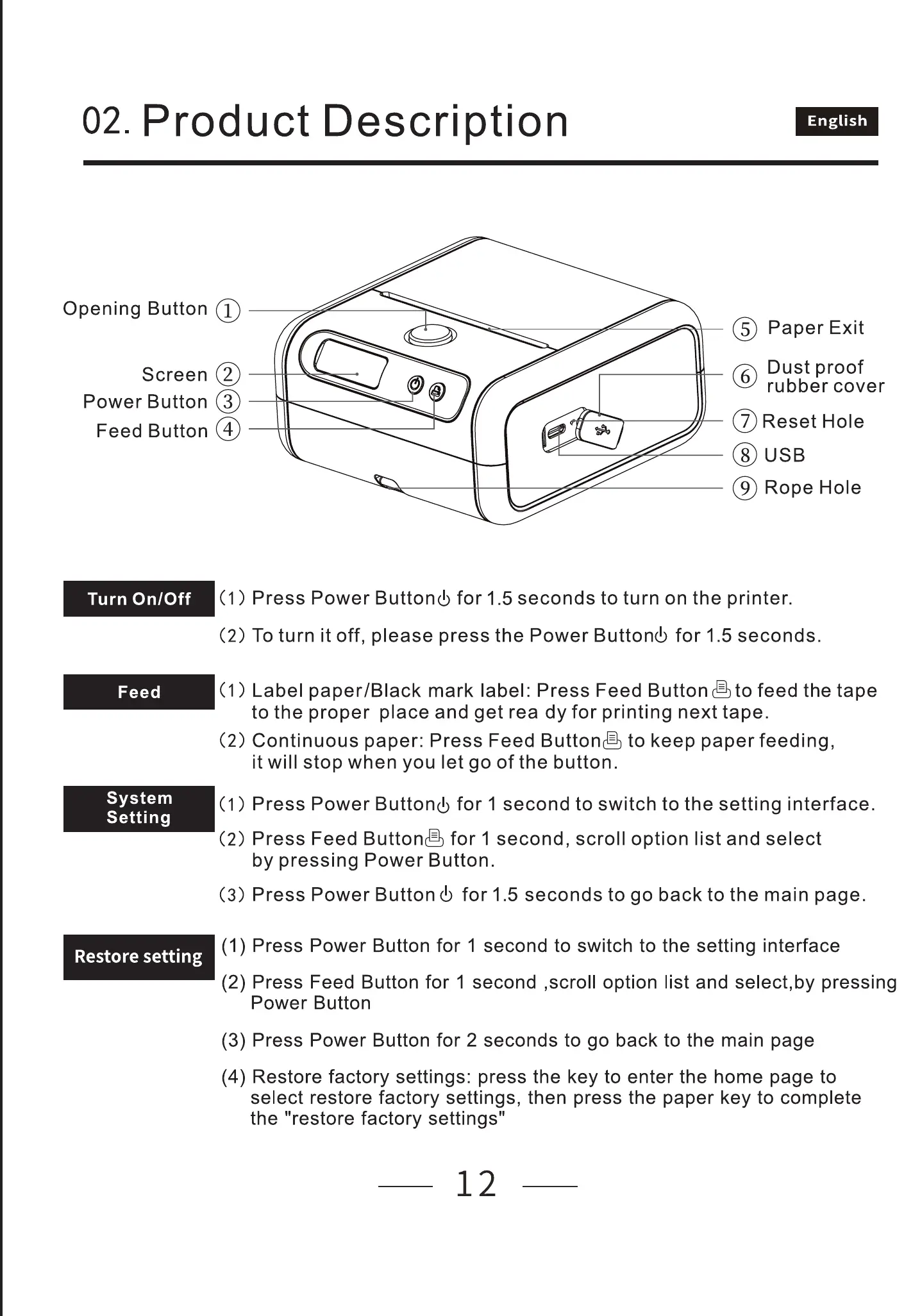
OpeningButton@
Screen@
PowerButton@
FeedButton@
English
@ PaperExit
Dust proof
C) rubber cover
@Reset Hole
@ USB
@ RopeHole
Turn On/Off
Feed
System
Setting
Restore setting
(1) Press Power Buttonb for 1.5 seconds to turn on the printer.
(2) To turn it off, please press the Power Buttonb for 1.5 seconds.
(1) Label paper/BIack mark label: Press Feed Buttongto feed the tape
to the proper place and get rea dy for printing next tape.
(2) Continuous paper: Press Feed Buttone to keep paper feeding,
it will stop when you let go of the button.
(1 ) Press Power Buttonb for 1 second to switch to the setting interface.
(2) Press Feed Buttone for 1 second, scroll option list and select
by pressing Power Button.
(3) Press Power Buttond) for 1.5 seconds to go back to the main page.
(1) Press Power Button for 1 second to switch to the setting interface
(2) Press Feed Button for 1 second ,scroll option list and select,by pressing
Power Button
(3) Press Power Button for 2 seconds to go back to the main page
(4) Restore factory settings: press the key to enter the home page to
select restore factory settings, then press the paper key to complete
the "restore factory settings"
12



 To Next Page