03. Screen Information English
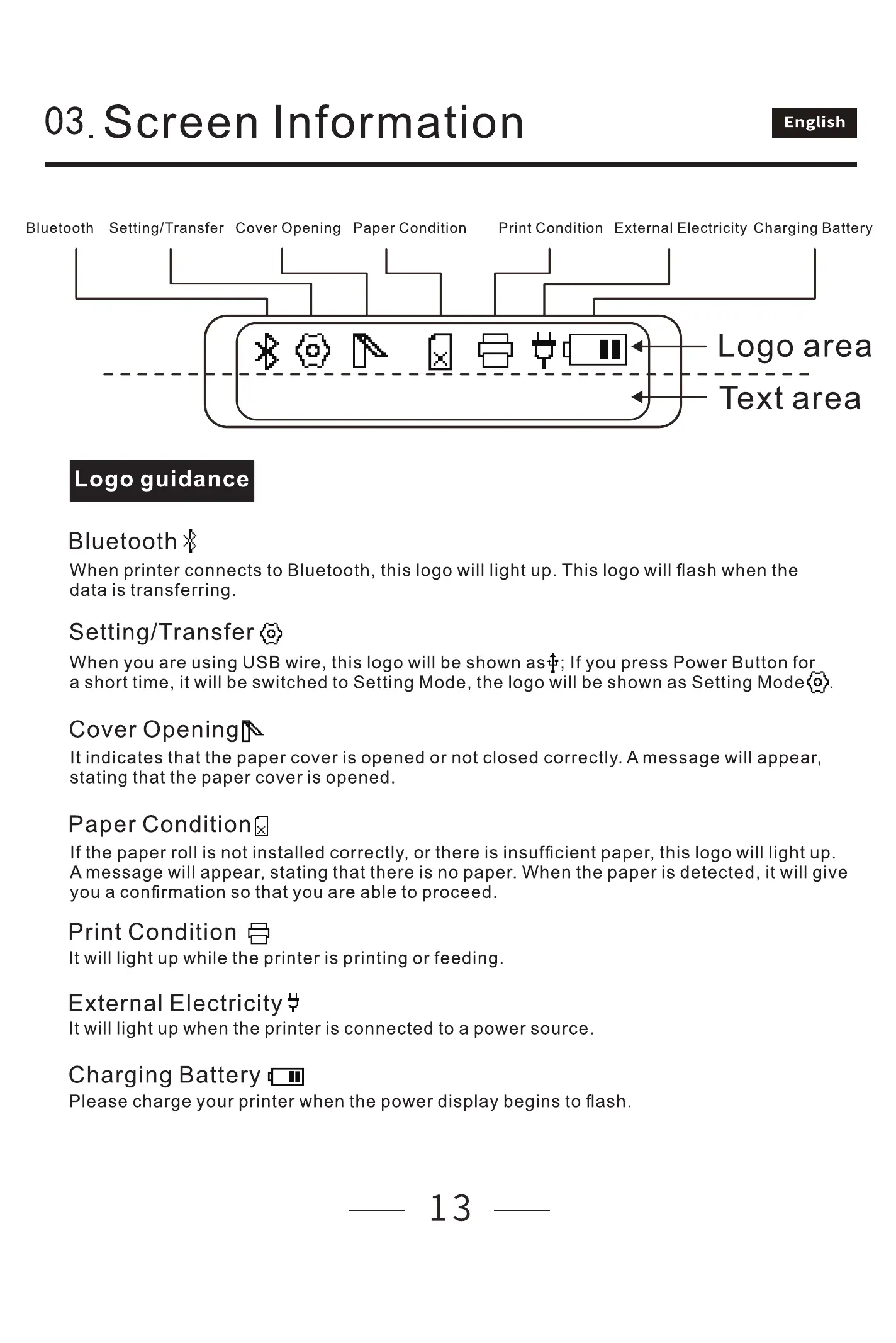
Bluetooth Setting/ Transfer Cover Opening Paper Condition
Logo guidance
Bluetooth
Print Condition External Electricity Charging Battery
Logo area
Text area
When printer connects to Bluetooth, this logo will light up. This logo will flash when the
data is transferring.
Setting/ Transfer @
When you are using USB wire, this logo will be shown astp; If you press Power Button for
a short time, it will be switched to Setting Mode,the logo will be shown as Setting Mode@.
Cover
It indicates that the paper cover is opened or not closed correctly. A message will appear,
stating that the paper cover is opened.
Paper Conditionq
If the paper roll is not installed correctly, or there is insufficient paper, this logo will light up.
A message will appear, stating that there is no paper. When the paper is detected, it will give
you a confirmation so that you are able to proceed.
Print Condition
It will light up while the printer is printing or feeding.
External Electricity #
It will light up when the printer is connected to a power source.
Charging Battery
Please charge your printer when the power display begins to flash.
13



 To Next Page