FEED BUTTON
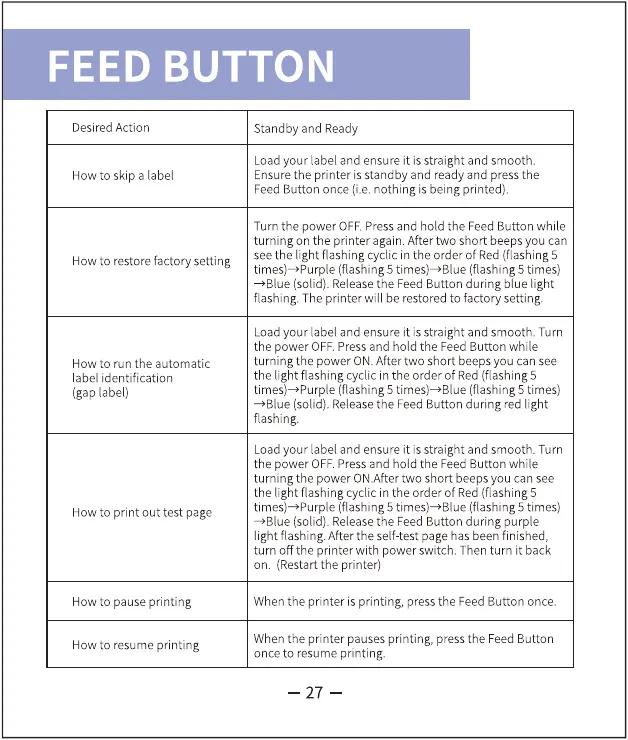
Desired Action
How to skip a label
How to restore factory setting
How to run the automatic
label identification
(gap label)
How to print out test page
How to pause printing
How to resume printing
Standby and Ready
Loadyour label and ensure it is straight and smooth.
Ensurethe printer is standby and ready and pressthe
Feed Button once (i.e. nothing is being printed).
Turn the power OFF.Pressand hold the FeedButton while
turning on the printer again. After two short beeps you can
seethe light flashing cyclic in the order of Red (flashing 5
times)-+Purple (flashing 5 times)-+Blue (flashing 5 times)
•Blue (solid). Releasethe FeedButton during blue light
flashing. The printer will be restoredto factory setting.
Loadyour label and ensure it is straight and smooth. Turn
the power OFF.Pressand hold the FeedButton while
turning the power ON.After two short beeps you can see
the light flashing cyclic in the order of Red (flashing 5
(flashing 5 times—Blue (flashing 5 times)
*Blue (solid). Releasethe FeedButton during red light
flashing.
Loadyour label and ensure it is straight and smooth. Turn
the power OFF.Pressand hold the FeedButton while
turning the power ON.Aftertwo short beepsyou can see
the light flashing cyclic in the order of Red (flashing 5
times)*Purple (flashing 5 (flashing 5 times)
•Blue (solid). Releasethe FeedButton during purple
light flashing.After the self-test page has beenfinished,
turn Offthe printer with power switch. Then turn it back
on. (Restartthe printer)
Whenthe printer is printing, pressthe FeedButton once.
Whenthe printer pauses printing, pressthe Feed Button
once to resume printing.
27



 To Next Page