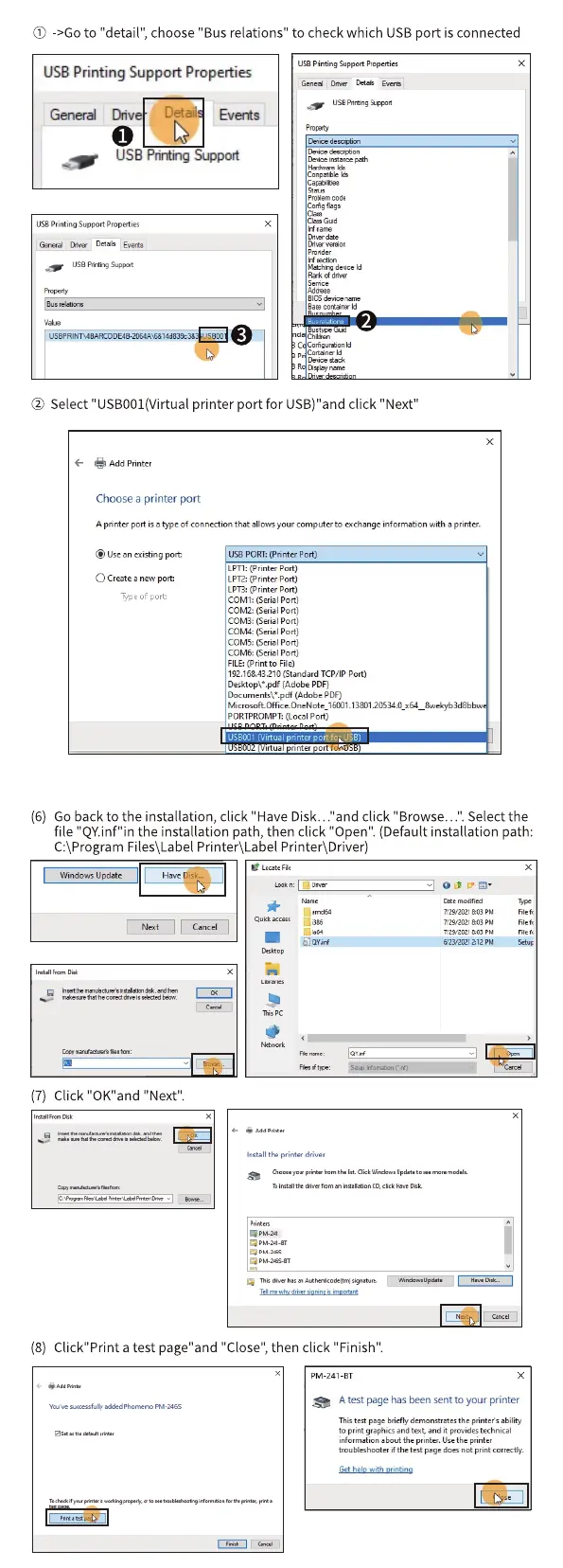
@ ->Go to "detail", choose "Bus relations" to check which USB port is connected
US8 Printing Suppott Properties
USE
General Dnv
Detail Events
LISB Pinting Support
Pmyemcode
'*Son
@ Select "USB001(Virtual printer port for USB)"and click "Next
Add p nter
Choosea printer port
A printer port isatype Ofconnectionthat allowsyour computerto achange information with a printer.
@Usean existing port:
C)Createanewport:
Typeof port:
use PORT: (Printer Port)
LPTI: (Printer Port)
LPT2:(Printer Port)
LPT3:(Printer port)
COW: (Serial port)
COW: (Serial Port)
COMB: (Serial Port)
COW: Port)
COM5: (Serial Port)
COM& (Serial Port)
FILE:(Print to File)
192.168.43210 (Standard TCP,'IP port)
Desktop\• .pdf (Adobe PDF)
Documents\• .pdf (Adobe PDF)
PORTPROMPT: (Local Port)
"tua nnter
(6) Go back to the installation, click "Have Disk..."and click "Browse...". Select the
file "QY.inf"in the installation path, then click "Open". (Default installation path:
C:\Program Files\Label Printer\LabeI Printer\Driver)
Windows Update
(7) Click "OK"and "Next".
Qun
7/29•2tet
aori
install printer driver
(8) Click"Print a test page"and"Close",then click "Finish".
PM-241-BT
A test page hasbeen sent to your printer
This s
to print graphks and tot. •nd it
inform*ion •bout the printer, Usethe printer



 To Previous Page