3. Solution for Not Finding
the Printer (Windows)
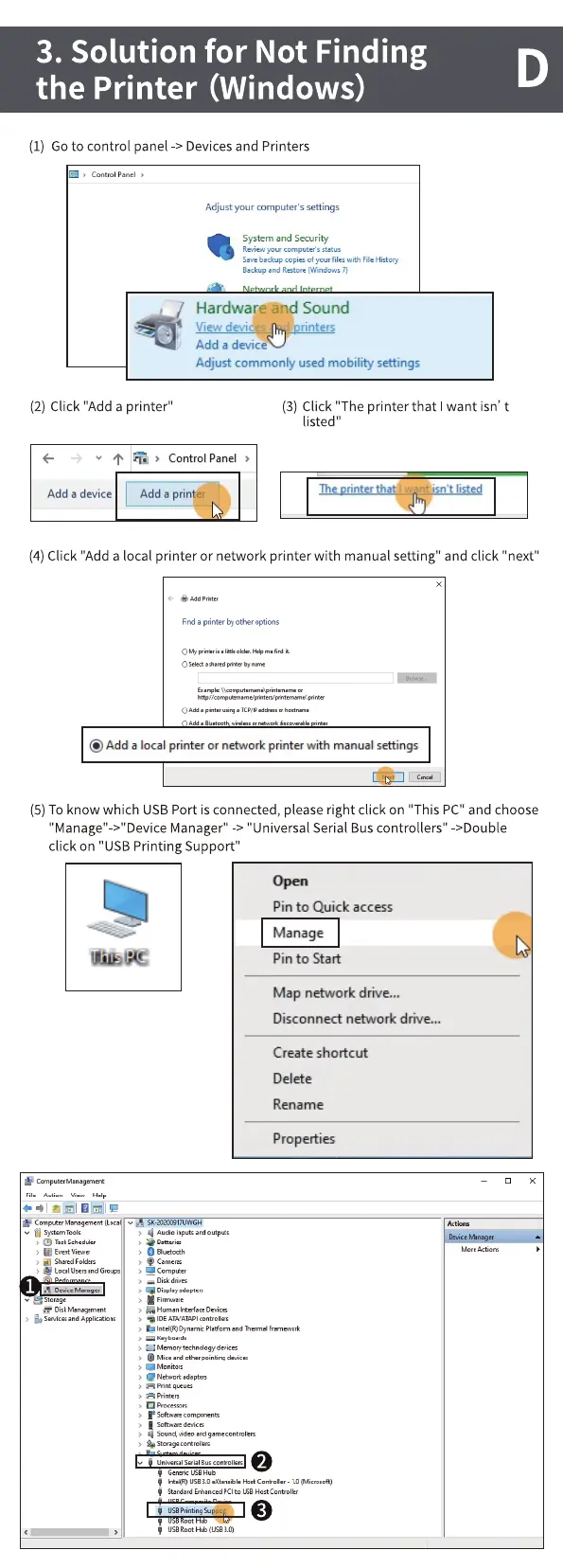
(I) Go to control panel -> Devices and Printers
Adjustyour computers settings
System and Security
Save backup copies of your wth File "stoo
gukup
Hardware and Sound
View devic s rinters
Add a device
Adjust commonly used mobility settings
D
(2) Click "Add a printer"
Control Panel
Add a printer
Add a device
(3) Click "The printer that want isn' t
listed"
The rintertha w nt isn't listed
(4) Click "Add a local printer or network printer with manual setting" and click "next"
FiM a printer b' Ottw options
@Add a local printer or network printer with manualsettings
(5) To know which USB Port is connected, please right click on "This PC" and choose
Manager" -> "Universal Serial Bus controllers" ->DoubIe
click on "USB Printing Support"
Pin to Quick access
Manage
Pin to Start
Map network drive„,
DiSccnnect network drive...
Create shortcut
Delete
Rename
Prope Ities
Z51
Comp_w men'
Audo



 To Next Page