1. Quick Start Video
The printer is a very capable printer. You can print barcodes, shipping labels, name
badges,warehouse labels,food nutrition labels,amazon FBAlabelsand labelsof all
sizes with it. It' s the perfect partner for your business with its economical, reliable
and high-efficient features.
Youcanget a more comprehensiveand detailed video tutorial in the
following ways:
•—Y Method 1: Download the latest driver from official website
Method 2: Complimentary USBdriver
Please kindly take a short time to watch the setup video. It will guide you through
the setup process step by step.
2. Product Overview
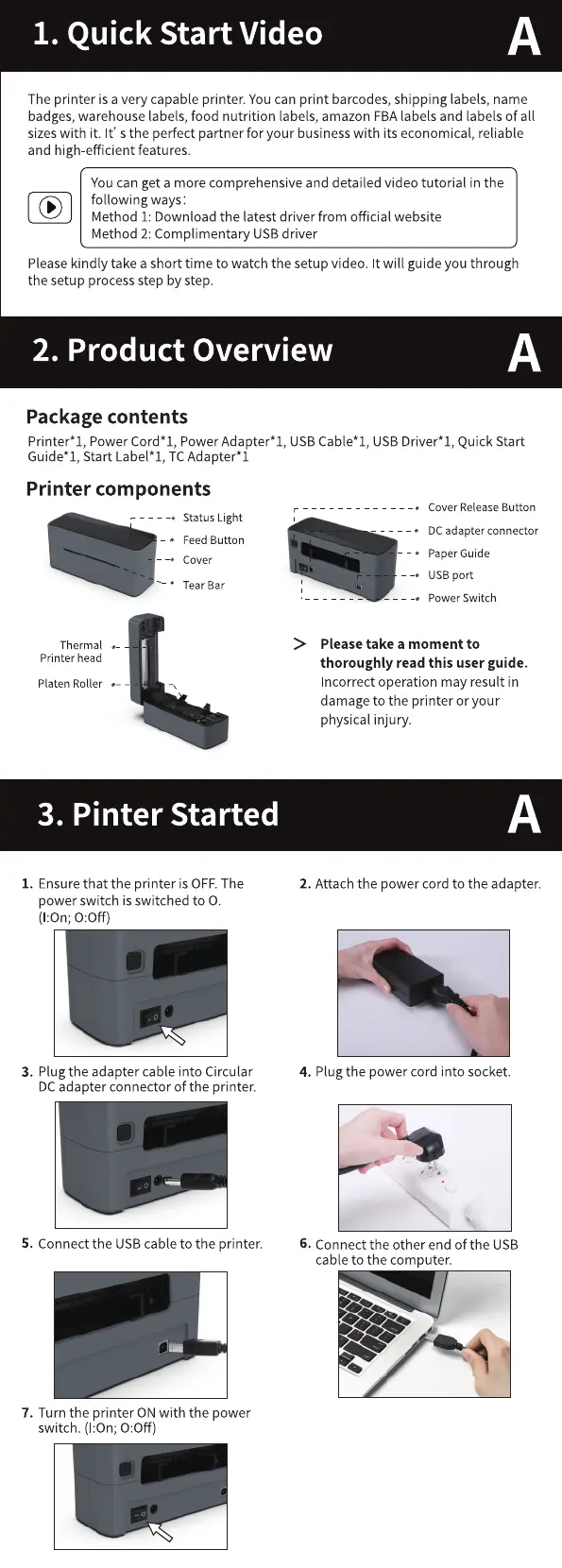
Package contents
Printer* 1, Power Cord* 1, Power Adapter* 1, USB Cable* 1, USB Driver *1, Quick Start
Guide* I, Start Label* I, TC Adapter* I
Printer components
• Status Light
Feed Button
Cover
—•
• Tear Bar
Thermal
Printer head
Platen Roller -
3. Pinter Started
1. Ensure that the printer is OFF.The
power switch is switched to O.
(1:0n; 0:0ff)
3. Plug the adapter cable into Circular
DCadapter connector of the printer.
5. Connect the USB cable to the printer.
7. Turn the printer ON with the power
switch. (I:On; 0:0ff)
• Cover Release Button
DCadapter connector
PaperGuide
USB port
Power Switch
Please take a moment to
thoroughly read this user guide.
Incorrect operation may result in
damage to the printer or your
physical injury.
2. Attach the power cord to the adapter.
4. Plugthe power cord into socket.
6. Connect the other end of the USB
cable to the computer.
1.



 To Next Page