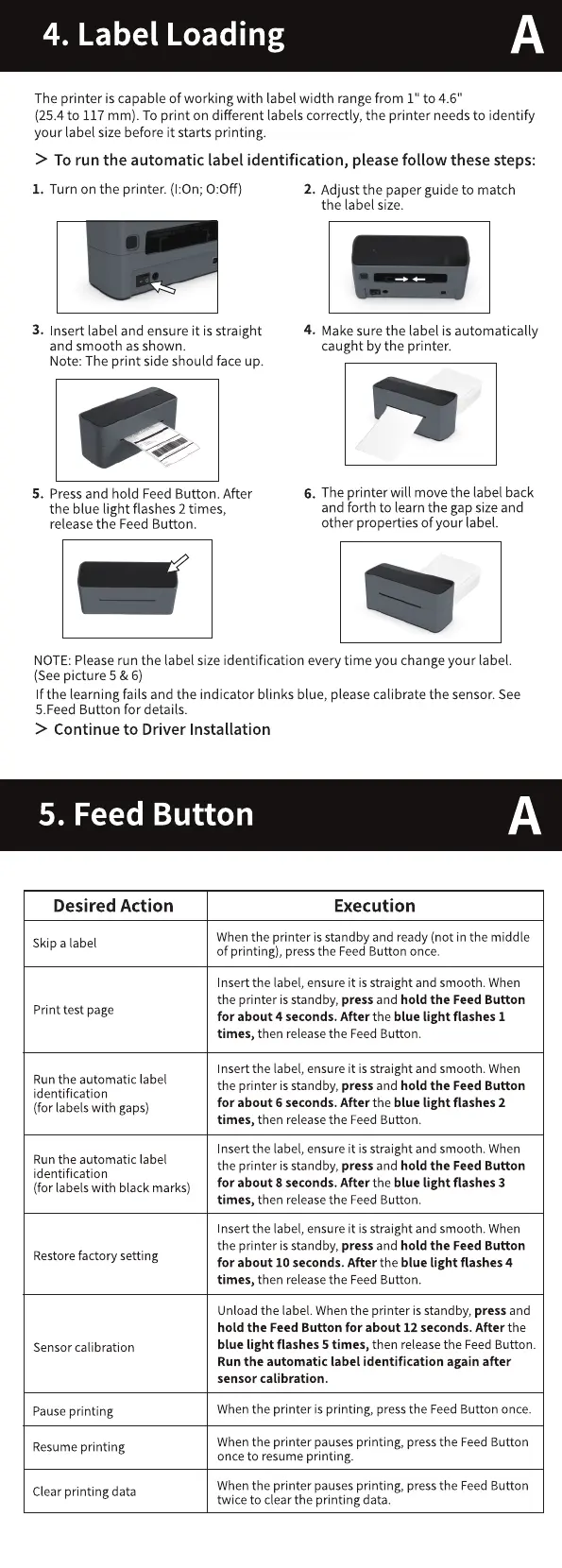
4. Label Loading
The printer is capable of working with label width rangefrom 1" to 4.6"
(25.4 to 117 mm). To print on different labels correctly, the printer needs to identify
your label sizebeforeit starts printing.
> To run the automatic label identification, please follow these steps:
1. Turn on the printer. (1:0n; 0:0ff)
3. Insert label and ensure it is straight
and smooth as shown.
Note: The print side should face up.
5. Press and hold Feed Button. After
the blue light flashes 2 times,
release the Feed Button.
2. Adjust the paper guide to match
the label size.
4. Make sure the label is automatically
caught by the printer.
6. The printer will move the label back
and forth to learn the gap size and
other properties of your label.
NOTE: Please run the label size identification every time you change your label.
(See picture 5 & 6)
If the learning fails and the indicator blinks blue, please calibrate the sensor. See
5.Feed Button for details.
> Continue to Driver Installation
5. Feed Button
Desired Action
Skip a label
Print test page
Run the automatic label
identification
(for labels with gaps)
Run the automatic label
identification
(for labels with black marks)
Restorefactory setting
Sensor calibration
Pause printing
Resume printing
Clear printing data
Execution
When the printer is standby and ready (not in the middle
of printing), pressthe FeedButton once.
nsertthe label, ensure it is straight and smooth. When
the printer is standby, press and hold the Feed Button
for about 4 seconds. After the blue light flashes 1
times, then release the Feed Button.
nsert the label, ensure it is straight and smooth. When
the printer is standby, press and hold the Feed Button
for about 6 seconds. After the blue light flashes 2
times, then release the Feed Button.
nsert the label, ensure it is straight and smooth. When
the printer is standby, press and hold the Feed Button
for about 8 seconds. After the blue light flashes 3
times, then release the Feed Button.
nsert the label, ensure it is straight and smooth. When
the printer is standby, press and hold the Feed Button
for about 10 seconds. After the blue light flashes 4
times, then release the Feed Button.
Unload the label. When the printer is standby, press and
hold the Feed Button for about 12 seconds. After the
blue light flashes 5 times, then releasethe FeedButton.
Run the automatic label identification again after
sensor calibration.
When the printer is printing, press the Feed Button once.
Whenthe printer pausesprinting, pressthe FeedButton
once to resume printing.
Whenthe printer pausesprinting, pressthe FeedButton
twice to clear the printing data.



 To Next Page
 Loading...






