macOS STEP 1.
Security & Privacy Setting
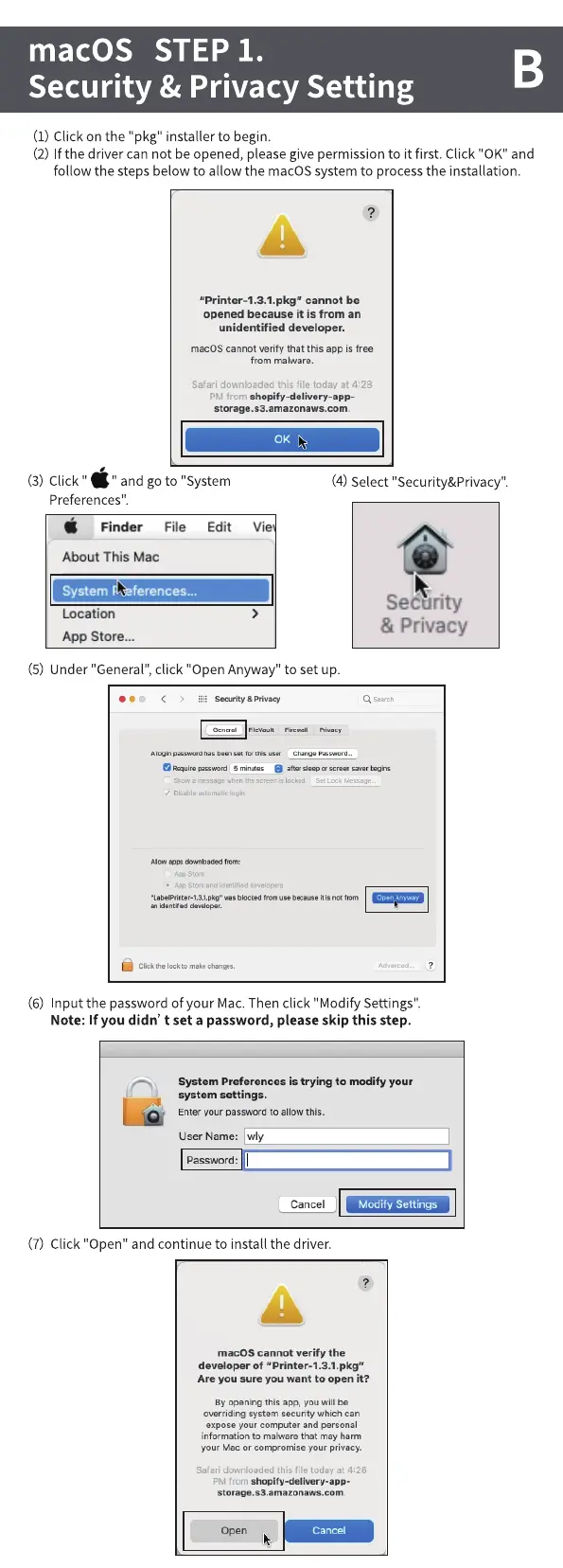
(1) Click on the "pkg" installer to begin.
(2) If the driver can not be opened, pleasegive permission to it first. Click "0K" and
follow the steps below to allow the macOS system to process the installation.
"Printer-l.3.1.pkg" cannot be
opened because it is from an
unidentified developer.
macOS cannot verify that this app is free
from malware.
Safari downloaded this file today at 4:28
shopify-delivery-app-
PM from
storage.s3.amazonaws.com
(3) Click '
" and go to "System
Finder File Edit
About This Mac
System
rences...
Location
App Store...
Vie
0K
(4) Select "Security&Privacy".
Security
& Privacy
(5) Under "General",click "Open Anyway" to set up.
& Priva•ey
A passwd us b
ot scr••
•La—rinter-1.3.1.pkg- is not
the to make
(6) Input the passwordof your Mac.Then click "Modify Settings".
Note: If you didn' t set a password, please skip this step.
System Preferences is trying to modify your
system settings.
Enter your password to allow this.
User Name: wly
Password:
Cancel
(7) Click "Open" and continue to install the driver.
Modify Settings
macOS cannot verify the
developer of "Printer-l.3.1.pkg"
Are you sure you want to open it?
By opening this app, you will be
overriding system security which can
expose your computer and personal
information to malware that may harm
your Mac or compromise your privacy.
Safari downloaded this file today at 4:28
shopify-delivery-app-
PM from
Open
Cancel



 To Next Page