"O
Introduction
Destination Select
L Installation Type
Installation
Summary
macOS
Install Label Printer
Welcome to the Label Printer Installer
You will be guided through the steps necessary to install this
software.
GO Back Continue
STEP 2. Driver Installation
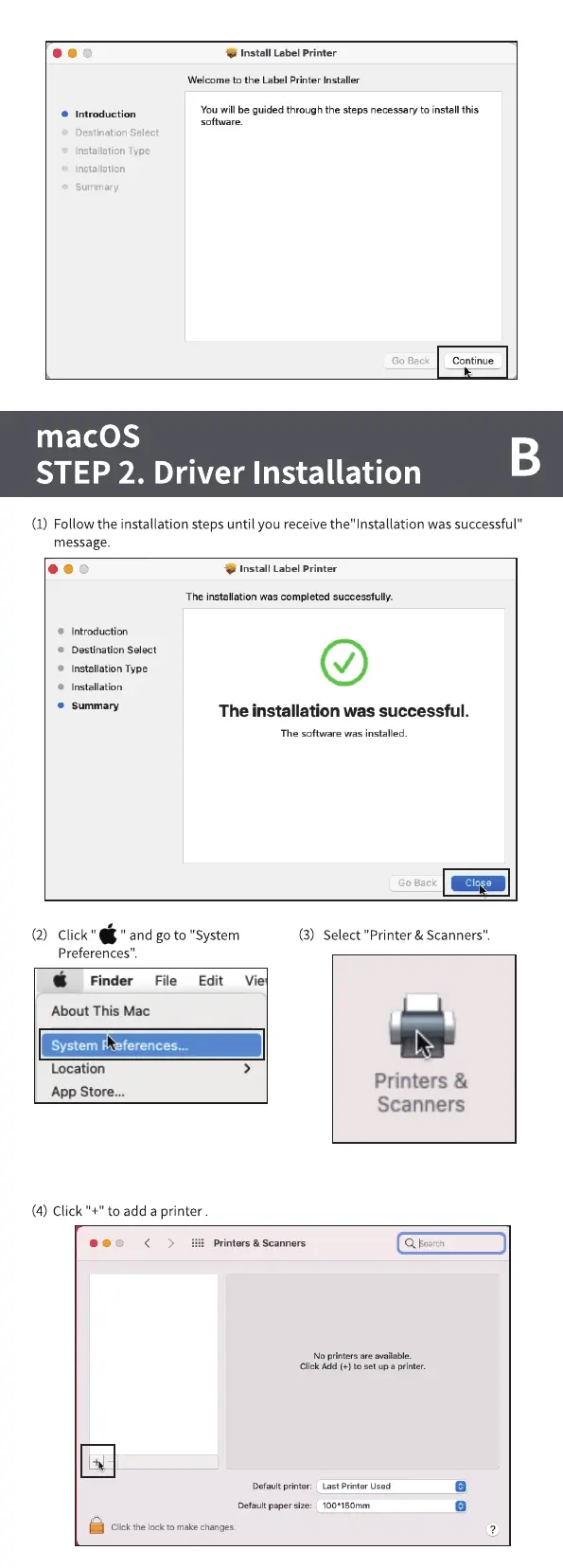
(1) Followthe installation stepsuntil you receivethe"lnstallation was successful"
message.
ooo
• Introduction
Destination Select
• Installation Type
• Installation
• Summary
Install Label Printer
The installation was completed successfully.
The installation was successful.
The software was installed.
Go Back
(2) Click "
" and goto "System
Finder File Edit Vie
About This Mac
System ferences...
Location
App Store...
(4) Click "+" to add a printer .
(3) Select "Printer & Scanners".
'CD < > Printers & Scanners
Printers &
Scanners
bcarch
No printers are available.
Click Add (+) to set up a printer.
Default printer:
Default paper size:
Click the lock to make changes.
Last Printer used
100•150rnm



 To Next Page