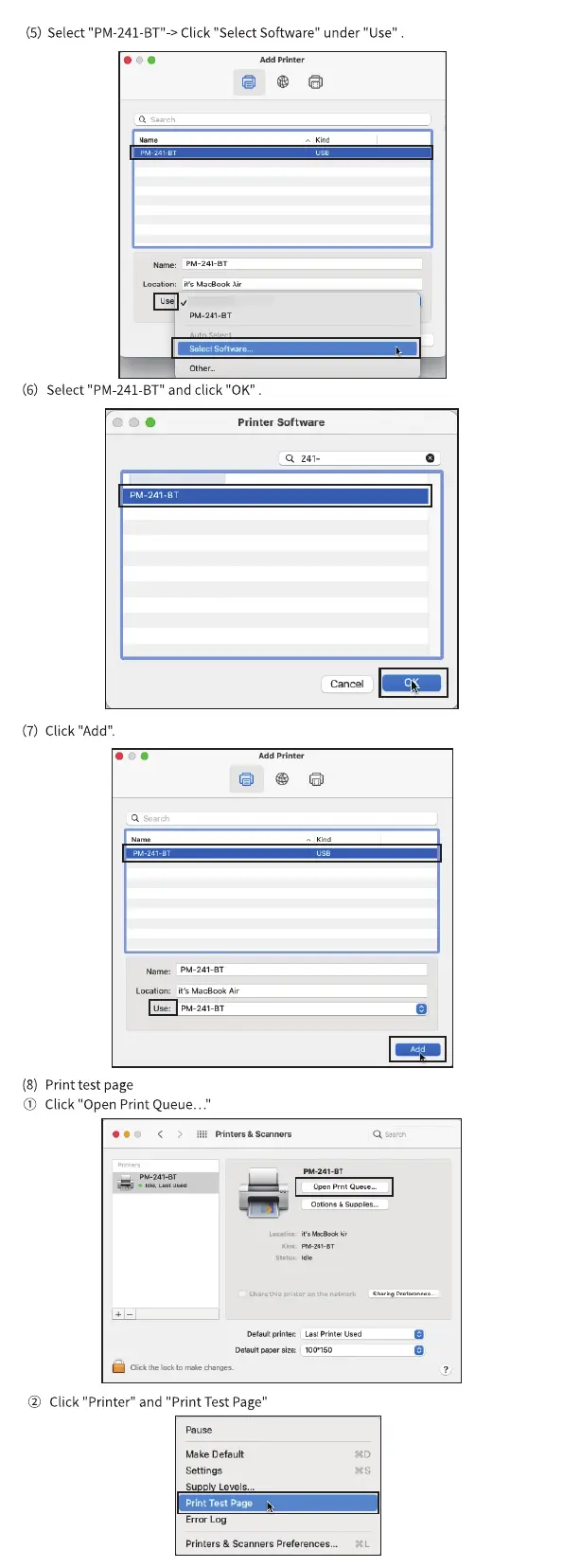
(5)
(6)
Select
Select
"PM-241 BT' Click "Select Software" under "Use
PM-241-3T
Locatim: n's P/acBOOk Air
Other„.
" and click "0K"PM-241-BT
000
PM-241-BT
(7) Click "Add".
q search
Narne: PM-241-BT
Printer Software
Q 241-
Cancel
Add Printer
Locatim: it's MacBook Air
use: PM-241-BT
(8) Print test page
(j) Click "Open Print Queue..."
> & Scantwrs
DeGet
giz•:
PM-24t-er
L•st Pr"t« Used
nonso
e
Click
the lock to
"Printer" and "Print Test Page"
Pause
Make Default
Settings
Su I Levels...
Print Test Page
Error Log
Printers & Scanners Preferences...



 To Next Page