macOS
STEP 3. Printer setup
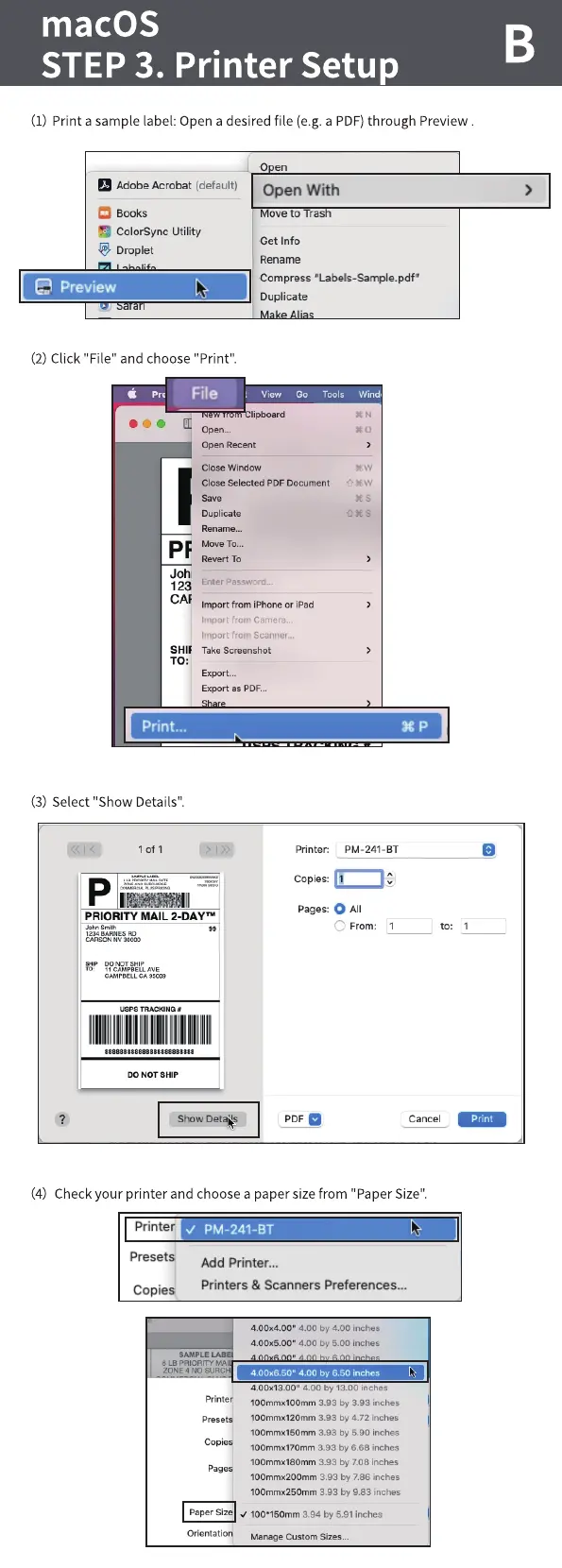
(I) Print a sample label:Open a desired file (e.g.a PDF)through Preview.
Pages: O All
Adobe Acrobat (default)
Books
ColorSync Utility
Droplet
Preview
(2) Click "File" and choose "Print".
File
Open Recent
Close
Open
Open With
ve to ras
Get Info
Rename
Compress "Labels-Sample.pdf"
Duplicate
View GO Tools Wind (
Close selected PDF Document
Duplicate
Revert To
Joh
Enter Password m
123
CAF
Import from iPhorw or iPad
Import from Camera.
Import from Scanner n
Take Screenshot
Export as PDFm
print...
(3) Select "Show Details".
lofl
PRIORITY MAIL 2-DAYTM
CARSON NV xmo
00 NOT
CAW BELL AV E
CA .scm
usps TRACKING
IIIllIIIIIIIIIIIIIIIIIIII
888888888888888888888888
DO NOT SHIP
Show
Printer:
Copies:
PDF
PM-241-BT
o
From:
to:
Cancel
(4) Checkyour printer and choose a paper sizefrom "Paper Size".
Printer
PM-241-BT
Preset
Copie
Add Printer...
Printers & Scanners Preferences...
SAMPLE LAB
6 LB VA
4.ooxaoo• 400 by 4.00 inches
4.ooxEoo• 400 by 5.00 inches
4.00*650• 400 by 6.50 inches
4.00113.00• 4 OO 13 OO Inches
100mmx100mm 3.93 by 3.93 inches
100mn•u120mm 3.93 by 4.72 inches
100mmx150nvn 3.93 by 5.90 inches
100mmx170rnm 3.93 by 6.68 inches
100mmx180nvn 393 by 7.08 inches
100mmx200mrn 3.93 by 7.86 inches
100mmx2SOmm 3.93 by 983 inches
PaperSize 100•1SOmm3.94 by5.91inches
Manage SizeE



 To Next Page