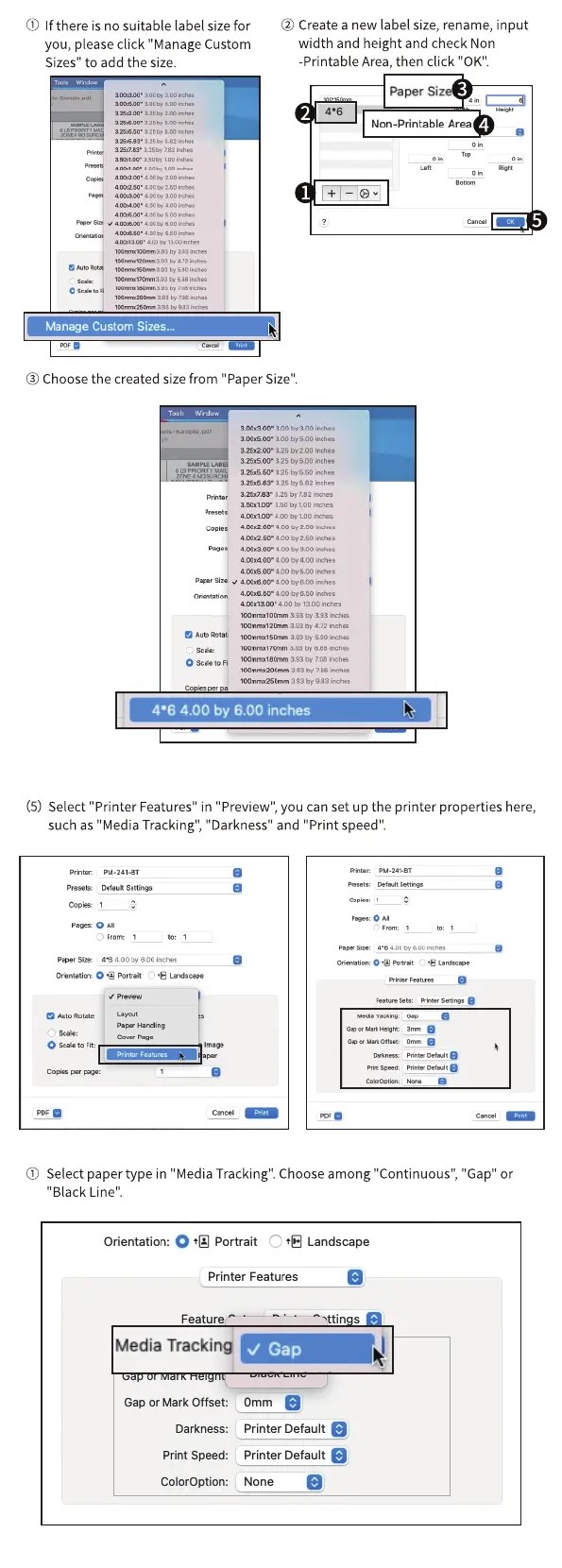
(j) If there is no suitable label size for
you, please click "Manage Custom
Sizes" to add the size.
aEÜ.n•
4026m •
@ Createa new label size,rename, input
width and height and check Non
-Printable Area, then click "0K".
Paper Size
Non-Printable Area
Manage Custom Sizes...
@ Choose the created size from "Paper Size".
Samul. .pdf
sno
3.ZS.ZOO• 325 200
3.2S.SCO• 375 500
i.2s.6i3•
Inches
aaoe,. 2.so
4.co o, soo ire,es
aco
am.soo- aco soo
O AuteRoth
A.m.ø.w- 'to
393 by 4.12
393 b, 668 a,ch.s
393 Oy708
983 ir-d-„
4'6 4.00 by 6.00 inches
(5) Select"Printer Features" in "Preview",you canset up the printer properties here,
such as "Media Tracking", "Darkness" and "Print speed"
Pret..
Preset*
Cop"
to Fit:
Pts O
pu.241-BT
Settiros
See: r 6 00 600
e
(j) Select paper type in "Media Tracking".Chooseamong "Continuous","Gap" or
"Black Line".
Orientation: O Portrait C) Landscape
Printer Features
Feature
Media Trackin
• V Gap
Gap or Mark Offset:
Omm
Printer Default
Darkness:
Printer Default
Print Speed:
Coloroption:
None



 To Next Page