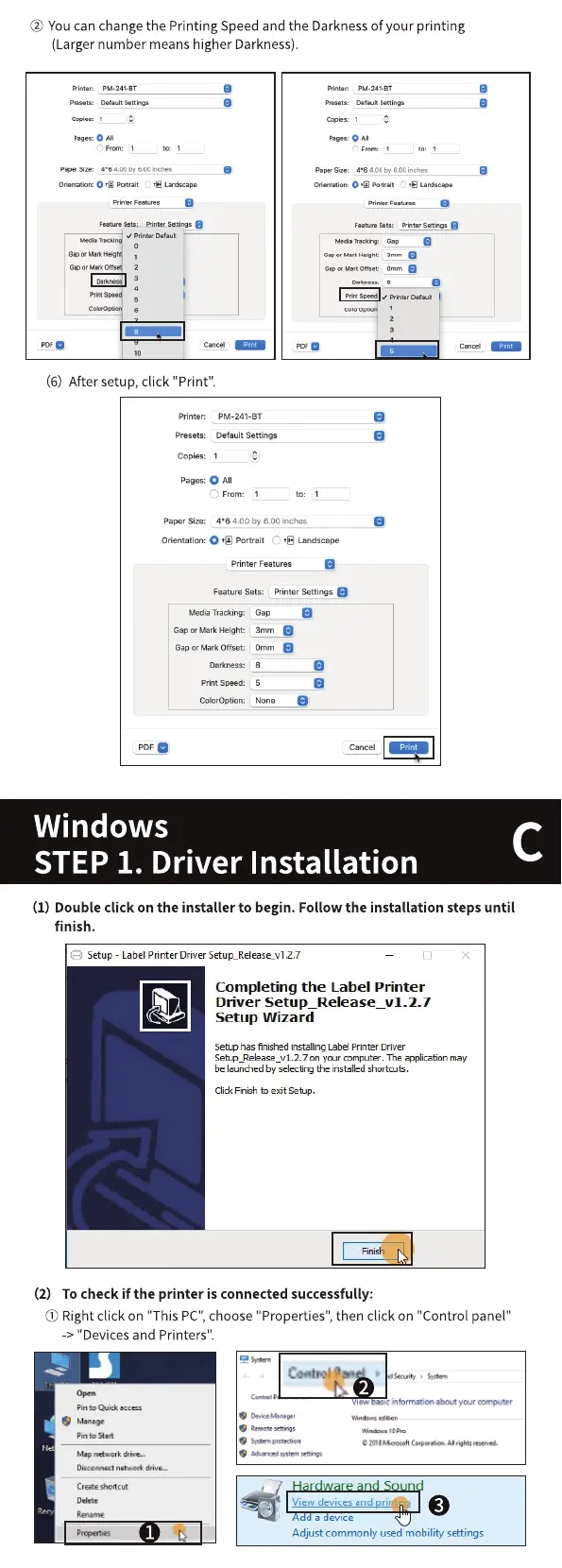
@ You canchangethe Printing Speed and the Darknessof your printing
(Larger number means higher Darkness).
Sew •s
pan
(6) After setup, click "Print".
printer: PM-241-BT
Presets: Defun Settings
Cop•s: I
pages: O A'
Sze: 400 by 6.00 irEt*s
Orientatiom O Portrait La-Ocape
Prilter Features
Feature Sets: prnter Settings
Media Trackirw
G" or
Wrk Offset:
PDFO
Windows
STEP 1. Driver
Gap
3nyn
Onvn
Print
Installation
(1) Double click on the installer to begin. Follow the installation steps until
finish.
e
Setup - LabelPrinter DriverSetup_Release_v12.7
Completing the Label Printer
Driver Setup_Release_v1.2.7
Setup Wizard
Setup has finished installing Label Printer Driver
1.2.7 on your computer. The a"icabon may
be launched by selecting the installed shortcuts.
ClickFnsh to exit Setup.
(2) To check if the printer is connected successfully:
(j) Rightclick on "This PC",choose"Properties", then click on "Control panel"
-> "Devices and Printers".
Pinto Quick
Pin
Disconnect
Cleate shotcut
*ten
information ccnputer
Hardware and Sound
View devices and rint rs
a evice
Adjust commonly used mobility' settings



 To Next Page