@ Rightclick on
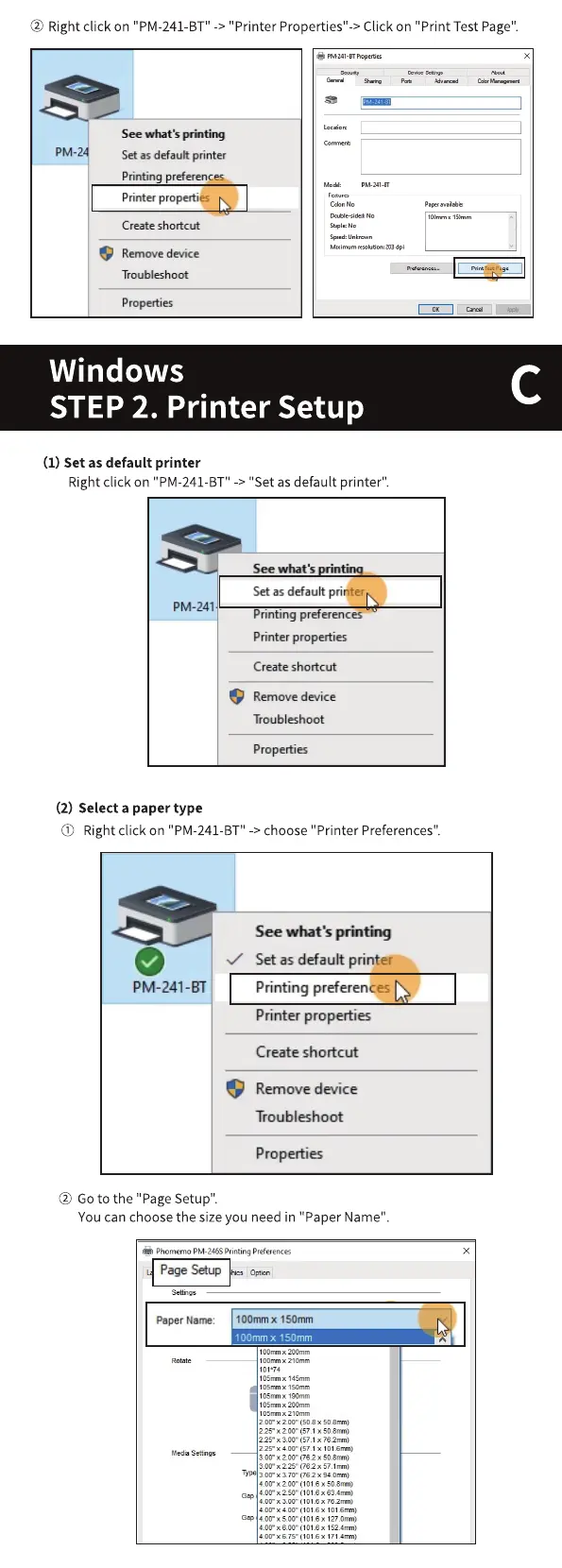
O) Rightclick on "PM-241-BT"-> choose"Printer Preferences".
"PM-241-BT"
-> "Printer Properties"-> Click on "Print Test Page".
See what's
Setas default printer
Printing preferences
Printer properties
Create shortcut
Remove device
Troubleshoot
Properties
Windows
STEP 2. Printer Setup
(1) Set as default printer
Right click on "PM-241-BT" -> "Set as default printer".
See what •s
Set as default printer
PM-241
Printing preferences
Printer properties
Create shortcut
Remove device
Troubleshoot
Properties
(2) Select a paper type
See what's printing
Set as default printer
PM-241-31
Printing preferences
Printer properties
Create shortcut
Remove device
Troubleshoot
Properties
@ Goto the "PageSetup".
You can choose the size you need in "Paper Name"
Phomemo PM- Printing
age
x
Page Setup
Paper Narne:
100mm x ISOmm
100mmx ISOmm
200mm
10-or„-nx 2100m
1 1Somm
1 x 190mm
105m 200m
x 21 Omm
200•x200- sozmrn)
22s•x x
22s•x 310-
22. x 400' x
3.00•x22S- (762 x snir,m)
(762 x
aoo•xzocr (1018 x scam)
3,CO•
'Cl.6m•m
Gap
171_4rrrn)



 To Next Page