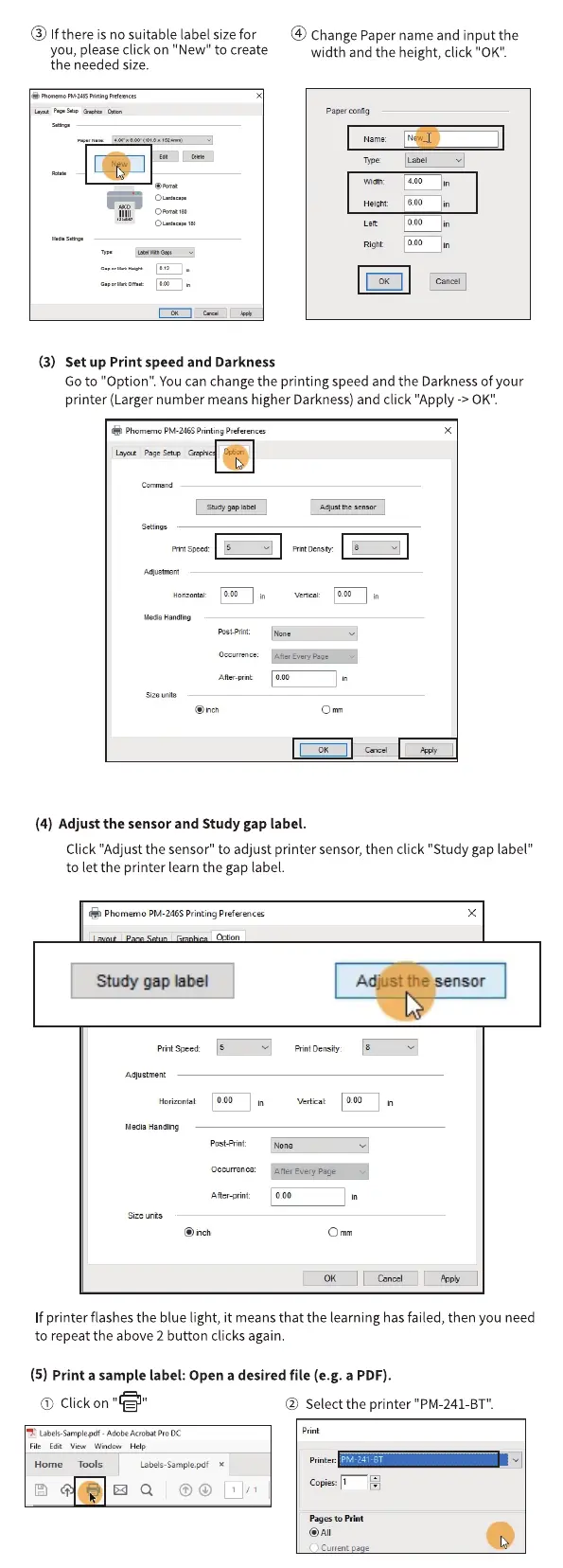
@ If there is no suitable label sizefor
you, please click on "New" to create
the needed size.
(3) Set up Print speed and Darkness
@ ChangePapernameandinputthe
width and the height, click "0K".
Paper
Name
Type:
000
0•00
Go to "Option". You can change the printing speed and the Darkness of your
printer (Larger number means higher Darkness) and click "Apply -> 0K".
Is
Aner-prit
@ich
8
(4) Adjust the sensor and Study gap label.
Click "Adjust the sensor" to adjust printer sensor, then click "Study gap label"
to let the printer learn the gap label.
Phomemo PM-246SPrinting Preferences
Study gap label
speed:
Horizontal:
Medb Handling
0.00
vertical:
AdJust the sensor
coo
Post-pmt
A ner-print:
@inch
0.00
If printer flashesthe blue light, it meansthat the learning hasfailed, then you need
to repeat the above 2 button clicks again.
(5) Print a sample label: Open a desired file (e.g. a PDF).
O Click on
- Adobe Pro DC
Edi
Horne Tools
Labels-Samc*egxlt
@ Select the printer "PM-241-BT".
P"es to
@All
Currentpage



 To Next Page