6 7
1. Quick guide
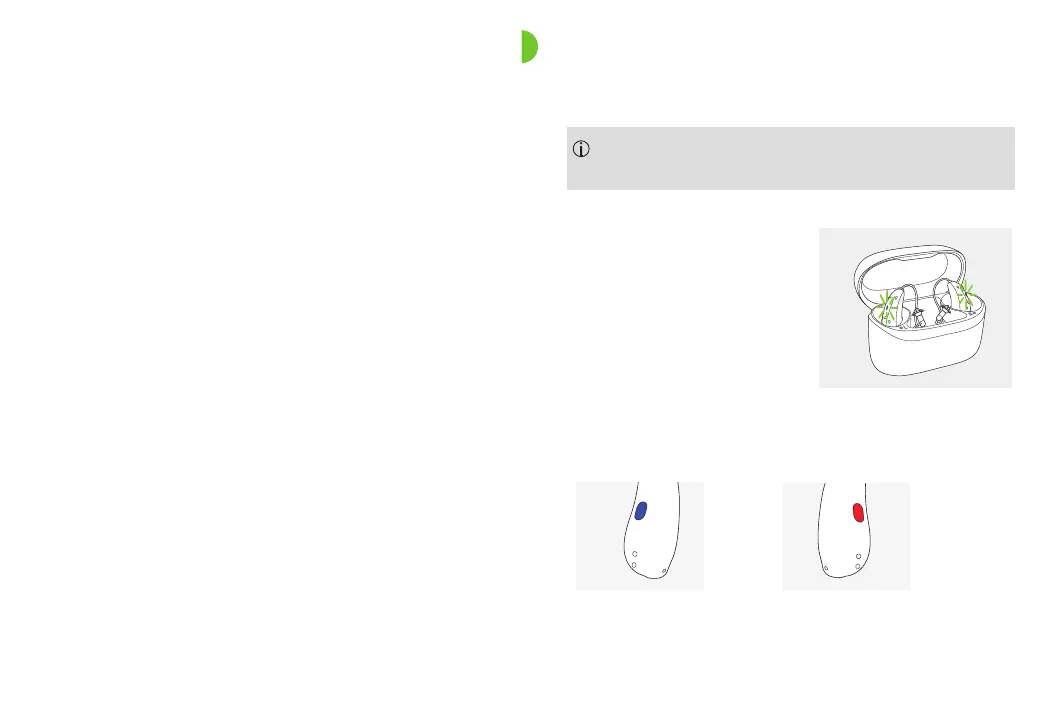
Charging your CROS device
After placing your CROS device
in the charger, the indicator
light will show the charging
state of the battery until the
CROS device is fully charged.
When fully charged, the
indicator light will be
constantly on, i.e. solid green.
Further information
Before using your hearing aid for the rst time, it is
recommended to charge it for 3 hours.
16. Environmental conditions 34
17. Care and maintenance 36
18. Exchanging the earpiece 39
19. Service and warranty 41
20. Compliance information 43
21. Information and description of symbols 48
22. Troubleshooting 54
23. Important safety information 58
Left & right CROS device markings
Red marking for
right hearing aid.
Blue marking for
left hearing aid.






 To Next Page