EasyManua.ls Logo

Phonak ComPilot Air II - User Manual

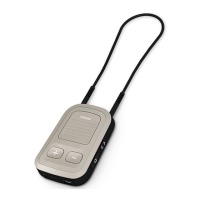
Phonak ComPilot Air II
68 pages
Print Icon
To Next Page IconTo Next Page
Loading...
User Guide
Phonak ComPilot Air II

Other manuals for Phonak ComPilot Air II

Questions and Answers

  • G
    gingramSep 23, 2025
    How to stop hearing key-press tones in my Phonak Hearing Aids?
    • R
      Robert KellerSep 23, 2025
      If you hear your phone’s key-press tones in your hearing aids, deactivate key-press and confirmation tones on your phone. Please refer to your phone’s user guide.
  • L
    lopezjacobAug 23, 2025
    Why is my Phonak ComPilot Air II Hearing Aid not connecting to Bluetooth?
    • P
      popeshirleyAug 23, 2025
      If your Phonak Hearing Aid ComPilot Air II isn't recognized by devices it was previously paired with, it might be due to key-press tones being enabled on your phone. Deactivate these tones. If that doesn't work: * Switch ComPilot Air II off and then on again. * Ensure the devices are within 1 meter of each other and try again.
  • B
    Brittany WellsAug 25, 2025
    What code do I enter when pairing my Phonak Hearing Aid via Bluetooth?
    • S
      Steve HarrisAug 26, 2025
      When your device prompts for a code during the initial Bluetooth pairing with your ComPilot Air II, enter "0000" (four zeros).
  • C
    cbartonAug 26, 2025
    How to adjust the volume on my Phonak ComPilot Air II Hearing Aid during calls or music?
    • B
      brycelewisAug 27, 2025
      If the volume of music or phone conversations is too loud or quiet, adjust the volume using the volume control on the external device (phone, music player, etc.) since different audio sources have varying outputs.
  • B
    Brian SolisAug 27, 2025
    What to do if my Phonak ComPilot Air II Hearing Aid doesn't ring when my phone rings?
    • D
      David DavisAug 27, 2025
      If your phone is ringing, but the indicator light on your ComPilot Air II isn't solid blue and you don't hear a ringing signal in your hearing aids, it could be due to several reasons: 1. Ensure Bluetooth is enabled on your phone. 2. Your ComPilot Air II and phone may not be connected. Try disabling and re-enabling Bluetooth on your phone, restart the ComPilot Air II, and activate the ComPilot Air II in your phone's 'Active device' menu. Also, reduce the distance between your phone and ComPilot Air II. 3. The ComPilot Air II may not be paired with your phone. Follow the pairing process. 4. The distance between the ComPilot Air II and your phone might be too great. Wear the ComPilot Air II clipped to your clothing and keep it within 10 meters (30 ft) of your phone.
  • J
    Julia FowlerSep 17, 2025
    Why doesn't my Phonak ComPilot Air II Hearing Aid announce the caller's name?
    • J
      Juan DunlapSep 18, 2025
      If your phone rings but the caller's name isn't announced, it could be due to: * The caller identification feature not being available or enabled on your phone. Refer to your phone’s user guide. * Two phones being connected to your ComPilot Air II. Caller identification is only available on the phone that was last paired. * Caller identification may be switched off. Ask your hearing care professional to enable it on your ComPilot Air II.
  • M
    Mindy ShawSep 14, 2025
    Why is my Phonak Hearing Aid audio streaming interrupted?
    • L
      lisa97Sep 14, 2025
      If you experience interruptions while audio streaming, it could be because: * The ComPilot Air II is too far from your hearing aids. Wear it clipped to your clothing, within 40 cm (16 inches) of your hearing aids. * The Bluetooth signal is out of range. Keep the Bluetooth device within the operating range.
  • B
    Brenda DuncanSep 15, 2025
    Why can callers hear me but I can't hear them on my Phonak ComPilot Air II?
    • C
      Crystal YoungSep 15, 2025
      If the caller can hear you but you cannot hear them, it might be because: * The call was transferred to your phone. Ensure the call is transferred back to ComPilot Air II via the phone menu. * Some phones don't use ComPilot Air II when accepting the call through the phone. Always accept the call by pressing the main button.
  • J
    Jeffrey OwensSep 6, 2025
    Why does my Phonak Hearing Aid have intermittent audio via ComPilot Air II?
    • M
      Michael PrinceSep 6, 2025
      Intermittent audio during transfer via ComPilot Air II can occur due to several reasons: * The Bluetooth device may be too far away or shielded by your body. Ensure the Bluetooth device is within 5–10 m (15–30 ft.) and positioned in front of you. * The ComPilot Air II searches for known devices for the first 2 minutes after being switched on. After this search period, the intermittency should stop. * If your phone is connected to other devices like a PC, it may not be able to stream music continuously. Disconnect your phone from other devices when using it as a music player.
  • M
    Michael TylerSep 3, 2025
    Why does my Phonak Hearing Aid streaming keep cutting out?
    • C
      Christopher PhillipsSep 3, 2025
      If you experience interruptions during audio streaming with your Phonak Hearing Aid, ensure the Bluetooth device is within the operating range.

Summary

Getting Started with ComPilot Air II

Charging the ComPilot Air II Battery

Procedure for charging the ComPilot Air II battery, including indicator light status.

Phone Calls with ComPilot Air II

How ComPilot Air II Works for Calls

Explanation of how the ComPilot Air II facilitates phone calls between the phone and hearing aids.

Initial Bluetooth Pairing to a Phone

Step-by-step guide for pairing the ComPilot Air II with a Bluetooth-enabled phone.

Connecting to Your Paired Phone

Instructions on how to establish a connection after initial pairing.

Making a Phone Call

Procedure for initiating a phone call using the ComPilot Air II.

Accepting or Rejecting a Call

How to answer or reject an incoming phone call via the ComPilot Air II.

Streaming Audio with ComPilot Air II

Streaming Audio via Bluetooth

How to stream audio wirelessly from cell phones and other Bluetooth devices.

Streaming Audio from TV

Instructions for streaming audio from a television, recommending the TVLink II accessory.

ComPilot Air II as a Remote Control

Detailed Information on ComPilot Air II

Understanding Indicator Light Signals

Explanation of the various states and meanings of the indicator lights on the ComPilot Air II.

Troubleshooting Common Issues

Service and Warranty Information

Important Safety Information

Phonak ComPilot Air II Specifications

General IconGeneral
CategoryHearing Aid Accessory
Bluetooth ConnectivityYes
Water ResistanceIP54
TypeStreamer
CompatibilityPhonak hearing aids
Charging Time2 hours

Related product manuals