While the manual that accompanies this insert sheet
features a good amount of information on the
operation and functionality of your new Powerpod
mixer, there is at least one feature not mentioned: your
Powerpod mixer also offers a USB recording and
playback function that is not detailed in the user’s
manual.
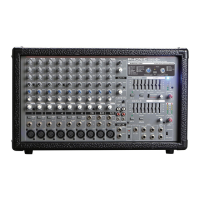
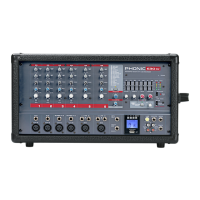
On the face of the mixer, users will find a USB port
accompanied by a 3-digit LCD and four function
buttons. When using the record function, files are
saved on the USB flash drive as uncompressed wave
files. The maximum bitrate possible for playback of
files is 320 kbit/seconds, and users are able to play
both WAV and MP3 files. See detailed instructions
below.
Play
1. When you first turn the Powerpod on, the USB
recorder’s display will show the word ‘ON’
2. Insert an appropriately formatted (FAT32) USB flash
disc.
3. The USB recorder will indicate the file type about to
be played (MP3 or WAV) and automatically find the
first available track. The screen will then indicate “II
001”. Tracks are ordered alphanumerically, with
MP3 files playing first, followed by WAV files.
4. Press the Play/Pause button to play the current
track, or the Back and Next buttons to skip forward
and backward s between tracks.
5. If you are currently playing the final MP3 file on the
USB disc, pushing the >>| button will skip to the first
WAV track. Similarly, if the final WAV track is
playing, pushing >>| will skip back to the first MP3
track.
6. Playback on the USB recorder is set to continuously
playback audio files, therefore pushing play will play
all files in sequence. Once all files have played, they
will then be repeated.
7. When in play or pause mode, pushing and holding
the Play/Pause button for 2 seconds will revert to
the very first track on the USB flash drive.
Mientras que el manual que acompaña esta hoja, figura
una gran variedad de información sobre la operación y
funcionalidad de su nueva mezcladora Potenciada, hay
por lo menos una característica que no ha sido
mencionada: Su mezcladora Powerpod también ofrece
función de grabado y reproducción USB que no ha sido
detallada en su manual de usuario.
En la parte frontal de su mezcladora, los usuarios
pueden encontrar con un puerto de USB que es
acompañado por un LCD de 3 dígitos y cuatro botones
de funciones. Cuando al estar usando la función de
grabado, los archivos están guardados en un USB flash
drive como archivos wav sin compresión. El máximo
bitrate posible para reproducción de archivos es de 320
kbit/segundos, y los usuarios pueden producir ambos
archivos de WAV y MP3. Vea las instrucciones de los
detalles.
Reproducir
1. Cuando usted encienda por primera vez el Powerpod,
la grabadora USB se mostrará en ¨ON¨.
2. Inserte apropiadamente el USB flash disc formateado
(FAT32).
3. La grabadora USB le indicará el tipo de archive que
usted está reproduciendo (MP3 o WAV) y
automáticamente localiza la primera pista disponible.
La pantalla le indicará “II 001”. Las pistas están orden
alfanumérica con los archivos MP3 para reproducir
primero, permitiendo que los archivos WAV.
4. Pulse Play/Pause para reproducir la pista actual o los
botones de Back y Next para mover hacia delante o
detrás entre las pistas.
5. Si usted está actualmente reproduciendo el archivo
MP3 en el disco USB, puse el botón >>| para
esquivar hasta la primera pista WAV, pulse >>| y
regresará a la primer pista WAV. Igualmente, si la
pista final WAV está reproduciendo, pulse >>| y
regresará a la primera pista MP3.
6. Reproducción en la grabadora USB es envida
continuamente para reproducción de archivos audio,
por lo tanto, al presionar play todo los archivos se
reproducirán en secuencia. Una vez que todos los
archivos hayan sido reproducidos, estos mismos se
repetirán.
7. Cuando está en el modo play o pause, presione y
mantenga dicho botón Play/Pause por 2 segundos y
regresará a la primera pista en su USB flash drive.
说 明 书 随 附 的 本 插 页 将 针 对 您 新 买
Powerpod功放调音台,叙述至少一个未能
在说明书中提及的性能的操作和功能。您购
买的功放调音台其实设有USB录音和重放
功能,这一点在说明书中并未提及。
在调音台的面板上,您可看到一个USB
接
口以及
3位LCD显示屏和4个功能按键。使
用录音功能时,文件将以无压缩波形声音文
件存储至USB闪存。重放文件的最大比特
率可达到320kbps,可重放WAV
和MP3文
件。具体操作如下:
播放播放
1. 首次打开Powerpod时,USB录音机的显
示屏将显示“ON”字样。
2. 插入格式化(FAT32)USB闪存。
3. USB录音机将显示等待播放的文件的类型
(MP3
或WAV)并自动找到可用的第一个
曲目。屏幕将显示“II 001”。所有的曲
目按字母顺序排列,先播放MP3文件,
然后才是WAV文件。
4. 按下播放/暂停按钮播放当前曲目,或按
上一曲和下一曲按钮在曲目间快速地向
前和向后选择曲目。
5. 如果当前播放的是USB闪存里最后一个
MP3文件,按下>>|按钮可跳至第一曲
WAV曲目。同样,如果播放的是最后一
个WAV文件,按下>>|可跳至第一曲MP3
曲目。
6. USB录音机的重放功能设置为连续重放
音频文件,所以按下播放按钮即可按顺
序播放所有的音频文件。所有文件播放
完后,又会从头重复。
7. 播放或暂停模式下,按下并保持播放/暂
停按钮
2秒将会回复至USB闪存中的第一
首曲目。



 To Next Page