page 8
POWERPOD User's Manual PHONIC CORPORATION
Rear Panel
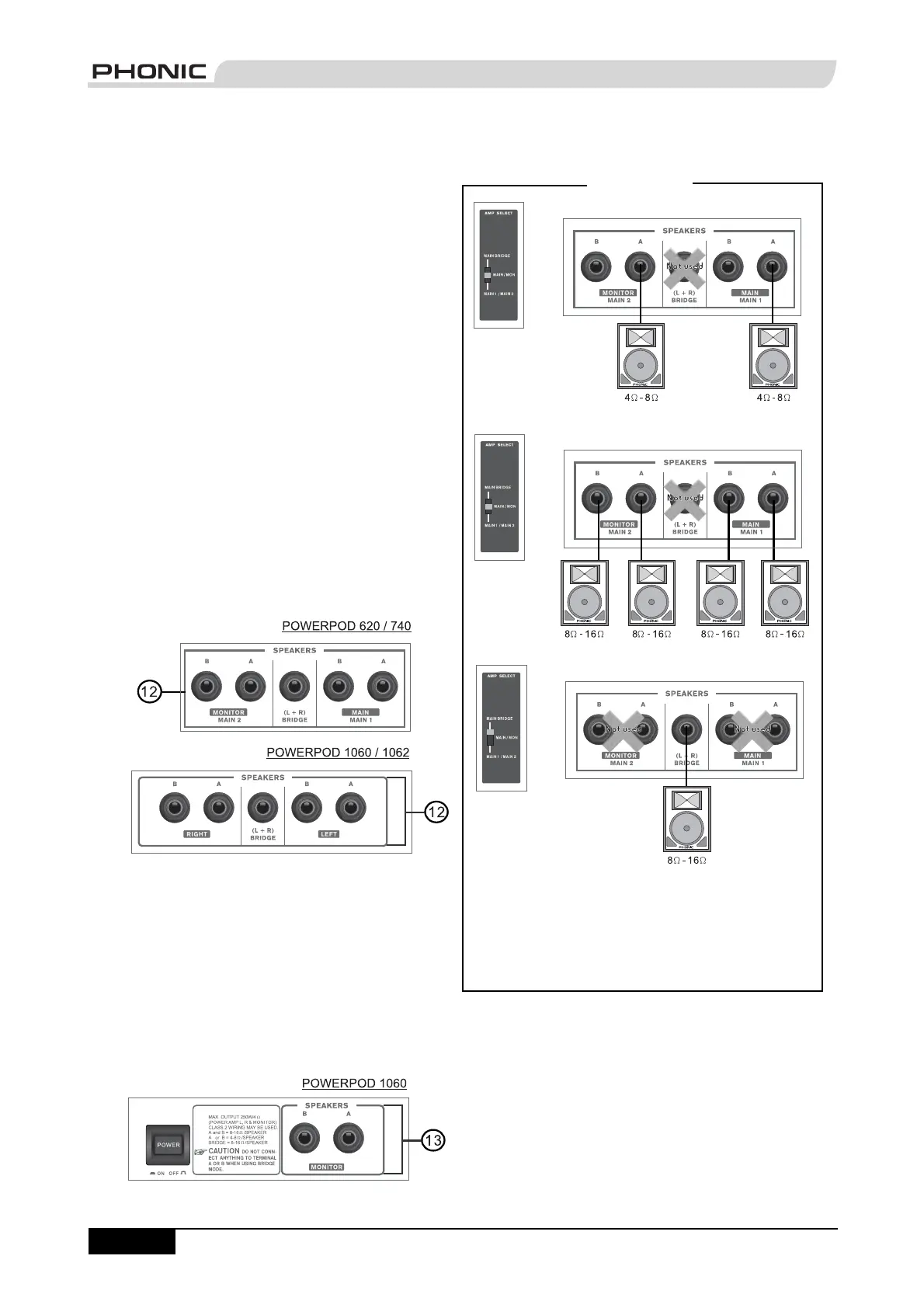
12. Speaker Outputs
These jacks are used to connect to speakers, fed from
the internal power amp. On all models, they consist of
1/4" Phone Jacks. The Amp Select switch determines
the operation of these jacks. If the Amp Select switch
is set to "Main L-R (Stereo)" or "Main / Moni" - or "Main
1 / Main 2" on the Powerpods 620 and 740 Deluxe - a
single speaker with a 4 to 8 ohm load can be connected
to jack A on both the left and right - or Main 1 and Main 2
- Speaker Outputs, or two speakers with a load between
8 and 16 ohms can be connected to both jacks A and B
of the left and right (Main 1 / 2) Speaker Outputs. When
using Bridge Mono mode, use the Speaker Output
labeled "(L+R) Bridge" only to connect a Speaker with a
loading between 8 and 16 ohms. Refer to the Speaker
set up chart to the right for a more detailed indication of
how to connect speakers.
NB. Due to the fact that the signal has been processed by the power
amp, these ports should be used in conjunction with passive
speakers only to avoid damaging any other equipment.
13. Monitor Speaker Outputs
(Powerpod 1060 Deluxe only)
These 1/4" Phone Jacks are used to connect to
speakers for monitoring purposes, fed from the internal
power amp. These Monitor Speaker Jacks are featured
on the Powerpod 1060 Deluxe only.
NB. Due to the fact that the signal has been processed by the power
amp, these ports should be used in conjunction with passive
speakers only to avoid damaging any other equipment.
Speaker Set Up
Using speakers with an incorrect loading can not only
cause distortion, but also irreversible damage to the
powered mixer. Please ensure the loadings of your
speakers are consistent with those shown above.


 To Next Page