13
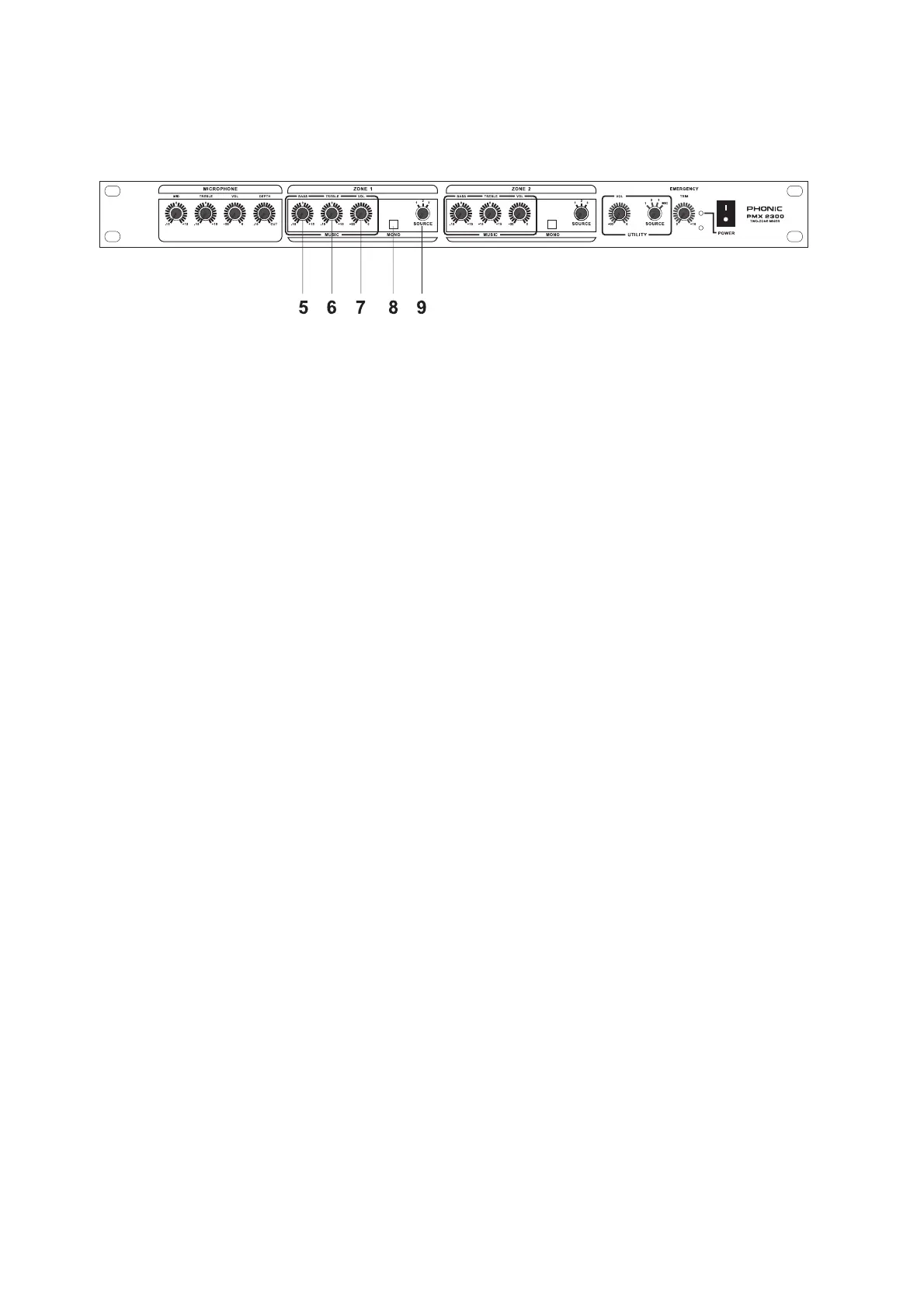
ZONE 1/ ZONE 2
55
55
5
. BASS(Low frequency)
Turn clockwise to boost low (bass) frequency at 100Hz by up to 15dB, adding warmth and bass depth to music.
Turn counter-clockwise to cut low frequency by up to 15dB for reducing hum, stage rumble or to improve a
mushy sound. Set the knob in the centre-detented position when not required.
66
66
6
. TREBLE(High frequency)
Turn the knob clockwise to boost high (treble) frequency at 10KHz by up to 15dB for adding sweetness to the
music. Turn the knob counter-clockwise to cut by up to 15dB Set the knob in the centre-detented position when
not required.
77
77
7
. VOL
This knob sets how much of the gain of input music source is sent to the ZONE 1(or ZONE 2) output from -
20dB to +10dB. Turn clockwise to boost the microphone volume.
88
88
8
. MONO
When the MONO switch is pressed, the switch sums the L & R outputs to mono.
99
99
9
. SOURCE
This switch allows you to select one of three music sources to be sent to ZONE 1(or ZONE 2) output.



 To Next Page