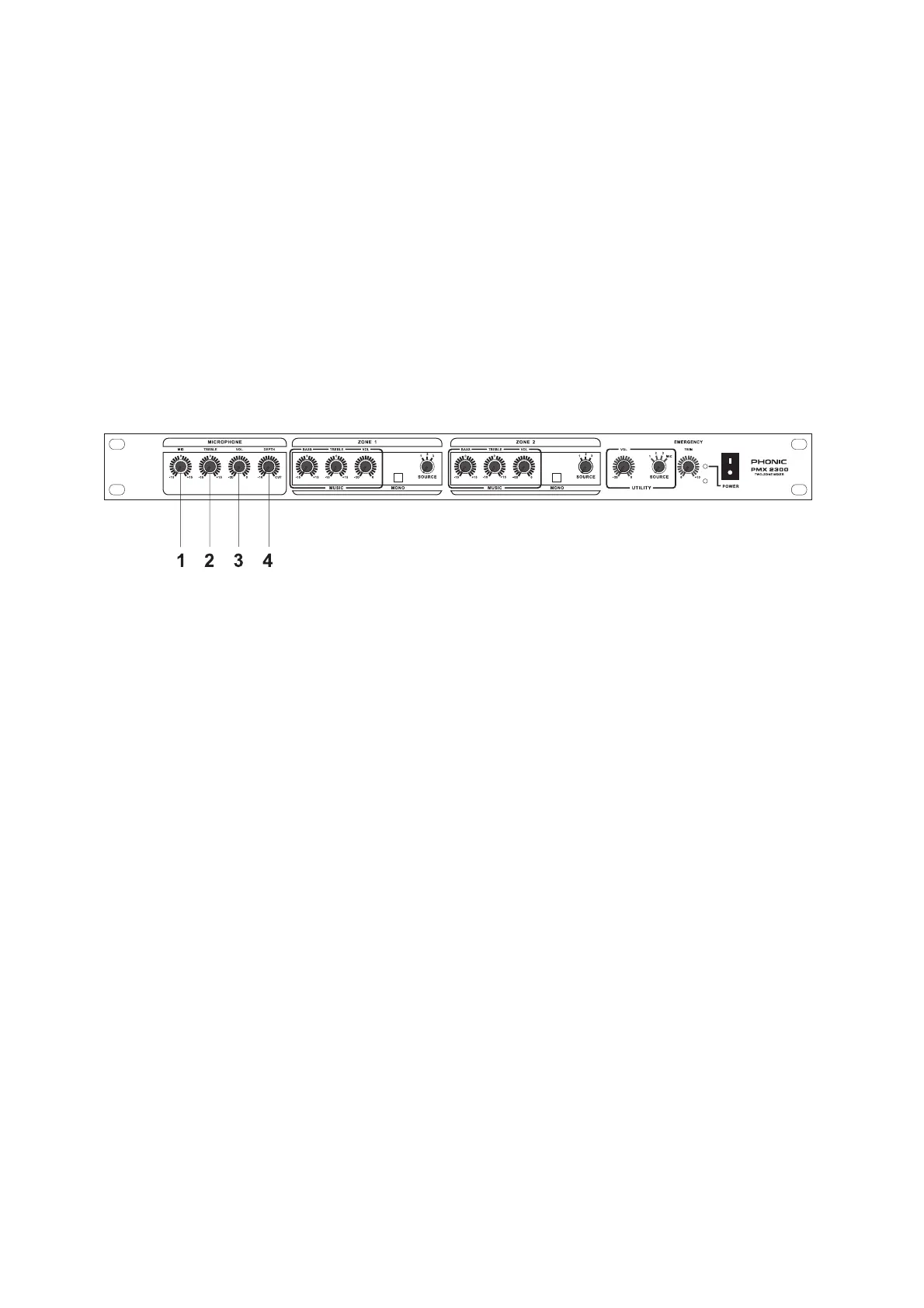
12
3. CONTROLS
3.1 FRONT PANEL
MICROPHONE EQUALIZER
The equalizer (EQ) allows fine manipulation of the treble and middle frequency bands, and is particularly
useful to improve the microphone sound.
11
11
1
. MID
Turn the knob clockwise to boost 800Hz, adding fullness or adequate solidness at middle frequency. Turn the
knob counter-clockwise to cut the 800Hz, reducing the excessively hard or “telephone-like” sound, the MID
provides a 15dB boost or cut. Set the knob in the centre-detented position when not required.
22
22
2
. TREBLE(High frequency)
Turn clockwise to boost high (treble) frequency at 8KHz, adding crispness to vocals. Turn counter-clockwise
cuts 8KHz, reducing hiss or excessive sibilance, the control is providing a 15dB boost or cut. Set the knob in
the centre position when not required.
33
33
3
. VOL
This knob controls the level of balanced input microphone feeding to the selected output from +10dB to +60dB.
Turn clockwise to boost the microphone volume.
44
44
4
. DEPTH
Turn the knob clockwise to cut the zone music source and change the paging depth to let the microphone
output louder than music source.



 To Next Page