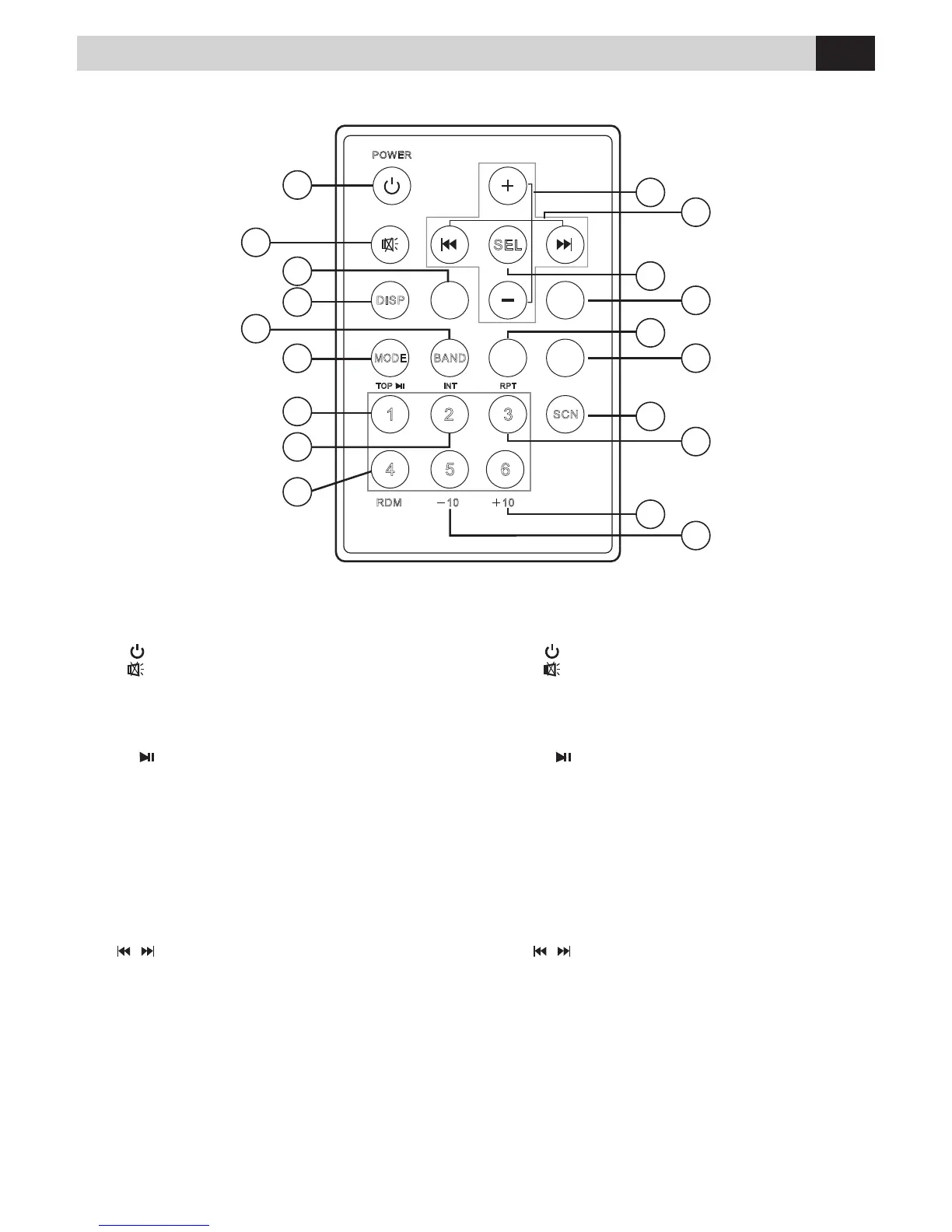
Funzioni Telecomando • Remote Functions
1.
Accensione/Spegnimento
2.
MUTE Volume azzerato
3.
AMS
Memorizzazione automatica stazioni radio
4. DISP Informazioni su display
5.
BAND
Banda di Frequenza radio
6.
MODE
Seleziona le sorgenti
7.
TOP
Pausa / Play / Memoria radio 1
8.
INT
Ascolto introduzione brani / 2
a
memoria
9.
RDM
Riproduzione casuale brani / 4
a
memoria
10.
-10
Retrocede di 10 brani da USB-SD / 5
a
memoria
11.
+10
Avanza di 10 brani da USB-SD / 6
a
memoria
12.
RPT
Ripetizione/ 3
a
memoria
13.
SCAN
Scansione stazioni radio
14.
TA
Informazioni sul traco
15.
PTY
Programmi musicali
16.
af
Ricerca frequenze alternative
17.
SEL
Selezione menù impostazioni
18.
/ Sintonizzazione / Seleziona Brani
Avanti-Indietro Veloce
19.
+/-
Controllo Volume
1.
Power
2.
Mute
3.
AMS
Automatic memory storing
4.
DISP
Display
5.
BAND
Band Switch
6.
MODE
Mode Switch
7.
TOP
Pause / play / Preset 1
8.
INT
Intro / Preset 2
9.
RDM
Random / Preset 4
10.
-10
Preset 5
11.
+10
Preset 6
12.
RPT
Repeat Playing / Preset 3
13.
SCAN
Scan
14.
ta
Trac information
15.
pty
Musical programs
16.
af
Search alternative frequencies
17.
SEL
Select
18.
/ Tuning / Selecting Tracks F.F/F.R
19.
+/-
Volume Control
SEL
AMS
TA
AF
PTY
Premere il tasto MODE (6) sul telecomando per scorrere la
lista delle sorgenti disponibili
(RADIO – USB – SDCARD – BLUETOOTH – AUXIN)
Press the MODE key (6) on the remote control to scroll
through the list of available sources
(RADIO - USB - SDCARD - BLUETOOTH - AUXIN).
IT EN
Il telecomando VM304 non è incluso nella dotazione.
The Remote-Control VM304 is NOT included in the package.



 To Next Page