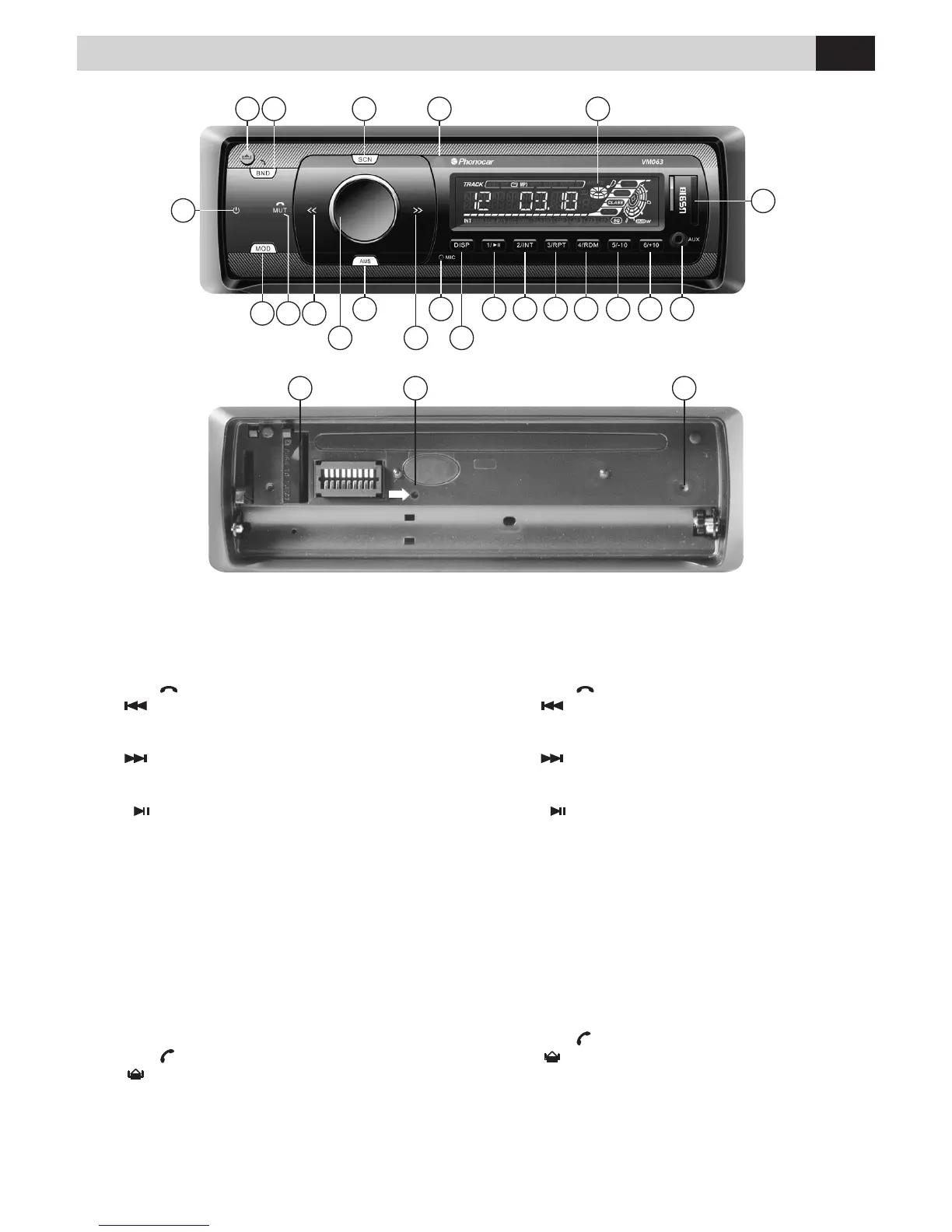
Funzioni • Functions
1.
PWR
Accensione / Spegnimento
2.
MODE Seleziona le sorgenti
3.
MUTE Volume azzerato / Abbassata cornetta
4. Sintonizzazione / Brano precedente
5. Volume / Selezione menù impostazioni
6.
AMS
Memorizzazione Automatica stazioni radio
7.
Sintonizzazione / Brano successivo
8.
Microfono interno
9.
DISP
Informazioni su display
10.
1/
Play/Pausa / 1
a
stazioni radio
11.
2/INT
Introduzione brani / 2
a
memoria stazioni radio
12. 3/RPT Ripetizione / 3
a
memoria stazioni radio
13.
RDM/4
Riproduzione casuale da USB-SD
4
a
memoria stazioni radio
14.
-10/5
Retrocede di 10 brani da USB-SD
5
a
memoria stazioni radio
15.
+10/6
Avanza di 10 brani da USB-SD
6
a
memoria stazioni radio
16. AUX-IN
17. Porta USB
18. Display
19. Sensore IR per il Telecomando
20.
SCAN
Scansione tracce/stazioni radio
21.
BND
Banda di Frequenza radio / Alzata cornetta
22.
Sgancia il frontalino.
23. Slot SD/MMC
24. RESET (premere per alcuni secondi)
25. LED lampeggiante senza frontalino
1.
PWR
Power
2.
MODE Mode switch
3.
MUTE Mute / Handset put down
4. Tune Seek / Track reverse
5. Volume / Setup selection
6.
AMS
Automatic memory storing
7.
Tune Seek / Track forward
8.
Internal microphone
9.
DISP
Info on display
10.
1/
Play/pause / Preset 1
11.
2/INT
Intro / Preset 2
12. 3/RPT Repeat / Preset 3
13.
RDM/4
Random / Preset 4
14.
-10/5
- 10/5 Jumps 10 Tracks backward from USB-SD
Preset 5
15.
+10/6
+10/6 Jumps 10 Tracks forward from USB-SD
Preset 6
16. AUX-IN jack
17. USB port
18. LCD Display
19. Remote Control sensor
20.
SCAN
Scrolling Tracks / Radio-Stations
21.
BND
Band switch / Handset picked up
22.
Release
23. SD/MMC slot
24. Reset
25. Flashing LED
23 24 25
2 4
6
9
19 18202122
8 10 11 12 13 14 15 16
5 7
1
17
3
Premere il tasto MODE (2) sul frontalino per scorrere la lista
delle sorgenti disponibili
(RADIO – USB – SDCARD - BLUETOOTH – AUXIN).
Press the MODE key (2) on the front panel to scroll through
the list of available sources
(RADIO - USB - SDCARD - BLUETOOTH - AUXIN).
IT EN



 To Next Page