20
IT/EN
PROGRAMMAZIONE COMANDI AL VOLANTE SULL’AUTORADIO
PROGRAMMING STEERING-WHEEL COMMANDS ON THE CAR-RADIO
IT/EN
La programmazione è uguale sia per i comandi
RESISTIVI, con o senza inerfaccia, che con i comandi
CAN-BUS.
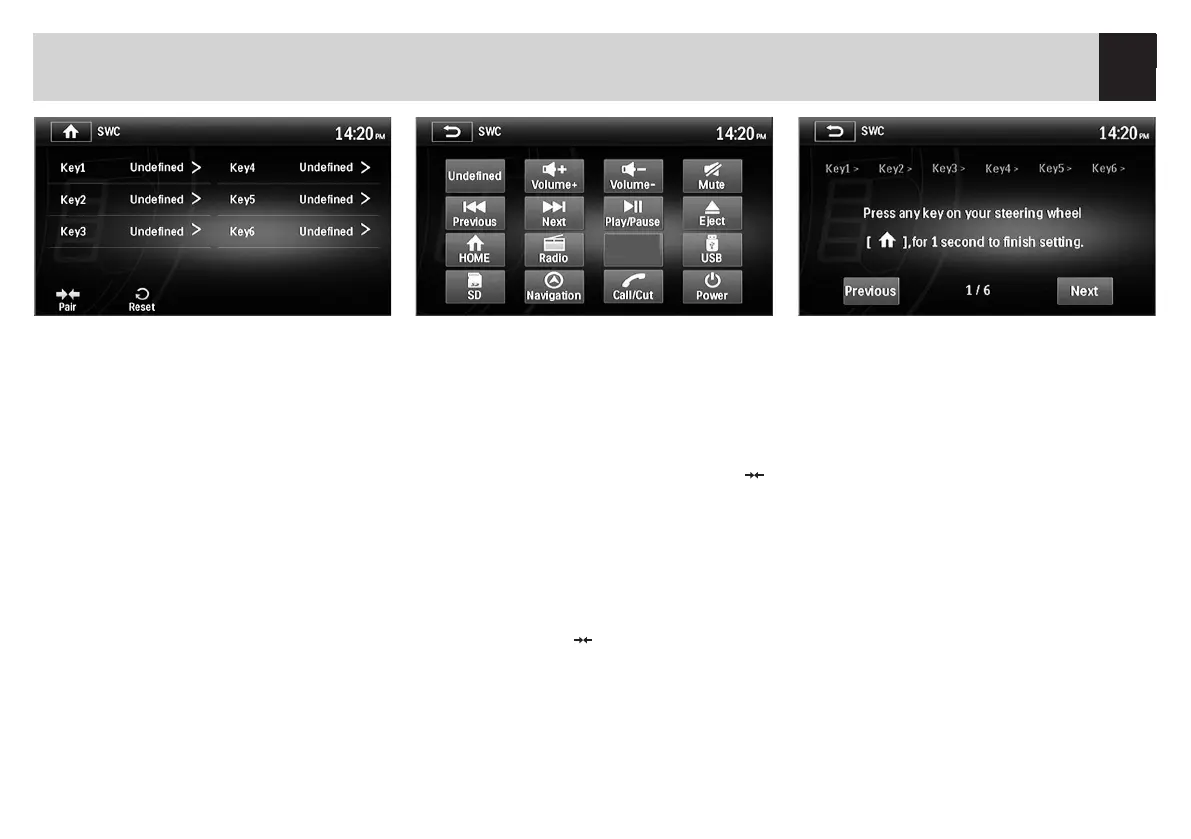
Premere l’icona SWC nel menù principale, dove ver
-
ranno visualizzati 6 tasti KEY a cui dovranno essere
abbinate le sei funzioni che si vogliono gestire dai
comandi al volante della vettura.
Programming-procedure is always the same, no matter
if RESISTIVE commands (with or without Interface) or
CAN-BUS.
Press SWC-icon from the Main Menu. 6 KEYS will now
appear to be combined with the 6 functions you wish to
pilot from the steering-wheel of your car.
Premere ognuno dei tasti KEY ed abbinare la funzio
-
ne desiderata.
Ad esempio premere KEY1 e successivamente
Volume+.
Sullo schermo verrà visualizzato il tasto KEY con a
anco la funzione scelta.
Eettuare questa operazione per tutti i com
andi presenti sul volante e inne premere l’icona
PAIR.
Press each of those KEYS and attribute the various KEYS to
the requested functions.
Exemple: press KEY1 and then Volume+.
The screen will show: KEY, with related type of function.
Repeat this procure for every single steering-wheel com-
mand and, to finish, press PAIR.-icon.
Sullo schermo verrà richiesto di premere il comando
sul volante corrispondente alla funzione del tasto
KEY1 precedentemente abbinato (KEY1 VOLUME+).
Premere il comando richiesto (VOLUME+) sul volan
-
te. Sullo schermo verrà richiesto di premere il tasto
KEY2 e così via per tutti gli altri tasti da program
-
mare. Al termine di tutti i comandi il VM069 tornerà
nella schermata iniziale. In caso di errore premere
l’icona RESET per azzerrare l’apprendimento dei
comandi e ripartire con la programmazione.
On the screen, you will be invited to press the key, on the
steering-wheel, combined with KEY1 (KEY1 VOLUME+).
Consequently, press VOLUME+ on the steering-wheel.
On the screen, you will be invited to press KEY2 and all
further keys to be programmed. When all commands
have been programmed, the VM069 will return to the
entry-page. In case of mistakes, press RESET-icon: this will
cancel the memorized data and you can start program
-
ming from the beginning.



 To Next Page