8
5. Press the button to exit the adjustment screen.
Please note:
1. Overheating and damage can result from excessive use of the Multi Strobo-
scopic Mode. Do not use more than 20 times in succession.
2. When overheated the ash will automatically increase charging time until
the ash temperature has decreased.
Stroboscopic Mode and Shutter Speeds
To determine the proper camera shutter speed to be used with various Strobo-
scopic Mode variables, use the following formula:
Number of ashes / Frequency = Shutter Speed
Example: 5x (number of ashes) / 10 Hz (Frequency) = .5 second shutter speed.
This is a rough guideline: You may need to increase or decrease the shutter
speed to get the desired result.
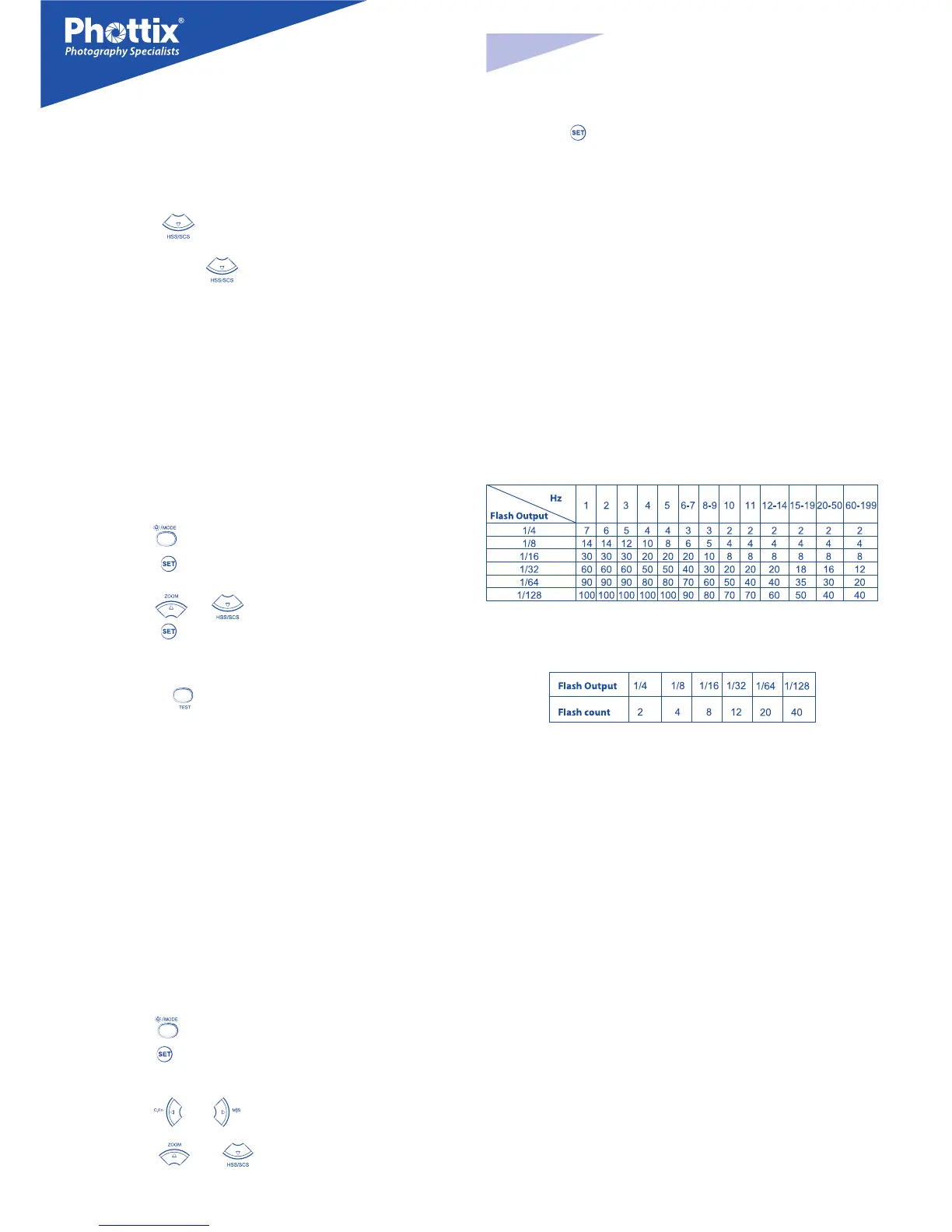
Multi Stroboscopic Mode Output Chart
If the number of ashes is displayed as “N---”, the maximum number of ashes
will be as shown by the table below regardless of the ring frequency.
Second Curtain Sync – SCS
The Phottix Mitros Second Curtain Sync function makes the ash re at the end
of an exposure, not the beginning. This can be useful with slow shutter speeds
for capturing special eect.
To use:
1. Press the button twice. This will cycle from FCS to HSS and then
the SCS mode.
2. To cancel: Press the button once. This will return to standard FCS
mode.
Please note:
SCS functions will not work in Wireless or Multi modes.
Manual (M) Mode
In Manual Mode the ash will re at the power level you set. The Phottix Mitros
TTL Flash can be adjusted from 1/1 (full power) to 1/128 – 8 stops of adjustments
in 1/3rd stop increments. Aperture, shutter speed and ISO on the camera needs
to be manually adjusted. For best results use M-Manual mode on the camera.
To use:
1. Press the button until M is displayed on the ash LCD.
2. Press the button to enter the power adjustment screen. The power
level will ash and be highlighted.
3. Press the or buttons to adjust the ash power.
4. Press the button to exit the power adjustment screen.
5. When the ash ready light is illuminated red the ash is fully charged and
ready to re.
6. Pressing the button will re the ash at the manual power level you
set. This is useful when taking meter readings.
Please note:
- Half pressing the shutter button will display the eective manual ash pow-
er range on the Flash LCD.
Multi: Stroboscopic Mode
With Multi Stroboscopic mode a series of rapid ashes will be red. The ash
count, frequency and power of these ashes can be programmed on the Phottix
Mitros. Multi mode is useful for capturing multiple images of a moving subject
in the same photo and other special eects.
The frequency of the eect (in Hz. - number of ashes per second), the total
number of ashes and output levels can be set.
To use:
1. Press the button until Multi is displayed on the ash LCD.
2. Press the button to adjust Multi settings. Displayed (from left to right
on the LCD) Power, Frequency (HZ) and Flash Count. Power is highlighted and
ashing upon entering the adjustment screen.
3. Press the and buttons to change between Power, Frequency
(HZ) and Flash count.
4. Press the and buttons while the setting is highlighted to
adjust Power, Frequency (HZ) and Flash count to the desired levels.
En
INSTRUCTION MANUAL


 To Next Page
 Loading...