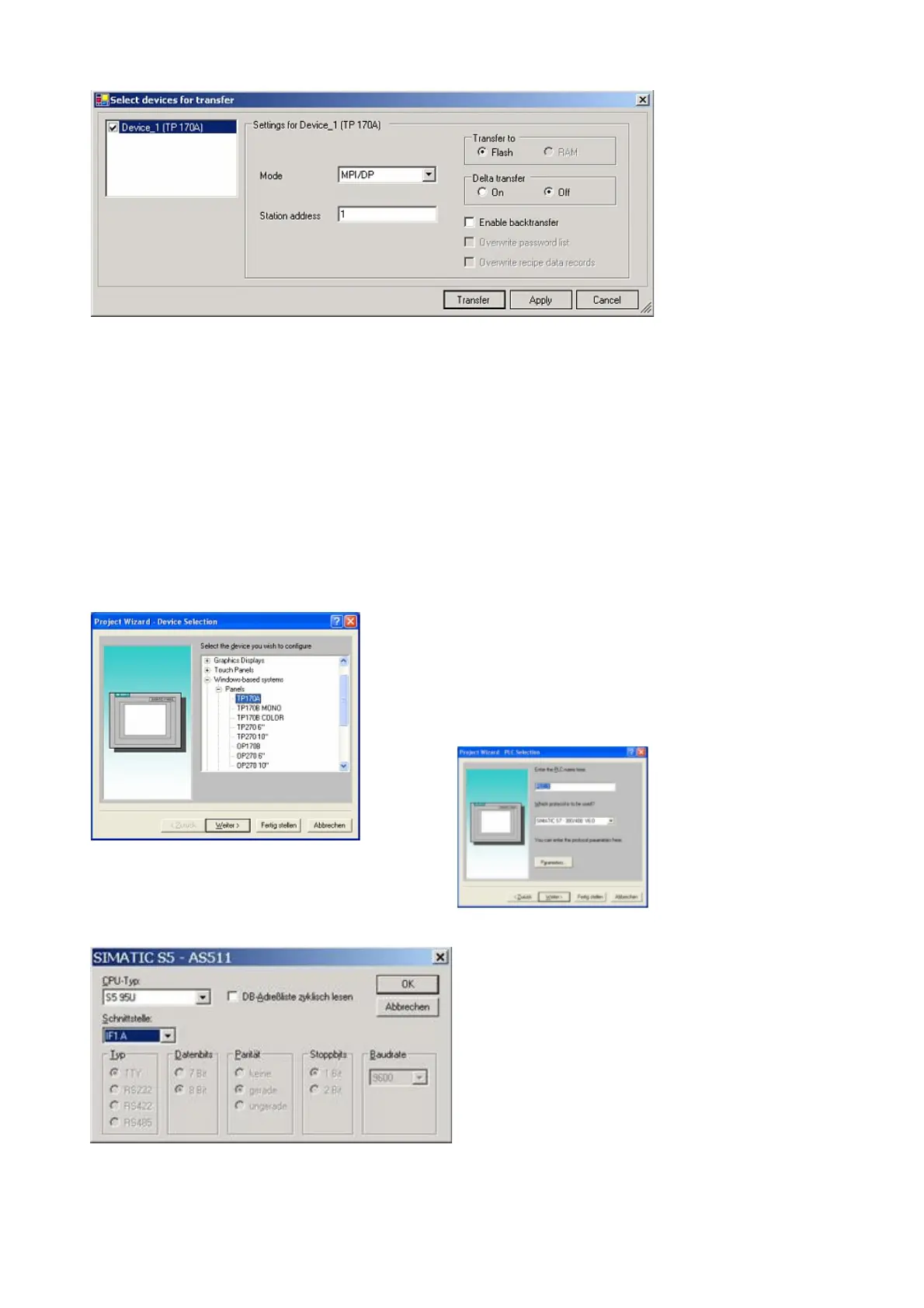
9. Press the button „Transfer“ to start communication with the terminal. Your project is about to be
transferred.
The communication with the operator terminal is so successfully established .
5.1.5 ProTool/Pro v6.0 SP2
1. Start ProTool/Pro by using the desktop link or program entry in the start menu.
2. Choose from the menu „File“ the sub menu „New“ or click on the right symbol.
3. The next dialog askes you which operator panel
you are using.
Mark the used panel (e.g. „TP 170A“)
4. „Next“ leads you to a new dialog. Type in the
specfic fields the name of the PLC device and
choose the used PLC in the driver selection
(e.g. „SIMATIC S5 – AS511 V6.0“)
5. Via „Parameter...“ you are calling an
configuration dialog from the chosen PLC driver
Select the used "CPU type" and the "interface" to
which the terminal is connected (eg "IF1 A").
Furthermore you configure the parameters of the
interface ("type", "bits", "Parity", "Stop Bits",
"baud rate").
Handbook PG-USB Page 14 of 21



 To Next Page