50 51
SECTION 6
Menu Screens
6.1 Main Menu
Main Menu
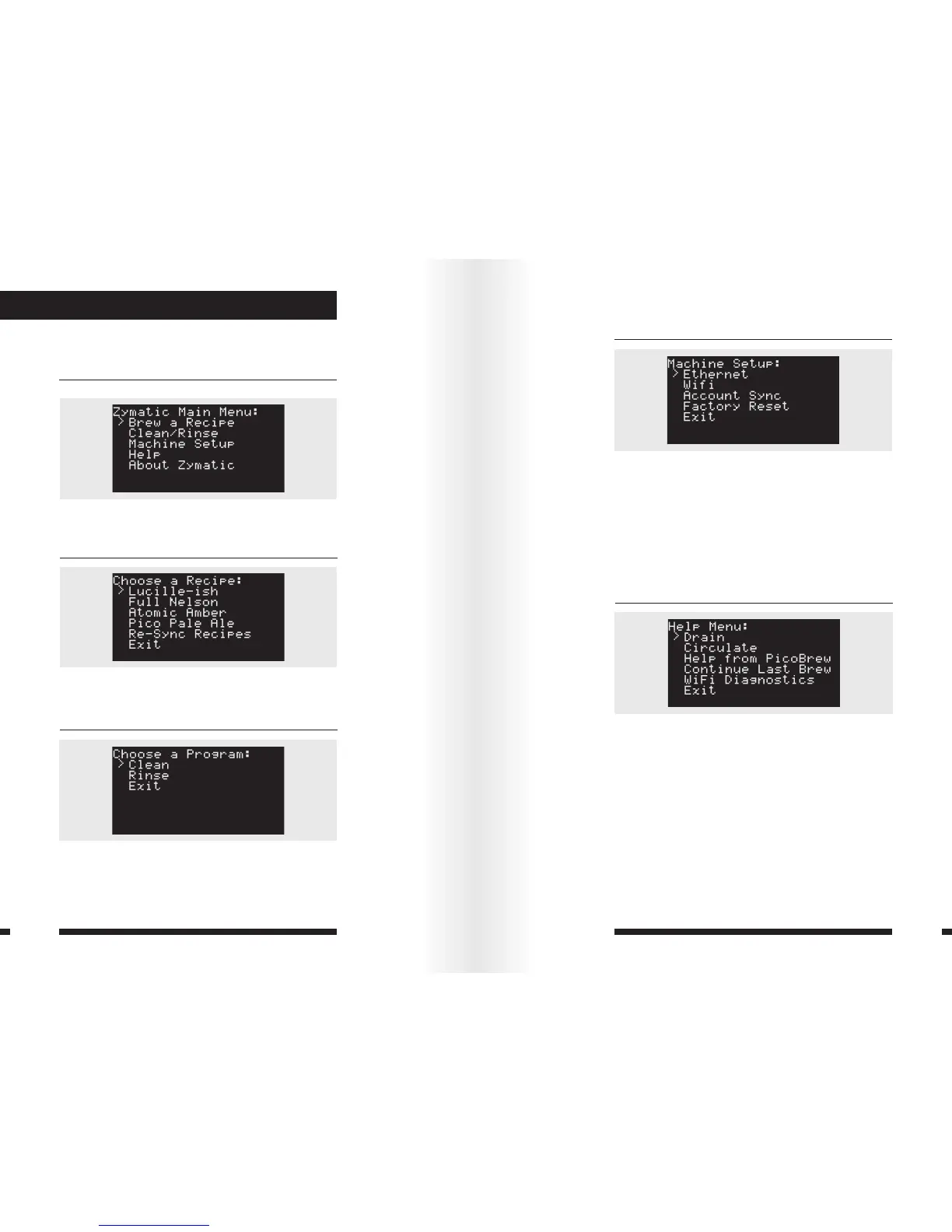
The Zymatic Main Menu appears when you click the control
knob after the machine starts up.
Brew a Recipe
Select to see the list of recipes synced to your Zymatic, then
select one to brew.
Clean/Rinse
Clean: Use this program for a deep clean every 3-4 brews
with a Zymatic cleaning tablet.
Rinse: Use this program after initial set-up and after every
brew to keep your Zymatic clean.
Machine Set-Up
Ethernet: Use to check your Ethernet connection. You must
have an Ethernet cable connected.
WiFi: Use to check your WiFi connection.
Account Sync: Use to sync recipes to your account if they
didn’t automatically sync.
Factory Reset: Reset your Zymatic to all factory default
settings. Do not choose this option unless directed to by
PicoBrew support personnel.
Help
Drain: Drains the machine for 5 minutes or until you manually
press stop.
Circulate: Runs the keg and drain pump while displaying
the current temperature. Do not select this option if you do
not have a step filter inserted and a keg or cleaning wands
connected to your ball locks.
Help from PicoBrew: Select if you have any issues with
your machine, and your Zymatic will send an error log to
PicoBrew’s customer support team.


 To Next Page