English - 27 -
1. Press and hold [UP] key of the microphone to enter into the radio functions menu.
2. Rotate the channel selector knob or press the [UP] / [DN] key of the microphone to
select the menu function options.
3. Press the [PTT] key of the microphone to enter into the menu setting.
4. Rotate the channel selector knob to select the desired setting.
5. Turn OFF to save and exit the functions menu.
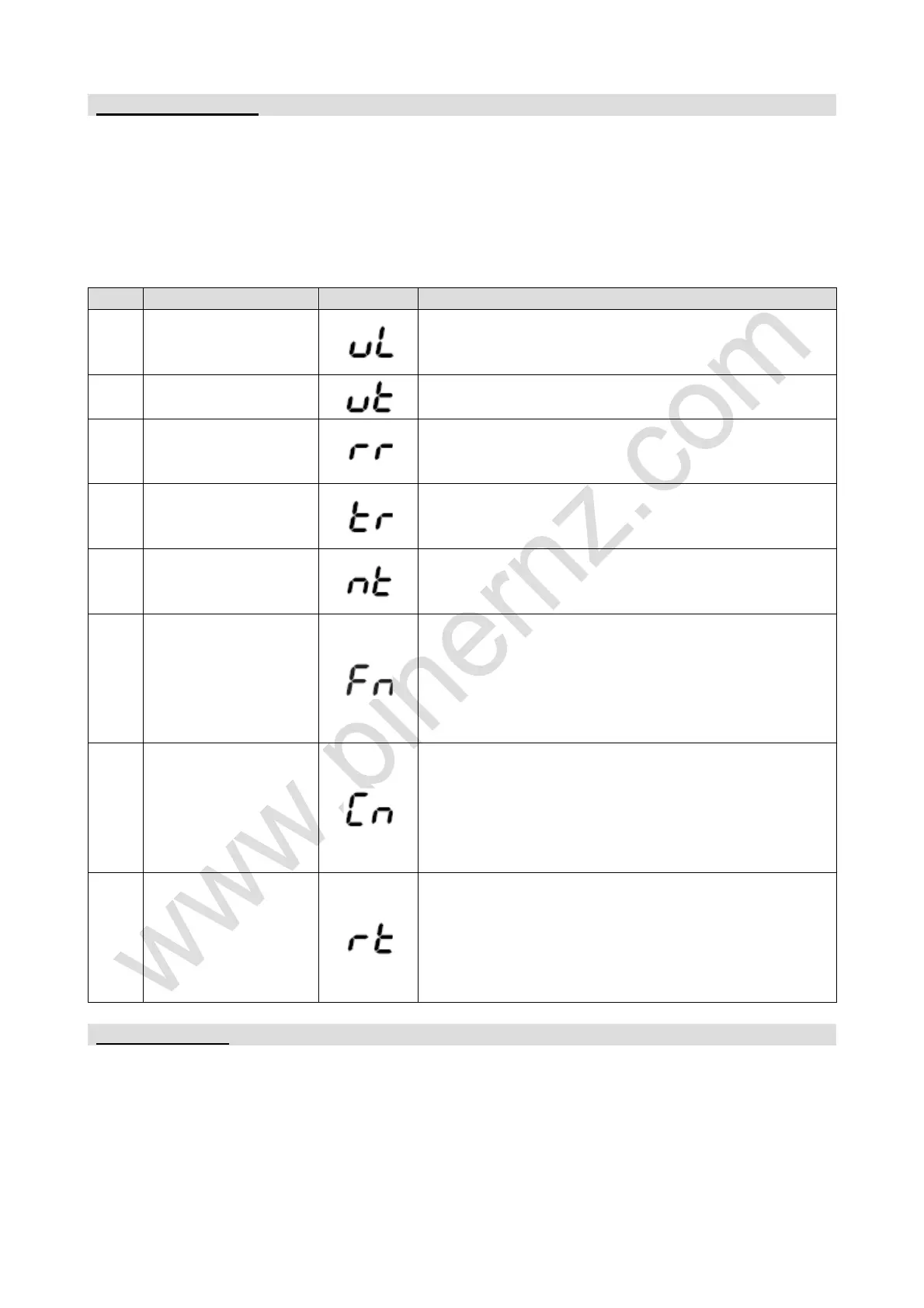
1
VOX sensitivity
level setting
Can set oF, 01-09 levels. oF turn off the VOX
function.
Default: oF.
2 VOX delay time
Can set 01-09 levels.
Default: 03.
3 RX noise reduction
Can set oF, 01-05 levels. oF turn off the RX
noise reduction.
Default: oF.
4 TX noise reduction
Can set oF, 01-05 levels. oF turn off the TX
noise reduction.
Default: oF.
5 Mic type selection
EL: Electronic microphone.
DY: Dynamic microphone.
Default: EL.
9
FINE function
setting
oF: Turn off the frequency fine function.
r: Turn on the RX frequency fine function.
t: Turn on the TX frequency fine function.
rt: Turn on the RX/TX frequency fine function at
the same time.
Default: rt (frequency range ±300 Hz).
10
COARSE function
setting
oF: Turn off the frequency coarse function.
r: Turn on the RX frequency coarse function.
t: Turn on the TX frequency coarse function.
rt: Turn on the RX/TX frequency coarse function
at the same time.
Default: rt (frequency range ±5 kHz).
11 Reset function
With the [NB/ANL] switch to OFF position, all
functions settings reset to the factory default,
except the channel settings.
With the [NB/ANL] switch to NB/ANL position, all
channel settings and all functions reset to
factory default.
When the RX/TX indicator light on yellow; LED displays the error code, means the radio
meet problem.
E1: Voltage too low.
E2: Voltage too high.
E4: Current BAND invalid.
E5: TX SWR too high.


 To Next Page