3. Installation and Conguration
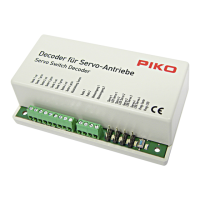
Before installing the switch decoder at its nal location, we recommend the
calibration of the decoder together with the switch machine near the digital central
station and to check for proper functioning.
First of all, please prepare the respective lengths of your connecting cables. Tap the
digital track voltage at a suitable point of the track (e.g. clean points on a straight
track). We recommend using PIKO power clamps with cable (#35270).
3.1 Wire Connections
Lift the sealing at the switch machine and open the clamp of the switch machine
using a suitable screwdriver. Plug the switch decoder onto the switch machine and
screw on the clamp of the switch machine.
The decoder is pre-set to the switch address 1. To select other switch addresses,
you need to re-program the switch decoder.
You can nd information regarding the programming in the section “Programming of
the decoder”.
Generally, the decoder is protected against short circuit or overload. However, if,
during the installation, cables are mixed up or if cables of different functions
(e.g. track + switching output) are short-circuited, this protection will not be effective
and the decoder might be damaged.
3.2 Operation
The switch decoder is pre-set to the address 1 ex works. A switching time of 0.75 s
per switching direction is preset.
The switch decoder is operated by means of a digital control unit (e.g. PIKO #35010
with #35011). You will nd all relevant information for the operation in the operating
manual of your digital control unit.
When using the PIKO system (digital central station and handheld remote
Navigator), please observe the following instructions.
Press the key
M1
of the Navigator over and over until “Switch command” is
displayed in the lower section of the display. This is the switch command mode.
Now, use the keypad of the PIKO Navigator to enter the address of the switch, and
move the switch left or right using the arrow keys
. By pressing the round
key , you can also browse through the 8 most recently operated switches.
If, for example, you already used the switches #0001 and #0006, you will return to
switch #0001 and afterwards to switch #0006 when pressing this key. After a switch
command has been carried out, the decoder turns off automatically in order to
prevent an overload of the switch machine.
17


 To Next Page
 Loading...