
 Need help?
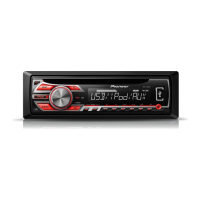
Do you have a question about the Pioneer deh-2550UI and is the answer not in the manual?
Advises contacting a dealer or service station if the unit fails to operate properly.
Guides through the initial setup menu process after installation, including clock setting.
Provides step-by-step instructions for setting the clock display (hour and minute).
Explains the procedure to detach the front panel for security purposes and how to store it.
Covers basic tuner operations like selecting bands, switching preset stations, manual tuning, and seeking.
Guides on accessing and adjusting various function settings like BSM, REGION, LOCAL, TA, AF, and NEWS.
Covers basic operations for playing CDs and USB storage devices, including file selection and playback.
Details connecting a USB device and how playback is performed automatically.
Details how to turn the MIXTRAX function on or off, specifically for the DEH-X3550UI.
Provides instructions for enabling or disabling the MIXTRAX feature.
Describes how the Sound Retriever function enhances compressed audio quality.
Guides on accessing and adjusting function settings related to iPod and USB operations.
Covers basic operations for playing songs, selecting songs, albums, and fast forwarding/reversing on an iPod.
Explains how to connect an iPod and perform basic playback functions.
Explains how to use the MIXTRAX button, including display switching and browsing for songs.
Details the sound retriever function for improving iPod audio quality.
Describes how to operate the unit's iPod functions directly from the connected iPod.
Explains how to switch between CONTROL iPod, CONTROL APP, and CONTROL AUDIO modes.
Guides on adjusting function settings related to iPod operations, such as audiobook speed.
Explains the S.RTRV function for enhancing compressed audio quality.
Guides on accessing and adjusting various audio settings like FADER, BALANCE, EQ, LOUDNESS, SUB.W, etc.
Guides on selecting equalizer presets and customizing EQ settings.
Guides on accessing and adjusting system menu functions like INFO DISPLAY and CLOCK SET.
Provides step-by-step instructions for setting the clock display (hour/minute) and time notation.
Guides on selecting custom illumination colors for the unit's keys.
Explains how to choose custom illumination colors for the unit's display.
Describes how to create custom illumination colors for both keys and display simultaneously.
Introduces MIXTRAX technology for creating dynamic audio-visual experiences with sound effects.
Guides on accessing and adjusting various MIXTRAX functions like playback modes and flash effects.
Guides on accessing and adjusting initial menu functions like FM/MW STEP and SP-P/O MODE.
Guides on accessing and adjusting system menu functions, referring to page 9 for details.
Provides essential information and warnings for installing the unit in a vehicle.
Details important warnings and precautions regarding wiring connections, including speaker and ground wire.
Illustrates the connection points for the main unit, including power, speakers, and remote input.
Shows how to connect an optional power amplifier, including system remote and RCA cable connections.
Guides on installing the mounting sleeve into the dashboard for front-mount setup.
Explains how to determine the correct position for rear-mount installation using the bracket.
Refers to page 4 for detailed instructions on removing and re-attaching the front panel for theft protection.
Provides solutions for common symptoms like display returning to normal or unexpected repeat range changes.
Lists common error messages, their causes, and recommended actions for CD player and USB/iPod issues.
Provides steps to resolve "CHECK USB" errors, including charging issues and cable shorts.
Offers solutions for communication failure errors related to iPod or USB devices.
Provides steps to troubleshoot iPod failure errors, including disconnection and reconnection.
Details compatibility information for WMA, MP3, and WAV audio files on discs and USB devices.
Lists supported iPod models and software versions, along with compatibility notes.
Lists general specifications for the unit, including power source, dimensions, weight, and current consumption.
 General
| Brand | Pioneer |
|---|---|
| Model | deh-2550UI |
| Category | Car Receiver |
| Language | English |



 To Next Page