EasyManua.ls Logo

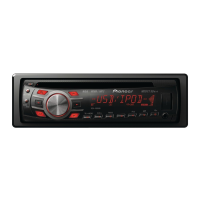
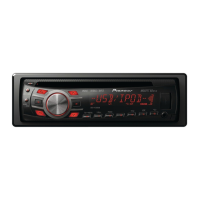
Pioneer DEH-3350UB - User Manual

Pioneer DEH-3350UB
72 pages
Print Icon
To Next Page IconTo Next Page
Loading...
Português (B)
Español
English
Owner’s Manual
Manual de instrucciones
Manual do proprietário
DEH-4350UB
DEH-3350UB
CD RDS RECEIVER
REPRODUCTOR DE CD CON RECEPTOR RDS
RECEPTOR DE CD RDS
<CRD4527-A/N>1

Table of Contents

Questions and Answers

Summary

Before You Start

About this unit

Provides general information and safety precautions about the unit.

Demo Mode Operation

Explains the demo mode feature and its operation.

Operating this unit

Display Indicators

Explains the indicators on the unit's display.

Basic Operations

Covers fundamental operations like turning on/off, selecting sources, and adjusting volume.

Front Panel Removal and Reattachment

Instructions on how to detach and reattach the front panel for security and maintenance.

Remote Control Usage and Care

Guidance on using and maintaining the remote control, including battery replacement.

Operating this unit

Tuner Functions

Covers basic tuner operations like band selection, manual tuning, and seeking.

Station Storage and Recall

Instructions on how to save and retrieve radio stations for each band.

Display Switching

How to change the information displayed on the unit's screen.

Function Settings

How to access and adjust various function settings for the unit.

CD and USB Operations

Basic operations for playing music from CDs and USB devices.

Advanced Operations

Explains advanced playback features and operations using special buttons.

Operating this unit

iPod Basic Operations

Basic operations for connecting and playing music from an iPod.

Advanced iPod Operations

Advanced iPod functions like repeat, shuffle, and link play.

iPod Function Settings

How to set repeat, shuffle, and other functions for iPod playback.

Operating this unit

Sound Retriever (S.RTRV)

How to use the sound retriever feature for enhanced audio.

Audio Adjustments

Adjusting audio settings like fader, balance, equalizer, tone, loudness, and subwoofer.

Source Level Adjustment (SLA)

Adjusting volume levels for different sources to balance output.

Initial Settings

How to access and set initial unit configurations like clock and tuning steps.

Tuning Step Settings

How to change the FM and AM tuning step increments.

Auxiliary and USB Settings

Activating auxiliary input and setting USB plug-and-play functionality.

SW Control Settings

Configuring rear speaker and subwoofer output settings.

Demo Display Setting

Turning the demo display on or off.

Operating this unit

Scroll Mode Setting

Setting the display scroll mode for text information.

Illumination Color Selection

How to choose a color for the unit's illumination.

Customizing Illumination Color

Steps to create a custom illumination color.

Using an AUX Source

How to connect and use an AUX audio source.

Clock Display On;Off

How to toggle the clock display on or off.

Installation

Connections

Important wiring and connection guidelines for installation.

Installation

Power Cord Wiring

Wiring instructions for connecting the power cord to the unit.

Mounting Options

Instructions for installing the unit using front-mount or rear-mount methods.

Installation

DIN Rear-Mount Installation

Instructions for installing the unit using the rear-mount method.

Unit Removal and Re-attachment

Steps to remove the unit and its front panel, and how to reattach them.

Troubleshooting

Solutions for common problems and error messages encountered with the unit.

Error Messages

Lists specific error messages, their causes, and recommended actions.

Additional Information

Troubleshooting (Continued)

Further troubleshooting steps for various issues.

USB Storage Device Guidelines

Notes on connecting and using USB storage devices.

Handling Guidelines

Guidelines for handling discs and the player to prevent damage.

Additional Information

iPod Information

Information on iPod connection, settings, and compatibility.

Disc and File Compatibility

Details on compatibility for various audio file formats (MP3, WMA) and disc types.

USB Storage Device Information

Notes on connecting and using USB storage devices.

iPod Compatibility Details

Lists compatible iPod models and software versions.

Additional Information

Copyright and Trademark

Copyright and trademark information for associated software and devices.

Specifications

Detailed technical specifications of the unit's hardware and features.

General Specifications

General specifications including power, dimensions, and weight.

Audio Specifications

Specifications related to audio output, tone controls, and subwoofer.

Tuner Specifications

Specifications for the FM and AM radio tuners.

Remote Control Specifications

Specifications for the infrared remote control.

CD Player Specifications

Specifications related to the CD playback functionality.

Pioneer DEH-3350UB Specifications

General IconGeneral
DIN SizeSingle DIN
Preamp Voltage2.2V
Number of Channels4
Built-in EqualizerYes
EQ Bands5
Display TypeLCD
Preamp Outputs1 pair
Subwoofer OutputYes
USB InputYes
AUX InputYes
PlaybackCD, MP3, WMA
Radio TunerAM/FM
Detachable FaceYes
Built-in USB PortYes
USB Direct Control for iPod/iPhoneYes
Built-in BluetoothNo
CD PlayerYes
MP3 PlaybackYes
WMA PlaybackYes
High-Pass FilterYes
Low-Pass FilterYes

Related product manuals