EasyManua.ls Logo

Pioneer DM-40 - User Manual

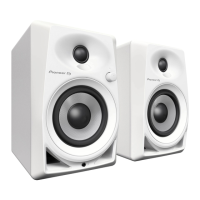
Pioneer DM-40
72 pages
Print Icon
To Next Page IconTo Next Page
Loading...
DM-40
Active Monitor Speaker
Haut-parleur de Moniteur Actif
Aktiver Monitorlautsprecher
Diffusore Monitor Attivo
Actieve Monitorluidspreker
Altavoz Monitor Activo
Coluna de Monitor Ativa
Активная Акустическая Система
ᆀ᠚઼ԥྜඵᖑᏣ
アクティブモニタースーカー
Operating Instructions
Mode d’emploi
Bedienungsanleitung
Istruzioni per l’uso
Handleiding
Manual de instrucciones
Manual de instruções
Инструкции по эксплуатации
ᐈձКь
取扱説明書
http://pioneerdj.com/support/
The Pioneer DJ support site shown above offers FAQs, information on software and various other types of
information and services to allow you to use your product in greater comfort.
Le site de support DJ de Pioneer indiqué ci-dessus propose une FAQ, des informations sur le logiciel et divers
types d’informations et de services qui permettent une utilisation plus confortable de ce produit.
Die oben gezeigte Pioneer DJ-Support-Website enthält häufig gestellte Fragen, Informationen über Software
und andere wichtige Informationen und Dienste, die Ihnen helfen, Ihr Produkt optimal zu verwenden.
Il sito di supporto DJ Pioneer indicato qui sopra offre una sezione FAQ, informazioni sul software ed
informazioni e servizi di vario tipo, per permettere un uso più confortevole dei nostri prodotti.
De bovengenoemde Pioneer DJ ondersteuningswebsite biedt een overzicht van de vaak gestelde vragen,
informatie over software en allerlei andere soorten informatie en diensten die u in staat stellen dit product met
meer gemak te gebruiken.
El sitio de asistencia Pioneer DJ mostrado arriba ofrece las preguntas frecuentes, información del software y
varios otros tipos de información y servicios que le permitirán usar su producto con mayor confort.
O site de suporte da Pioneer DJ mostrado acima oferece FAQs, informações sobre o software e outros tipos
de informações e serviços para permitir utilizar o produto com um maior conforto.
На указанном выше сайте поддержки Pioneer DJ содержатся раздел часто задаваемых вопросов,
информация по программному обеспечению, а также различные другие типы информации и услуг,
позволяющие использовать ваше изделие более лучшим образом.
αРᡘұޠӒᎣEKМනᆪયණٽGBRȃ೻ᡞၦଊІөԓڐу᜹࠯ޠၦଊᇅ݉ଡ଼ȂѠᡲ்؂Р߰ޠٻң౱ࠣȄ
上記のPioneerDJサポート サイトでは、困ったときのよくある質問やソトウェアの情報などより適に製品をお使
いただくための各種情報やサービスを提供しております
商品相談修理受付付属品購入窓口のご案
お取り扱いにお困りのとき本書の巻末をご覧ください。
保証書付
日本Français Deutsch Italiano
English
Nederlands Español
Português Русский
ϜН

Table of Contents

Questions and Answers

  • L
    Lorraine CohenJul 27, 2025
    What to do if my Pioneer DM-40 Speakers have no sound?
    • A
      Amanda KrauseJul 27, 2025
      If you're experiencing low or no sound from your Pioneer Speakers, here are a few things to check: * Ensure the [POWER] switch on the rear panel is turned on. * Try turning the [POWER] switch off and then on again after a few seconds. * Increase the volume by turning the [LEVEL] control on the front panel clockwise. * If the POWER indicator (white) does not light, clean the terminals and plugs before making connections.
  • T
    Trevor CollinsJul 31, 2025
    What to do if my Pioneer DM-40 only output sound from the left speaker?
    • R
      Richard LoveAug 1, 2025
      If sound is only coming from the left speaker of your Pioneer Speakers, ensure that you connect the left and right speakers properly.
  • S
    Sara BarkerAug 6, 2025
    What to do if my Pioneer DM-40 Speakers only output sound from one speaker?
    • V
      villascottAug 6, 2025
      If sound is only coming from one speaker, connect the device to both the left and right input terminals of your Pioneer Speakers.
  • R
    Robert JonesAug 11, 2025
    How to fix distorted sound from Pioneer DM-40 Speakers?
    • S
      Sarah MorrisAug 11, 2025
      If you are experiencing distorted sound from your Pioneer Speakers, you can try the following: * Reduce the volume by turning the [LEVEL] control on the front panel counterclockwise. * Adjust the output level of the connected device to an appropriate level.
  • M
    Ms. Tammie GuzmanAug 16, 2025
    Why do my Pioneer DM-40 Speakers oscillate and output a loud sound continuously?
    • D
      deborahjacksonAug 16, 2025
      If your Pioneer Speakers are oscillating and producing a continuous loud sound, turn the [LEVEL] control on the front panel counterclockwise to reduce the volume.
  • M
    Miguel JohnsonAug 21, 2025
    What to do if Pioneer Speakers do not recover from standby state?
    • C
      Christopher SmithAug 21, 2025
      If your Pioneer Speakers are not recovering from the standby state, try increasing the input signal level.

Summary

General Safety and Operating Precautions

Electrical, Hearing, and Environmental Safety

Covers electric shock risks, hearing protection, water avoidance, and ventilation.

Power Cord, Plug, and Servicing Guidelines

Precautions for power cords, plugs, use of accessories, and referring servicing.

Health, Environmental, and Compliance Information

Fire Hazard and Chemical Exposure Warnings

Warnings about fire hazards, chemical content, and proper handling.

Product Disposal and User Modifications

Guidelines for product disposal and disclaimer on unauthorized user modifications.

European and FCC Compliance Notes

Specific compliance information for European users and FCC regulations.

Product Warnings and Cautions

Water, Fire, and General Hazard Warnings

Warnings against water, naked flames, and general hazards.

Operating Environment and Ventilation

Details on temperature, humidity, and required space for ventilation.

Power Cord and Specific Model Precautions

Precautions for power cord handling and specific warnings for the DM-40 model.

Usage Limitations and Blocking Openings

Notes on household use, repair charges for business use, and not blocking ventilation.

Product Features and Components

Key Product Features

Highlights powerful sound, improved directivity, and clear audio quality from its design.

Included Accessories List

List of items included with the product, such as power cord, speaker cord, and manual.

Front Panel Controls and Indicators

Description of tweeters, diffusers, power indicator, level control, woofers, and headphone terminal.

Rear Panel Connections and Operation

Rear Panel Terminals and Switches

Details on input terminals, speaker connectors, power switch, and AC IN.

Power Off and Auto Standby Function

Instructions for complete power shutdown and explanation of the auto standby feature.

Installation Procedures

Speaker Placement Recommendations

Guidance on optimal speaker placement for listening conditions and stereo effect.

Product Handling and Connections

Accessory Attachment and Safety Warnings

Instructions for affixing cushions and warnings about storing small parts.

Connecting Speaker Cables

Step-by-step guide for connecting speaker cords, including checks and polarity.

Troubleshooting and Specifications

Troubleshooting Common Issues

Table of problems, checks, and remedies for operational issues like no sound or distortion.

Product Technical Specifications

Detailed specifications including model, amplifier output, dimensions, and weight.

Warranty and Service Information

Limited Warranty Terms and Coverage

Details on warranty validity, what is covered, exclusions, and period.

Service, Support, and Dispute Resolution

How to obtain service, contact customer support, and resolve disputes.

Purchase Information Recording

Instructions to record purchase details for future reference and warranty claims.

Pioneer DM-40 Specifications

General IconGeneral
Impedance10000 Ω
Number of products included2 pc(s)
Sound enhancement technologyDECO
Power sourceAC
AC input voltage110 - 240 V
AC input frequency50 - 60 Hz
Power consumption (standby)0.5 W
Power consumption (typical)35 W
ManualYes
Center speaker weight2700 g
Center speaker tweeter diameter0.75 \
Center speaker dimensions (WxDxH)227 x 146 x 223 mm
Center speaker woofer diameter (imperial)4 \
Satellite speaker type-
Satellite speaker weight2200 g
Number of satellite speakers1
Satellite speakers RMS power- W
Satellite speaker dimensions (WxDxH)227 x 146 x 210 mm
Amplifier classA/B
Amplifier output power42 W
Amplification device form factorBuilt-in
Amplifier/receiver input interface typeRCA
AirPlayNo
Headphone connectivity6.3 mm
Connectivity technologyWired
Product colorBlack
Volume controlRotary
Recommended usageUniversal
Audio output channels- channels
Speaker type2-way
Woofer diameter102 mm
Tweeter diameter19 mm
Speaker placementTabletop/bookshelf
Number of tweeter drivers2
Speaker depth210 mm
Speaker width146 mm
Speaker height227 mm
Number of amplifier channels2 channels
Weight and Dimensions IconWeight and Dimensions
Depth223 mm

Related product manuals