Need help?
Do you have a question about the Pioneer MCS-838 and is the answer not in the manual?
Covers risks of electric shock, laser safety, and internal component warnings.
Addresses hazards like liquid near unit, ventilation, fire risks, and power cord handling.
Advises on potential fatigue or discomfort from extended 3D viewing.
Explains copyright protection systems and TV color system compatibility.
Overview of product, manual, and included items like remote, batteries, and antennas.
Details on pads and screws for different speaker models (MCS-838/737, 636/535, 434/333).
Table detailing compatible disc types (BD-ROM, DVD-Video, CD) and application formats.
Lists discs that cannot be played and general notes on disc playback.
Lists supported audio formats (Dolby, DTS, AAC, PCM) and video formats (BDMV, BDAV).
Explains STANDBY/ON, FUNCTION, and OPEN/CLOSE buttons for basic operation.
Covers playback (PLAY, PAUSE, STOP), navigation (cursor, ENTER, RETURN), and search functions.
Details buttons for KARAOKE, AUDIO, SUBTITLE, ANGLE, ZOOM, BOOKMARK, and SOUND.
Describes front panel disc tray, operation buttons, display, ports (USB, PORTABLE IN), and indicators.
Details rear panel connections: AC IN, SPEAKERS, Antenna, AUX, LAN, HDMI, and OPTICAL ports.
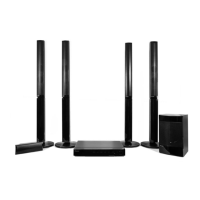
Instructions for speaker assembly, wire connection, and pad attachment for MCS-838/737.
Guidance on securely mounting speakers (MCS-838/737, MCS-636/535, MCS-434/333) to walls.
Recommendations for optimal speaker positioning for surround sound and safety precautions.
Instructions for connecting to a TV via HDMI and connecting the FM antenna.
Details AUX, PORTABLE IN, OPTICAL IN, and HDMI IN connections for external audio/video.
Explains wired and wireless network connections for accessing online services and media.
Covers connecting USB devices, file playback, copying, and recording CD/FM.
Notes on supported file systems, partitions, and potential device recognition issues.
Guides through initial setup for language, resolution, and aspect ratio using Setup Navigator.
Instructions for programming the player's remote to control the TV and a list of preset TV codes.
Covers loading discs, starting playback, pausing, stopping, and resume playback functions.
Explains scanning, skipping content, slow motion, step playback, and A-B repeat functions.
Details repeat play, programmed play, and editing playback sequences.
Covers bookmarks, zoom, slideshows, camera angles, subtitles, and audio switching.
Information on enjoying enhanced features like secondary video/audio and internet content.
Accessing and using the TOOLS menu for playback adjustments and information.
Guides on time search, title/chapter search, and continuing playback from a saved position.
Introduction to playing files from discs, USB, and networks via Home Media Gallery.
Details on network playback using Windows Media Player and DLNA technologies.
Instructions for playing files from networks, discs, or USB, including slideshow and play mode settings.
Steps for creating, playing, and deleting playlists of tracks and files.
Procedures for copying files/folders to USB from discs or front USB.
Guide to connecting mobile devices directly using Wi-Fi Direct for media playback.
Lists supported online services like YouTube, vTuner, and Picasa for streaming content.
Instructions to display selection screen and play web items, including YouTube.
Guide for recording audio from CDs to USB, including setting speed and bitrate.
Information on connecting and playing content from iPod, iPhone, and iPad devices.
Covers listening to radio, preset stations, improving reception, and FM recording.
Instructions for karaoke, adjusting mic volume/echo, key control, and vocal cancel.
Explains sound adjustments like Sound Retriever, Equalizer, Surround modes, Bass Boost, Audio Sync.
Covers initial setup, TV screen aspect ratio, video adjustments, and noise reduction.
Details audio output, speaker setup, HDMI color space, resolution, and audio out options.
Configuration for network (IP, Proxy, DLNA, Wireless) and language/subtitle/audio settings.
Options for playback behavior (auto play, last memory) and security (parental control).
Fine-tuning video settings (brightness, contrast) and speaker settings (trim, delay).
Setting IP addresses, proxy servers, and testing network connections.
Procedures for passwords, parental lock levels, and country/area codes.
Instructions for updating player software via internet or USB drive.
Steps to restore all player settings to their original factory defaults.
Common problems with picture display: no image, stretching, interruption, or 3D issues.
Troubleshooting steps for no sound, low volume, multi-channel problems, and noise.
Solutions for discs not playing, frozen screen, subtitle errors, and loading issues.
Troubleshooting connectivity, BD-LIVE access, slow updates, and network component access.
Specific troubleshooting for wireless network access and iPod/iPhone/iPad connectivity.
Addresses power failures, remote control malfunction, USB errors, and display errors.
Detailed technical specs: power, dimensions, inputs/outputs, tuner, amplifier, and system.
Dimensions and impedance for speakers used with MCS-838/737, MCS-636/535, and MCS-434/333.
Guidance on handling the unit during shipping, cleaning surfaces, and player maintenance.
Instructions on proper disc handling, storage, and cleaning for optimal playback.
Information regarding third-party network content, services, and Pioneer's liability.
 General
| Disc types supported | BD-R, BD-RE, CD-R, CD-RW, DVD+R, DVD+RW, DVD-R, DVD-RW |
|---|---|
| Optical disc player type | Blu-Ray player |
| Built-in HDD | No |
| CD-RW playback | Yes |
| TV tuner integrated | - |
| Image formats supported | JPG, PNG |
| Apple docking compatibility | iPad (1 gen), iPad 2, iPad 3, iPad 4, iPhone 3G, iPhone 3GS, iPhone 4, iPhone 4S, iPhone 5, iPod Nano 2, iPod Nano 3, iPod Nano 4, iPod Nano 5, iPod Nano 6, iPod Nano 7, iPod Touch 1, iPod Touch 2, iPod Touch 3, iPod Touch 4, iPod Touch 5 |
| Video formats supported | AVCHD, DIVX, DIVX HD, MKV, Quicktime, WMV |
| Audio decoders | Dolby Digital, Dolby Digital Plus, Dolby Pro Logic II, DTS, DTS-HD |
| RMS rated power | 1000 W |
| Audio output channels | 5.1 channels |
| Product color | Black |
| HDMI in | 4 |
| USB version | 2.0 |
| USB ports quantity | 2 |
| SCART ports quantity | 0 |
| Number of HDMI outputs | 1 |
 Weight and Dimensions
| Subwoofer weight | 4400 g |
|---|---|
| Center speaker weight | 700 g |
| Satellite speaker weight | 3600 g |
| Subwoofer dimensions (WxDxH) | 130.5 x 375 x 420 mm |
| Front speaker dimensions (WxDxH) | 250 x 250 x 1100 mm |
| Center speaker dimensions (WxDxH) | 230 x 90 x 80 mm |

 To Next Page