EasyManua.ls Logo

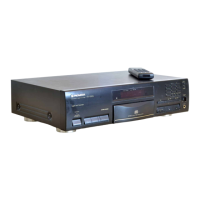
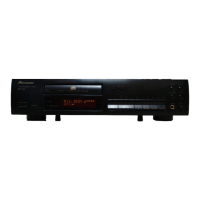
Pioneer PD-217 - User Manual

Pioneer PD-217
38 pages
Print Icon
To Next Page IconTo Next Page
Loading...
'
Operating Instructions
Manual de instrucciones
操作說明書
COMPACT DISC PLAYER
REPRODUCTOR DE COMPACTOS
雷射唱機
PD-217
PD-117

Other manuals for Pioneer PD-217

Questions and Answers

  • K
    Kimberly BullockAug 15, 2025
    Why is my Pioneer CD Player remote control not working?
    • T
      Tracy SmithAug 15, 2025
      If your Pioneer CD player remote control isn't working, replace the batteries. Ensure that there is no more than about 7 meters between the remote control unit and player and that the operational angle against the front panel is within 30° from right or left end of the player. Remove any obstructions between the remote and the player. For PD-117 models, check the control cable is connected properly, refer to page 12, 14.
  • K
    Kyle DeckerAug 19, 2025
    Why does my Pioneer PD-217 CD Player make loud noise with some discs?
    • C
      Charles DeleonAug 19, 2025
      If your Pioneer CD player is producing loud noise or stopping with certain discs, the disc may have a bad scratch or warp, so replace it. Alternatively, the disc may be extremely dirty, so clean it.
  • R
    rhonda37Aug 21, 2025
    What to do if there is a disc loading error on Pioneer CD Player?
    • S
      Sean ThomasAug 22, 2025
      If you are experiencing a disc loading error with your Pioneer CD player, make sure the disc is set in the correct position. Also, check for and remove any foreign objects that may have been loaded into the player.
  • L
    Lisa WardAug 26, 2025
    What to do if there is a disc setup error on Pioneer CD Player?
    • J
      Jessica BarnettAug 26, 2025
      If you are experiencing a disc setup error with your Pioneer CD player, ensure that the disc is not set upside down. If the disc is dirty, clean it and set it again.
  • A
    Andrew DavisAug 28, 2025
    Why is there no sound coming from my Pioneer PD-217 CD Player?
    • K
      Kelly GarciaAug 28, 2025
      If your Pioneer CD Player is producing no sound, ensure the output cables are correctly and tightly connected. Check the settings on your stereo amplifier, including the switches and volume controls. Clean any dirt from the pin plugs and amplifier terminals. Also, make sure the player is not in pause mode by pressing the 6 (or 3) button.
  • A
    Alicia WhiteheadSep 1, 2025
    What to do if my Pioneer PD-217 sound is distorted?
    • T
      Thomas RobertsonSep 1, 2025
      If the sound from your Pioneer CD Player is distorted or noisy, check that the connections are correct, using the amplifier's AUX or CD terminals instead of PHONO. Clean any dirt from the pin plugs and amplifier terminals. If a TV set is causing interference, switch it off or move the CD player away from it.
  • H
    harrisonemilySep 4, 2025
    How to fix a Pioneer PD-217 when the disc tray won't open?
    • K
      kathleenstephensSep 4, 2025
      If your Pioneer CD player's disc tray won't open when you press OPEN/CLOSE, ensure the power plug is correctly connected to the amplifier or wall outlet. Also, check that the STANDBY/ON switch is set to ON.
  • N
    Nicole MillerSep 7, 2025
    What to do if Pioneer PD-217 CD Player stops or pauses during playback?
    • T
      Taylor ShawSep 7, 2025
      If your Pioneer CD Player stops immediately after starting playback, or pauses/stops during playback, make sure the disc is loaded correctly with the label side up. Also, clean any smudges or dirt from the disc before playing it again.
  • G
    Gina RobinsonSep 12, 2025
    How to stop my Pioneer PD-217 CD Player interfering with my TV screen?
    • J
      jason91Sep 12, 2025
      To resolve fluctuation on the TV screen or noise interference in FM broadcast when using your Pioneer CD player, unplug the AC power cord or move the player away from the TV or tuner.

Summary

Safety Precautions

Electrical Safety and Power Cord Handling

Warnings about electric shock, not opening the unit, and safe handling of the power cord.

Laser and Radiation Safety

Precautions regarding the Class 1 laser product and potential radiation exposure.

Environmental Hazard Warnings

Apparatus is not waterproof; avoid exposure to moisture, rain, and ensure proper ventilation.

FCC Compliance and Interference

Notes on FCC regulations and preventing electromagnetic interference.

Standby Power Information

Unit remains connected to mains power in standby; disconnect when unused for extended periods.

Installation and Operation Guidelines

Initial Setup and Voltage Requirements

Importance of reading instructions and setting the correct voltage for your region.

Fire Prevention and Ventilation

Warnings against naked flames and blocking ventilation openings to prevent fire.

Operating Environment and Location

Recommended operating temperature, humidity, and restrictions on installation locations.

Voltage Selector Adjustment

How to locate and adjust the voltage selector switch on multi-voltage models.

Introduction and AC Power Functions

Manual Scope

States that instructions are based on PD-217 but also apply to PD-117.

AC Power Cord Impact on Functions

Explains how AC power cord connection affects certain player functions.

Handling and Care Precautions

Installation and Environmental Precautions

Guidelines for proper placement, avoiding heat, humidity, direct sunlight, and unstable surfaces.

Player and Disc Cleaning

Instructions for cleaning the player, storing discs, and handling CDs properly.

CD Handling and Special Cases

Detailed CD care, shaped CD caution, handling notes, and lens cleaner advice.

Connections

Connecting Output Cables

How to connect the player's LINE OUT to amplifier input jacks, avoiding PHONO input.

CD-Deck Synchro Functionality

How to connect for synchro recording between CD player and cassette deck.

Connecting the Power Cord

Instructions for connecting the power cord to an AC outlet.

Advanced Connection Features

Timer Playback Setup

How to set up automatic playback using an external audio timer.

System Remote Control Integration

Connecting for remote control via a compatible Pioneer stereo amplifier.

Accessories and Remote Control Setup

Confirm Supplied Accessories

Lists all items included in the package.

Remote Control Battery Installation

Step-by-step guide for inserting batteries into the remote control unit.

Remote Control Operation Guidelines

Instructions on how to operate the remote control, including range and angles.

Component Identification

Front Panel Controls and Indicators

Identifies and describes the functions of buttons and indicators on the front panel.

Remote Control Unit Overview

Identifies and describes the functions of the remote control buttons.

Basic Operation

Powering On and Disc Playback

Steps to turn on the player, load a disc, and start playback.

Pausing and Stopping Playback

How to temporarily pause, stop, or stop and eject a disc.

Display Control

How to turn off the front panel display and its behavior.

Time Display Modes

Explains how to cycle through different time displays during playback.

Various Operations

Track Selection and Search

How to play specific tracks by number, search for tracks, and perform manual passage search.

Playback Time Display

How to view the playing time of tracks and total playback duration.

Hi-Lite Scan Playback

How to use Hi-Lite scan for quick track preview and its operational notes.

Repeat and Random Playback Modes

How to set the player for single track repeat, all track repeat, and random track playback.

Output Volume Adjustment

How to adjust the audio output level using the remote control (PD-217 only).

Program Playback

Programming Track Sequence

How to program a sequence of tracks for playback using buttons or digit keys.

Programming Pauses

How to insert pauses into the programmed playback sequence (PD-217 only).

Clearing Programmed Content

How to clear all programmed tracks from memory.

Convenient Recording Operations

Compu Program Edit Mode

Automatically rearranges track order to match a specified total playing time.

Auto Program Edit Mode

Selects tracks within a designated time, starting from the first track.

Setting Tape Length for Recording

How to designate the tape length using digit buttons or track search buttons.

Confirming Programmed Results

How to review programmed results for tape sides A and B.

Specifications

General Specifications

Covers type, power requirements, consumption, temperature, weight, and dimensions.

Audio Section Details

Provides technical audio specifications like frequency response, S/N ratio, and distortion.

Output Terminal Information

Details the available output jacks, including line out and synchro.

Included Accessories List

Lists all accessories provided with the unit.

Troubleshooting

Common Troubleshooting Guide

A table listing common symptoms, their likely causes, and suggested remedies.

Self-Diagnostics Functionality

Explains the unit's self-diagnostic feature and how to interpret error messages.

Demo Mode Operation

Entering Demo Mode

Instructions on how to activate the demo mode display.

Exiting Demo Mode

How to deactivate the demo mode and return to normal operation.

Pioneer PD-217 Specifications

General IconGeneral
BrandPioneer
ModelPD-217
CategoryCD Player
LanguageEnglish

Related product manuals