Need help?
Do you have a question about the Pioneer PD-30AE and is the answer not in the manual?
Essential safety guidelines for operating the CD player to prevent hazards.
Details on connecting analog audio cables and understanding color coding.
Information on digital audio outputs for the PD-30AE model.
How to control multiple Pioneer components using a single remote.
Instructions for connecting the unit to a power source.
Steps to power the CD player on and off or put it in standby mode.
Configures automatic power-off after a period of inactivity.
Adjusting the brightness level of the player's display.
Connecting and adjusting volume for stereo headphones.
How to navigate and select audio tracks on a CD.
Using remote buttons for playback control like pause, play, stop.
Viewing track numbers, total time, and remaining time.
Methods for selecting MP3 files and folders (Navigation, All Folder).
Selecting MP3 folders and files during playback using search.
Viewing MP3 metadata like title, artist, and album.
Playing all files on the disc in random order.
Creating a custom playlist of up to 25 audio files.
Creating a custom playlist of MP3 files.
Setting memory playback via navigation or all folder selection.
Playing entire CD, track, or playlist repeatedly.
Changing how MP3 file information is displayed and played.
Settings for displaying disc name, file name, and folder name.
Preference for handling characters that cannot be displayed in names.
Settings for ID3 tag versions and file system compatibility.
Preference for hiding or enabling numbers in file and folder names.
Configuring how the Stop button functions for MP3 modes.
Setting the auto standby function for MP3 playback.
Solutions for power-on failures and lack of sound.
Solutions for discs that won't play, skip, or have long seek times.
How to access setup and resolve remote control malfunctions.
Tips for ensuring reliable remote control operation.
Procedure to resolve unit lockup issues by unplugging and resetting.
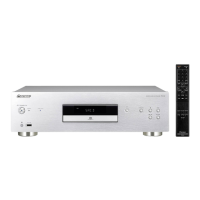
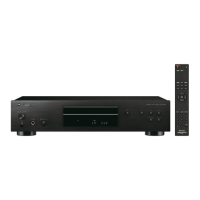
This document describes the Pioneer PD-30AE and PD-10AE Compact Disc Players, offering a comprehensive guide to their functions, usage, and maintenance.
The Pioneer PD-30AE and PD-10AE are compact disc players designed for high-quality audio playback. They support standard audio CDs, as well as CD-R and CD-RW discs containing MP3 files. The PD-30AE model features a 24-bit 192kHz D/A converter, coaxial and optical digital audio outputs, and a headphones output, enhancing its versatility for various audio setups. Both models offer 25-track memory playback, allowing users to create custom playlists. They also include random playback and random repeat playback modes for varied listening experiences. An auto standby function is integrated to conserve power when the unit is not in use.
To power on the CD player, press the STANDBY/ON button on the unit or the remote controller. Pressing it again will set the unit to Standby mode. The display brightness can be adjusted using the DIMMER button on the remote controller, cycling through Normal, Dim, and Dimmer options. For private listening, headphones can be connected to the PHONES jack (available on PD-30AE), and the volume adjusted with the PHONES LEVEL knob.
To load a disc, press the Open/Close [▲] button to open the disc tray, place the CD label-side up (center an 8 cm CD), and then press the Play [▷] button to close the tray and begin playback. During playback, the display shows information such as track number and total playing time for audio CDs. For MP3 CDs, it can display the disc name, file name, folder name, title, artist, album (from ID3 tags), and sampling/bit rate. The DISPLAY button on the remote controller cycles through these information displays.
To navigate tracks, use the [◄◄◄◄] and [►►►►] buttons on the unit or the remote controller. Holding these buttons down enables fast-reverse or fast-forward. For MP3 CDs, fast-reverse only works within the current file. Individual tracks can be selected directly using the number buttons on the remote controller.
Press the Pause [■] button to temporarily stop playback; the [■] indicator will light up. Pressing Play [▷] or Pause [■] again resumes playback. To stop playback completely, press the Stop [■] button.
Press the Open/Close [▲] button to open the disc tray and eject the CD.
The SETUP menu allows customization of MP3 playback preferences. While playback is stopped, press the SETUP button. Use the arrow buttons to select preferences like "DISC NAME" (display disc name), "FILE NAME" (scroll file name), "FOLDER NAME" (scroll folder name), "BAD NAME" (replace undisplayable characters), "ID3 VER. 1" and "ID3 VER. 2" (read ID3 tags), "CD EXTRA" (audio or MP3 session playback), "JOLIET" (SVD/ISO9660 format), and "HIDE NUMBER" (hide numbers at the beginning of file/folder names). The "STOP KEY" preference defines the behavior of the Stop [■] button (All Folder, Navigation, or Disable). The "ASb" (Auto Standby) function can also be configured here.
By connecting Pioneer components with control jacks using monaural miniplug cables, you can centralize control of all devices with this unit's remote controller. Note that analog audio cables must also be connected for proper system control. If a monaural miniplug cable is connected to the CONTROL IN jack, the unit's remote sensor is automatically disabled.
Regularly dust the unit with a soft cloth. For stubborn stains, use a soft cloth dampened with a weak solution of mild detergent and water, then dry immediately. Avoid abrasive cloths, thinners, alcohol, or other chemical solvents, as they can damage the finish.
Handle discs by the edge or center hole, avoiding contact with the playback surface. Do not attach paper or stickers, or write on the disc surface. If a disc is dirty, gently wipe off fingerprints and dust with a soft, dry cloth, moving from the center outwards. For stubborn dirt, use a soft cloth dampened with water, then dry with a clean cloth. Never use cleaning sprays for analog records or antistatic agents, or volatile chemicals like benzine or paint thinner, as they can damage the disc surface. Avoid using discs with residue from cellophane tape, peeling labels, or decorative labels, as these can get stuck or damage the CD player. For inkjet printable discs, remove them from the player when not in use and store them in a case, as freshly printed discs can stick easily.
If the remote controller does not work reliably, replace the batteries. Open the battery compartment, insert two R03/AAA batteries according to the polarity diagram, and slide the cover shut. Do not mix new and old batteries or different types. Remove batteries if the remote controller will not be used for a long time to prevent leakage or corrosion. Expired batteries should be removed promptly.
Install the unit in a well-ventilated location, ensuring adequate free space (20 cm top/sides, 10 cm rear) to prevent overheating. Avoid direct sunlight, heat sources, damp or dusty places, and vibrations from loudspeakers. Always install the unit horizontally. If installed near a TV, radio, or VCR, move the unit away if picture or sound quality is affected.
Moisture condensation can damage the unit. It can occur when moving the unit from a cold to a warm place, when a heater is turned on, or when cold air from an air conditioner hits the unit. If condensation occurs, unplug the power cord and leave the unit for two to three hours at room temperature before use.
If issues arise, consult the troubleshooting section in the manual. Common problems include no power (check power cord), no sound (check connections and amplifier input source), or discs not playing (check disc orientation, cleanliness, and for condensation). If problems persist, resetting the CD player to factory defaults (by turning it on, holding [►►►►], and pressing [■]) may resolve them, but this will delete custom settings. If the issue cannot be resolved, contact the dealer.
 General
| Frequency range | 4 - 20000 Hz |
|---|---|
| Audio formats supported | MP3 |
| Signal-to-Noise Ratio (SNR) | 107 dB |
| Total Harmonic Distortion (THD) | 0.0029 % |
| Built-in audio D/A Converter (DAC) | Yes |
| Power source type | AC |
| AC adapter frequency | 50/60 Hz |
| AC adapter input voltage | 220 - 240 V |
| Power consumption (standby) | 0.2 W |
| Power consumption (typical) | 12 W |
| CD changer | No |
| Clock mode | 24h |
| Device type | Personal CD player |
| Title memory | 25 |
| Product color | Silver |
| Housing material | Aluminum |
| Disc loading type | Tray |
| Disc playback modes | Random, Repeat track |
| Playback disc types | CD, CD-R, CD-RW |
| ID3 Tag display support | Album title, Artist name, Track title |
| Playback disc formats | CD audio |
| Volume control | Digital |
| Headphone connectivity | 6.3 mm |
| Remote control type | RC-947C |
| Operating temperature (T-T) | 5 - 35 °C |
| Package type | Box |
 Weight and Dimensions
| Depth | 298 mm |
|---|---|
| Width | 435 mm |
| Height | 103 mm |
| Weight | 5300 g |

 To Next Page