EasyManua.ls Logo

Pioneer RT-707 - Playback and Record Head Fine Adjustment

Pioneer RT-707
85 pages
Print Icon
To Next Page IconTo Next Page
To Previous Page IconTo Previous Page
Loading...
10.2
PLAYBACK
HEAD
ADJUSTMENT
10.3
RECORD
HEAD
ADJUSTMENT
e
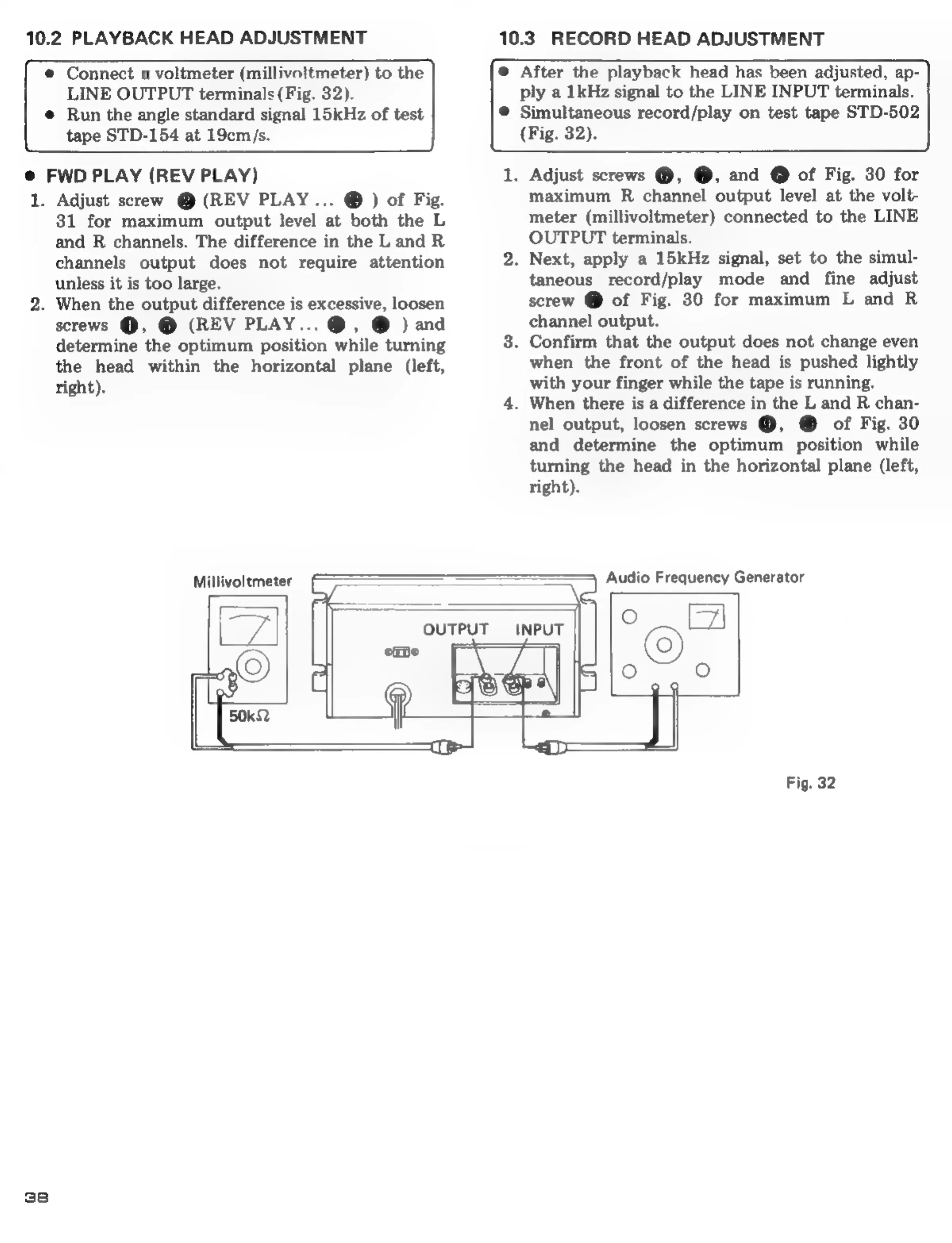
Connect
a
voltmeter
(millivoltmeter)
to
the
LINE
OUTPUT
terminals
(Fig.
32).
e
Run
the
angle
standard
signal
15kHz
of
test
tape
STD-154
at
19cm/s.
@
After
the
playback
head
has
been
adjusted,
ap-
ply
a
1kHz
signal
to
the
LINE
INPUT
terminals.
@
Simultaneous
record/play
on
test
tape
STD-502
(Fig.
32).
@
FWD
PLAY
(REV
PLAY)
1.
38
Adjust
screw
@
(REV
PLAY...
®
)
of
Fig.
31
for
maximum
output
level
at
both
the
L
and
R
channels.
The
difference
in
the
L
and
R
channels
output
does
not
require
attention
unless
it
is
too
large.
.
When
the
output
difference
is
excessive,
loosen
screws
@,
@
(REV
PLAY...
®,
@
)
and
determine
the
optimum
position
while
turning
the
head
within
the
horizontal
plane
(left,
right).
.
Adjust
screws
@,
@,
and
@
of
Fig.
30
for
maximum
R
channel
output
level
at
the
volt-
meter
(millivoltmeter)
connected
to
the
LINE
OUTPUT
terminals.
.
Next,
apply
a
15kHz
signal,
set
to
the
simul-
taneous
record/play
mode
and
fine
adjust
screw
@
of
Fig.
30
for
maximum
L
and
R
channel
output.
.
Confirm
that
the
output
does
not
change
even
when
the
front
of
the
head
is
pushed
lightly
with
your
finger
while
the
tape
is
running.
.
When
there
is
a
difference
in
the
L
and
R
chan-
nel
output,
loosen
screws
@,
@
of
Fig.
30
and
determine
the
optimum
position
while
turning
the
head
in
the
horizontal
plane
(left,
right).
Millivoltmeter
Fig.
32