EasyManua.ls Logo

Pioneer RT-707 - 11. Electrical Adjustments; Playback Level and Equalizer Calibration; Level Meter and Bias Calibration

Pioneer RT-707
85 pages
Print Icon
To Next Page IconTo Next Page
To Previous Page IconTo Previous Page
Loading...
RT-707
11.
ELECTRICAL
ADJUSTMENTS
@
Confirm
that
head
adjustments
and
mechanism
|
adjustments
have
been
performed
correctly
before
attempting
to
adjust
the
electrical
circuit.
@
Always
perform
adjustment
is
the
below
order.
The
rated
values
will
not
be
satisfied
if
any
adjustment
items
are
skipped.
Head
adjustment
(page
37).
Playback
level
Playback
EQ
adjustment
Level
meter
0
VU
adjustment
Bias
trap
adjustment
Recording
bias
adjustment
Record
/playback
frequency
adjustment
.
Recording
level
adjustment
e
‘Adjustment
points
are
shown
(PHOTO
1).
Recorded
Contents
of
Tape
STD-154
DAS
Te
ON
in
page
41
11.1
PLAYBACK
LEVEL
ADJUSTMENT
@
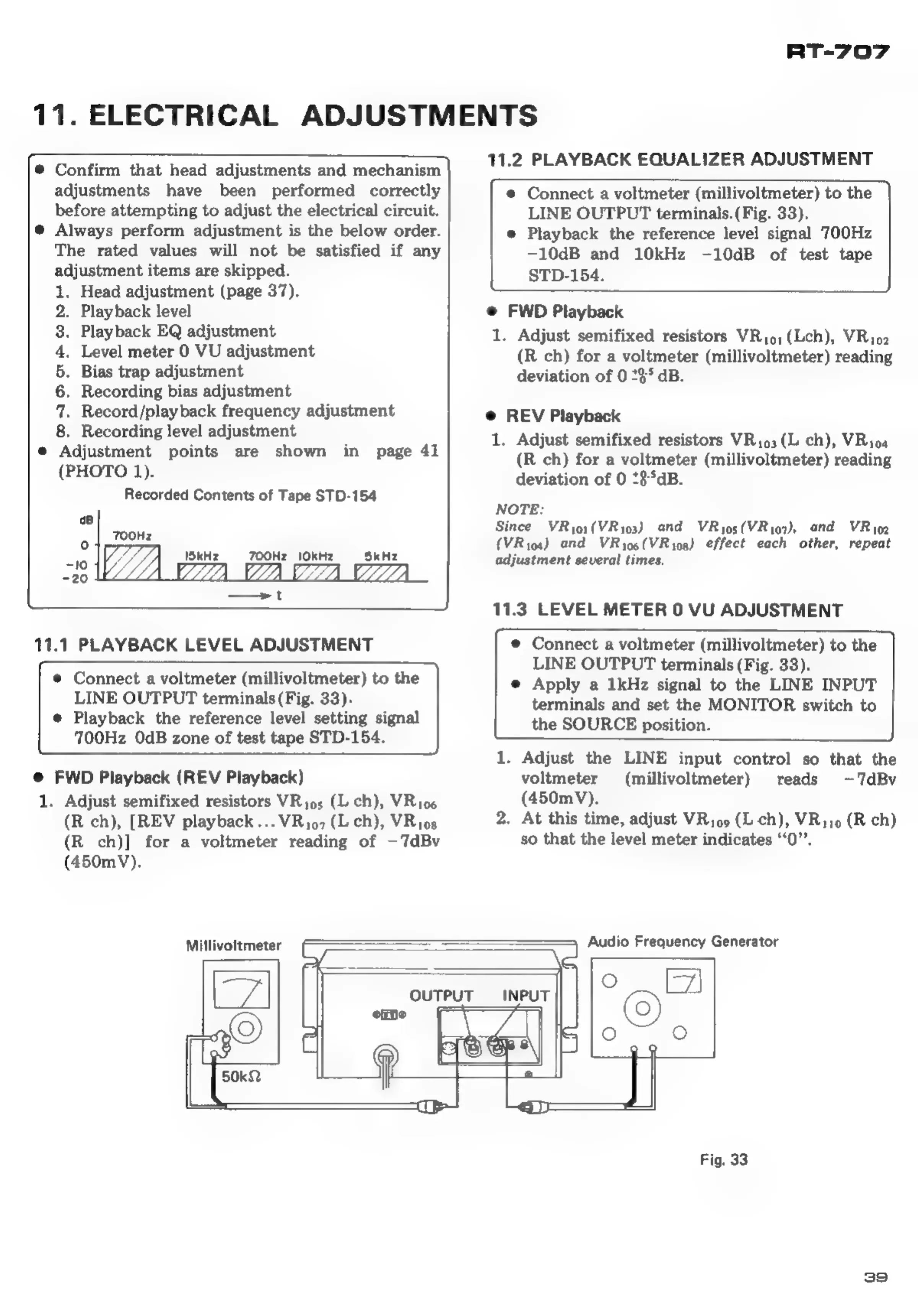
Connect
a
voltmeter
(millivoltmeter)
to
the
LINE
OUTPUT
terminals
(Fig.
33).
e
Playback
the
reference
level
setting
signal
700Hz
OdB
zone
of
test
tape
STD-154.
@
FWD
Playback
(REV
Playback)
1.
Adjust
semifixed
resistors
VRio;
(L
ch),
VRio6
(R
ch),
[REV
playback...
VRio7
(L
ch),
VRios
(R
ch)]
for
a
voltmeter
reading
of
—7dBv
(450mV).
11.2
PLAYBACK
EQUALIZER
ADJUSTMENT
©
Connect
a
voltmeter
(millivoltmeter)
to
the
LINE
OUTPUT
terminals.
(Fig.
33).
e
Playback
the
reference
level
signal
700Hz
-10dB
and
10kHz
-10dB
of
test
tape
STD-154.
@
FWD
Playback
1.
Adjust
semifixed
resistors
VRj0,(Lch),
VRio2
(R
ch)
for
a
voltmeter
(millivoltmeter)
reading
deviation
of
0
235
dB.
@
REV
Playback
1.
Adjust
semifixed
resistors
VR193(L
ch),
VRioa
(R
ch)
for
a
voltmeter
(millivoltmeter)
reading
deviation
of
0
*8°aB.
NOTE:
Since
VRyoi(VRyo3)
and
VRyos(VRyo7),
and
VRig2
(VRio4)
and
VRyo6(VRyos)
effect
each
other,
repeat
adjustment
several
times.
11.3
LEVEL
METER
0
VU
ADJUSTMENT
©
Connect
a
voltmeter
(millivoltmeter)
to
the
LINE
OUTPUT
terminals
(Fig.
33).
e
Apply
a
1kHz
signal
to
the
LINE
INPUT
terminals
and
set
the
MONITOR
switch
to
the
SOURCE
position.
1.
Adjust
the
LINE
input
control
so
that
the
voltmeter
(millivoltmeter)
reads
-7dBv
(450mV).
2.
At
this
time,
adjust
VRjo9
(L-ch),
VRi19
(R
ch)
so
that
the
level
meter
indicates
‘‘0”’.
Millivoltmeter
Audio
Frequency
Generator
OUTPUT
(2)
INPUT
Fig.
33
39

Other manuals for Pioneer RT-707

Related product manuals