26
Connecting your equipment
03
Bi-wiring your speakers
Your speakers can also be bi-wired if they support bi-amping.
! With these connections, the Speaker System setting makes no difference.
CAUTION
! Don’t connect different speakers from the same terminal in this way.
! When bi-wiring as well, heed the cautions for bi-amping shown above.
% To bi-wire a speaker, connect two speaker cords to the speaker terminal on the receiver.
Installing your speaker system
At the very least, front left and right speakers only are necessary. Note that your main surround speakers should
always be connected as a pair, but you can connect just one surround back speaker if you like (it must be con-
nected to the left surround back terminal).
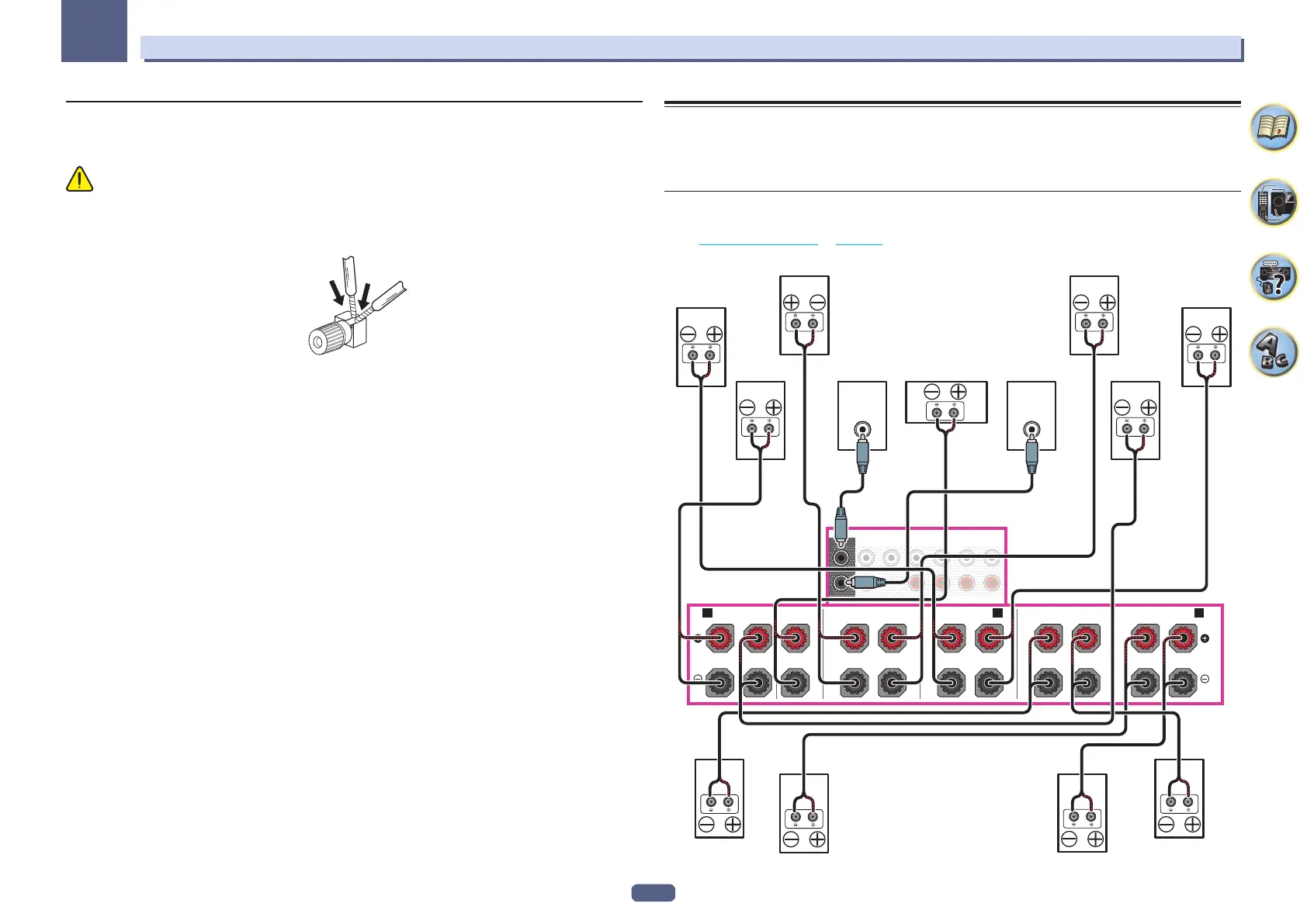
[A] 9.2 channel surround system (Top middle/Front wide) connection
! If necessary, select ‘7.2.2ch TMd/FW’ from the Speaker System menu.
See Speaker system setting on page 103 to do this.
! When only connecting one surround back speaker, connect it to the SURROUND BACK L (Single) terminals.
PRE OUT
SURROUND SURR BACK
T.MIDDLE
(Single)
FRONTCENTER
SUBWOOFER
1
2
F WIDE
(Single)
FRONT CENTER
A AB
RL
SURROUND
RL
SURROUND BACK
TOP MIDDLE
RL
FRONT WIDE /
RL
LINE LEVEL
INPUT
LINE LEVEL
INPUT
Top middle leftTop middle right
Front wide leftFront wide right
Front leftFront right Center Subwoofer 2Subwoofer 1
Surround left
Surround back right Surround back left
Surround right



 To Next Page
 Loading...