Connect Monitoring Center
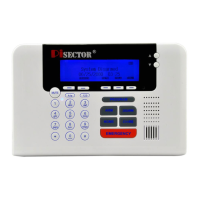
Press PROGRAM key on console. Enter the default password 888 888. Use scroll key to select Monitoring Center. You
can call your Monitoring Company to set up all requests. Please make sure your monitoring company supports ADMECO
protocol if you want a third party Monitoring Company to monitor your system (it will cost you a monthly monitoring charges
depending on which company you choose.)
Monitoring Center Number Selector and press Enter then selects Add to add your monitoring center telephone number
ADMECO Contact Id Selector and press Enter then selects Add to add your monitoring company account number.
Select Delete to delete your account number, select ADEMECO Contact ID then press Enter to select the protocol ID
according your monitoring center protocol ID request.
Upload Alarm Data Selector and press Enter if set YES, all your data will be upload to monitoring center station, default
is NO.
Upload Arm/Disarm Data Selector and press Enter if you set YES, every time you do arm or disarm your system
information will be upload to monitoring center station, default is NO.
Daily Schedule
Press PROGRAM key on console. Enter the default password 888 888. Use scroll key to select Daily Schedule.
Enable If you want to enable this function, first select Disable then press Enter, set NO, then back and select Enable, you
can set the Arm time for your departure, and Disarm Time for when you arrive Home, then the system will Arm/Disarm
automatically on schedule, so that you will never forget to arm or disarm system.
Disable If you want to disable this function, select Disable then press Enter and check Yes. Default is set to disable as
YES.
System Settings
Press PROGRAM key on console. Enter the default password 888 888. Use scroll key to select System Settings, you will
see below list.
Password Select Password then press Enter you will see Old Password 888888 then press Enter and input 6 digits(not
letter or icons) new password press Enter and input same password to confirm your new password, then press Save
Arm Delay Time Select it and press Enter, you will see 60, directly input 2 digits for your delay time, you can change the
Delay time to allow you to have enough time to leave the house. Defaults set at 60 seconds. The Delay Time for entire
system. Maximum is 60 seconds.
Alarm Delay Time Select it and press Enter, you will see 60, directly input 2 digits for your delay time, you can change
the Delay time that allows you to open the door to disarm system when you return home. Default is set to 40
seconds.( This Alarm Delay time only works when you set individual sensors as Delay Zone. Otherwise it does not work.
E.g. Disarm system press PROGRAM key then input password, highlight Sensor press Enter, highlight Edit press
Enter, than highlight Manual Search press Enter and choose the sensor name then press enter, use scroll key find
Delay Zone then press Enter and check Yes, save it. ), Maximum is 60 seconds.
Landline Cut Warning Select it and press Enter, If you set Yes, during System Arm or Home Status, if an intruder cuts
the landline or unplugs the landline jack, the system will immediately go off and sirens will start alarming. Default is set
as No
Ring Time Before Answer Select it and press Enter, you will see 1 flash, directly input a digit for your ring circle
(maximum is 9), it allows you to change the ring times for answering your regular home phone, e.g. if you set it as 5
rings, during 5 rings you can answer your regular home phone, after 5 rings if no one answers the regular home phone,
the alarm system will answer it. You will hear a prompt "Enter your Password" then you can enter your password 888
888 to control the System. Press 1 to Arm System, Press 2 to Disarm System, Press 3 to listen in. Press 4 to intercom,
press # to end.


 To Next Page
 Loading...